> For the complete documentation index, see [llms.txt](https://help.ppgg.in/llms.txt). Markdown versions of documentation pages are available by appending `.md` to page URLs; this page is available as [Markdown](https://help.ppgg.in/courses/password-manager/personal/family-plan/family-admin.md).
# 家庭管理员
{% hint style="success" %}
对应的[官方文档地址](https://bitwarden.com/help/courses/password-manager-family-admin/)
{% endhint %}
准备好成为家庭密码守护者了吗?了解如何建立家庭组织、邀请成员、分享重要内容以及确保每个人的数字生活安全而简单。
## 开始使用
注册 Bitwarden
Bitwarden 提供随您使用的无设备数量限制或登录数量限制的免费账户。[现在就开始吧](https://bitwarden.com/go/start-free/)!
### 您的主密码
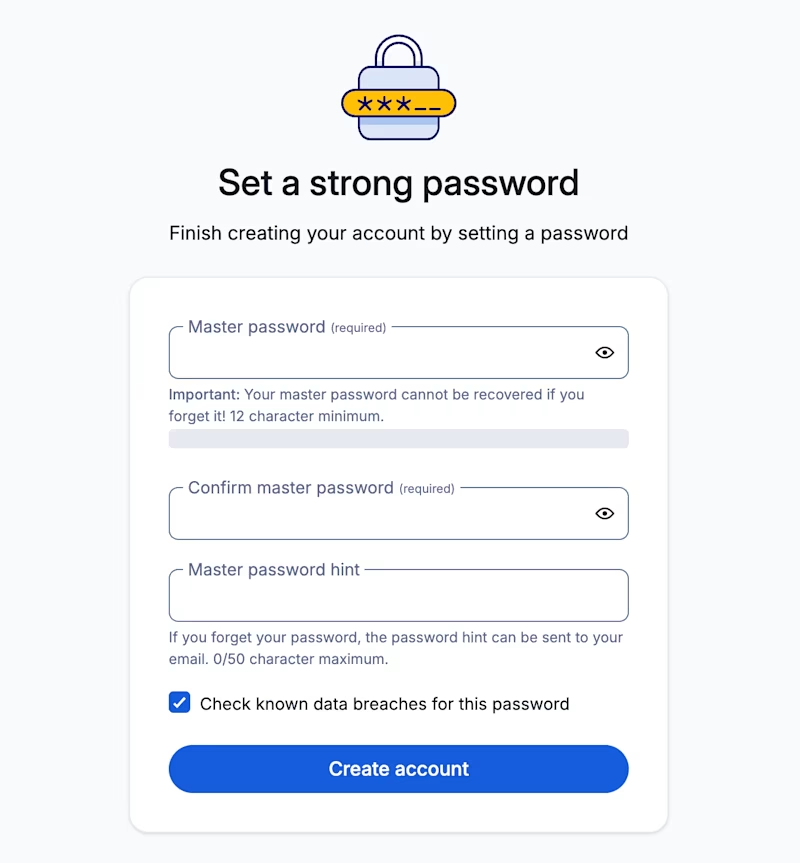
注册时,您将创建一个用于登录 Bitwarden 的主密码。您的主密码必须是:
* **易记**:Bitwarden 的员工以及 Bitwarden 系统对您的主密码一无所知、没有办法找回或重置您的主密码。**千万不要忘记您的主密码!**
* **强大**:保护账户的最佳方式是使用更长、更复杂、更不常见的密码。Bitwarden 提供了一个免费的[密码强度测试工具](https://bitwarden.com/password-strength/),可以测试您正在考虑的一些易记的密码的强度。
创建组织
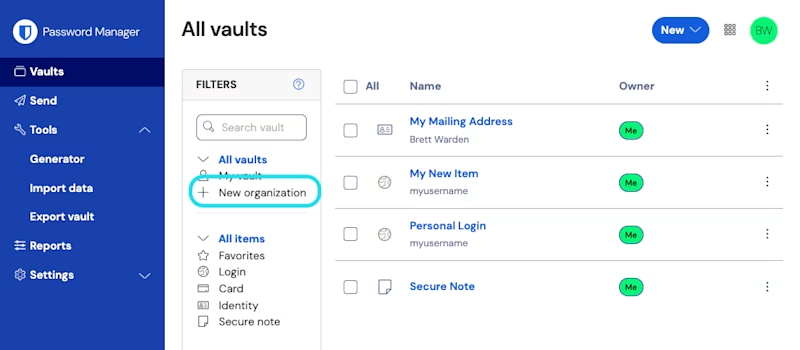
通过在 Bitwarden 网页 App 中选择**新增组织**按钮,现在就[创建您的组织](/docs/admin-console/organizations-overview.md#create-an-organization):
或加入现有组织
如果您的组织已经创建,请要求组织的其他成员向您发送邀请。
了解 Admin Console
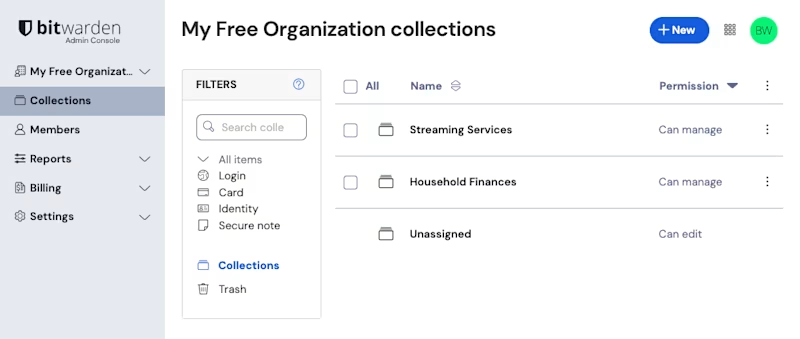
创建后,您将进入 Admin Console,这是所有共享和组织管理的中心枢纽。作为组织所有者,您可以查看**密码库**项目和[集合](/docs/admin-console/organizations-overview.md#collections)、管理**成员**、运行**报告**、更改**计费**设置,以及配置其他组织**设置**:
管理密码库项目和集合
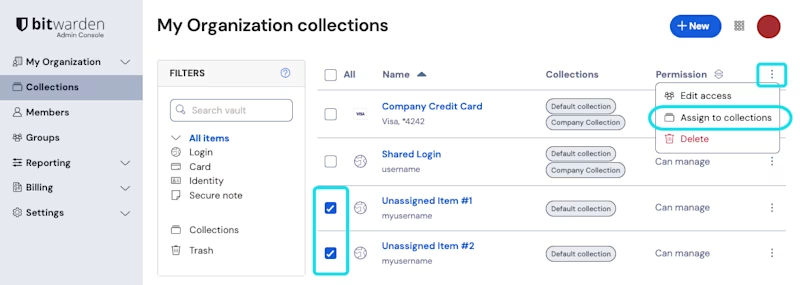
作为所有者或管理员,您可能负责管理公司或团队对**密码库项目**(如共享凭据)的访问权限。您可以直接从网页 App 中创建项目,并将其分配到集合,以便与团队共享:
说到[集合](/docs/admin-console/manage-shared-items/collections/about-collections.md),它们是一种重要的结构,用于将相关的登录、备注、支付卡和身份组合在一起,以便与组织安全地共享:
* 组织可以定义对集合的访问权限,允许用户或群组只能访问他们需要的项目。
* 存储在组织集合中的项目不属于任何个人用户,而是属于组织。
* 组织拥有的项目**必须**至少包含在一个集合中。
{% hint style="success" %}
数据也可以直接导入到您的组织中。
{% endhint %}
管理成员和群组
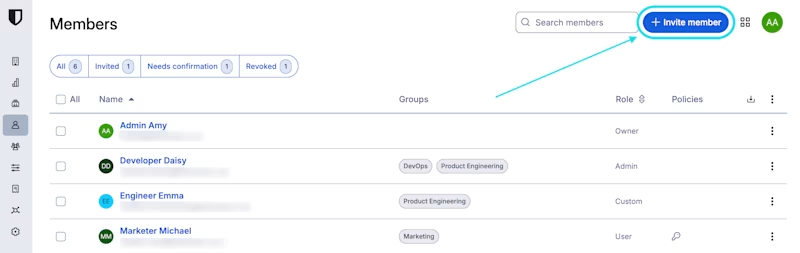
作为所有者,您将负责直接从 Admin Console 的**成员**页面邀请其他成员加入您的组织([了解详情](/docs/admin-console/manage-members/user-management.md#invite)):
帮助家人受到保护
现在您已设置好通过 Bitwarden 与家人安全地共享数据,请考虑其他一些方法来确保您所爱的人保持在线安全:
* 帮助您的家人设置[两步登录](/docs/account/two-step-login/setup-two-step-login/two-step-login-methods.md)以保护他们的 Bitwarden 账户。
* 帮助您的家人设置[紧急访问](/docs/account/emergency-access/about-emergency-access.md),以便在紧急情况下可以访问重要数据。
## 导入您的密码
网页 App
{% embed url="" %}
了解如何使用 Bitwarden 网页 App 中的 Admin Console 将密码导入您的组织。
打开网页 App
* **00:00**:简介
* **00:04**:开始使用
* **00:17**:
选择文件格式
* **00:20**:
定位导入文件
* **00:26**:
导入数据
桌面 App - 包括 Chromium 浏览器的直接导入
{% embed url="" %}
了解如何使用桌面 App [导入密码](/docs/password-manager/import-and-export/import-data.md)和其他数据到 Bitwarden。浏览器密码可以从 Chrome、Edge、Opera、Brave 和 Vivaldi [直接导入](/docs/password-manager/import-and-export/import-guides/import-data-from-chrome.md#import-directly-from-browser)。
直接从 Bitwarden 网站下载桌面 App,以使用「从浏览器直接导入」选项。
下载桌面 App
* **00:00**:简介
* **00:06**:开始使用
* **00:27**:直接从浏览器导入
* **01:03**:从文件导入
浏览器扩展
{% embed url="" %}
了解使用 Bitwarden 浏览器扩展[如何导入](/docs/password-manager/import-and-export/import-data.md#liu-lan-qi-kuo-zhan)密码和其他数据。
* **00:00**:简介
* **00:05**:开始使用
* **00:17**:选择导入位置
* **00:29**:选择文件格式
* **00:43**:定位您的文件
* **00:46**:导入您的数据
移动 App - 包括 iOS 上兼容的 App 的直接导入/导出
{% embed url="" %}
了解在 Bitwarden 移动 App 中[如何导入](/docs/password-manager/import-and-export/import-data.md#yi-dong-app)您的密码和其他数据。
* **00:00**:简介
* **00:05**:开始使用
* **00:15**:使用网页 App
* **00:23**:iOS 26 直接导入
从自定义文件
{% embed url="" %}
了解从自定义文件[如何导入](/docs/password-manager/import-and-export/condition-bitwarden-import.md)密码和其他数据。
下载示例文件
* **00:00**:简介
* **00:08**:开始使用
* **00:12**:下载示例 CSV
* **00:21**:查看列标题
* **00:25**:导入自定义文件
## 支持
Smart Search
使用 **Bitwarden Smart Search** 立即寻找答案。
Try Smart Search
询问社区
与经验丰富的 Bitwarden 用户联系,分享技巧并共同解决问题。在[社区论坛](https://community.bitwarden.com/c/support/pm-ask-the-community/?_gl=1*1gc3ljx*_gcl_au*NDkyNTE5NzM4LjE3NjU1Mzk5OTUuMTMxODM0NjMwLjE3NjY4OTA0MjUuMTc2Njg5MDQyNQ..*_ga*MTk5NzU0OTg5My4xNzU2OTg5NjI5*_ga_QBRN562QQQ*czE3Njc2MzE2MjUkbzE3OCRnMSR0MTc2NzYzMjUxNyRqNjAkbDAkaDA.)或 [Reddit](https://www.reddit.com/r/Bitwarden/new/) 上提问。
联系支持
遇到技术问题或有账户问题?请联系 Bitwarden 支持团队获取直接的协助。
联系支持