# 选择服务器

{% hint style="success" %}
对应的[官方文档地址](https://bitwarden.com/help/choose-my-server/)
{% endhint %}

Bitwarden Cloud 在全球范围内可用，在**美国**和**欧盟**地区提供数据存储。

{% hint style="info" %}
Bitwarden 的数据区域是相互独立的，您的账户或组织仅存在于其最初创建的区域，这意味着：

* 如果您的账户是在美国服务器上创建的，则无法登录欧盟服务器，反之亦然。尝试登录将导致系统识别为输入错误的主密码。
* 在两个服务器上创建账户不会导致数据在两个服务器之间同步。如果您使用多个 Bitwarden App 并发现数据不匹配，请检查它们是否登录到同一服务器。
* 一个服务器上的账户无法加入另一个服务器上的组织。
* 账户创建后无法变更服务器。要从美国服务器切换到欧盟服务器（或反之），您必须在目标服务器上创建一个新的账户。创建新账户后，您可以[将现有密码库数据导出](/docs/password-manager/import-and-export/export-vault-data.md)到新账户。
  {% endhint %}

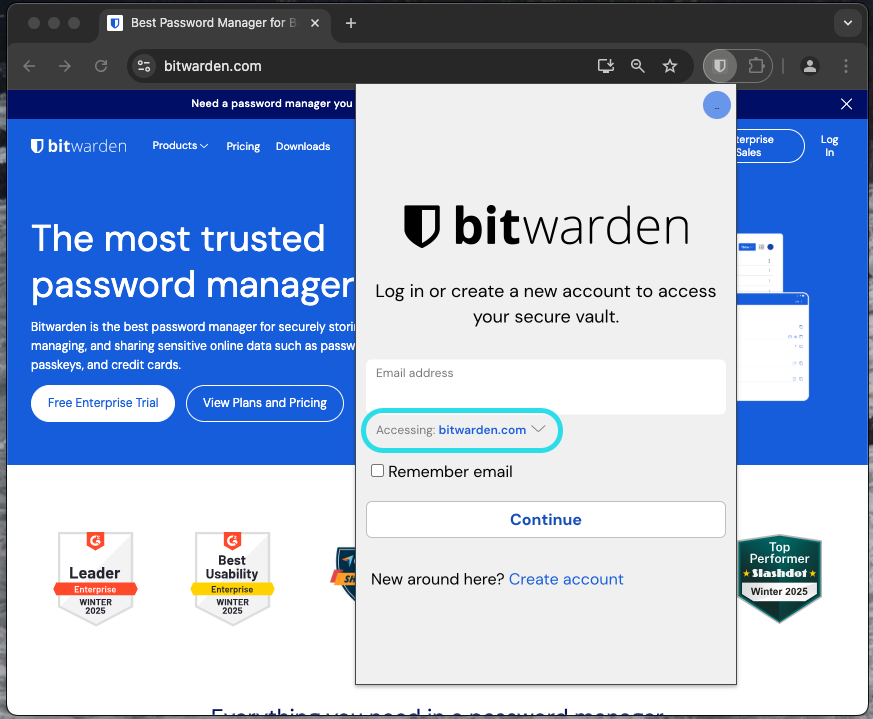
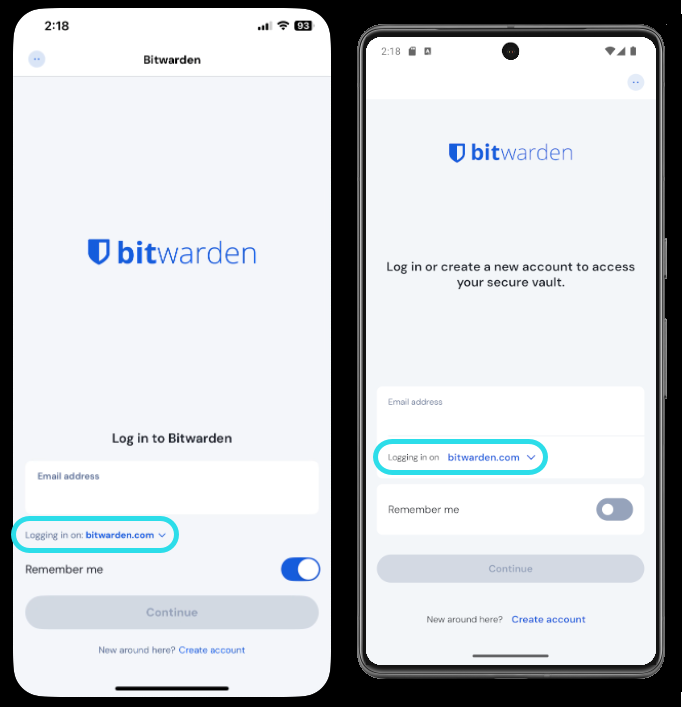
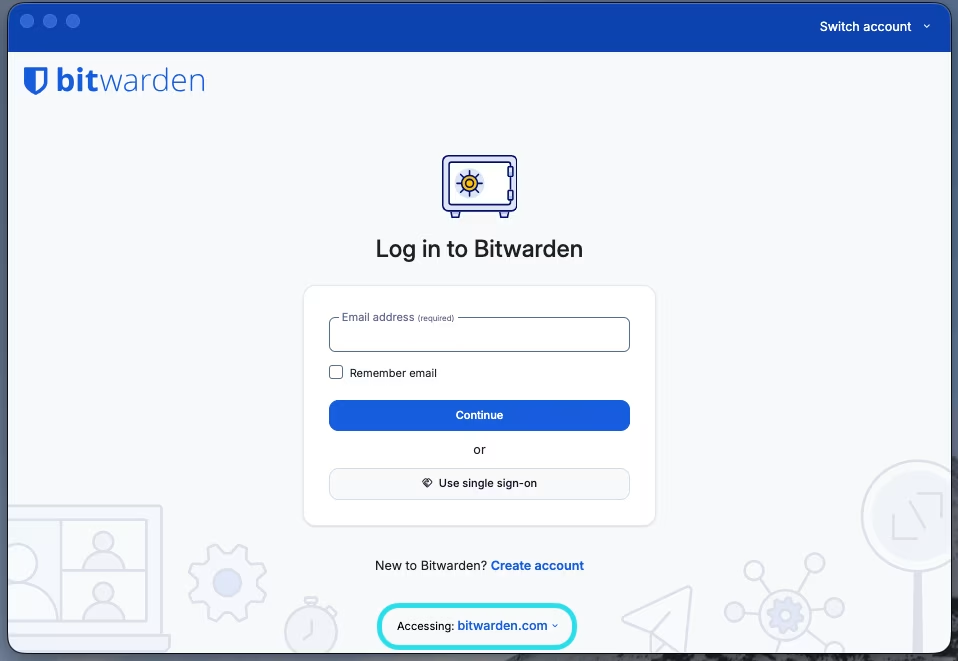
要选择登录到或创建账户到哪个服务器，请在登录或注册界面使用**服务器**或**正登录到：**&#x4E0B;拉菜单：

{% tabs %}
{% tab title="网页 App" %}
<div data-with-frame="true"><figure><img src="https://bitwarden.com/assets/30W3B0aJy0dzO0pKTaBr7h/ed4fa669856dc3b13dbd80a1e0b237b5/2024-12-04_10-09-00.png" alt=""><figcaption><p>网页 App 上的区域选择器</p></figcaption></figure></div>
{% endtab %}

{% tab title="浏览器扩展" %}

<div data-with-frame="true"><figure><img src="https://bitwarden.com/assets/4Kas8J6TjKZWMdaTo7pZMX/7d33be1c411bcf7eaf0816842beb824b/2025-02-18_14-09-00.png" alt=""><figcaption><p>浏览器扩展上的区域选择器</p></figcaption></figure></div>
{% endtab %}

{% tab title="移动 App" %}

<div data-with-frame="true"><figure><img src="https://bitwarden.com/assets/753jtQ6dg9u6Rln2A7TF4R/01b3d12d193d8f00432b925c29999d91/2025-02-18_14-18-33.png" alt=""><figcaption><p>移动 App 上的区域选择器</p></figcaption></figure></div>
{% endtab %}

{% tab title="桌面 App" %}

<div data-with-frame="true"><figure><img src="https://bitwarden.com/assets/3FlU02971dqGGkp86WJJc5/43aeb8ee7de20a3cc0156fbf2c766432/choose-my-service-1.png?w=800&#x26;fm=avif" alt=""><figcaption><p>桌面 App 上的区域选择器</p></figcaption></figure></div>
{% endtab %}
{% endtabs %}


---

# Agent Instructions: Querying This Documentation

If you need additional information that is not directly available in this page, you can query the documentation dynamically by asking a question.

Perform an HTTP GET request on the current page URL with the `ask` query parameter:

```
GET https://help.ppgg.in/docs/account/choose-my-server.md?ask=<question>
```

The question should be specific, self-contained, and written in natural language.
The response will contain a direct answer to the question and relevant excerpts and sources from the documentation.

Use this mechanism when the answer is not explicitly present in the current page, you need clarification or additional context, or you want to retrieve related documentation sections.