# 忘记主密码

{% hint style="success" %}
对应的[官方文档地址](https://bitwarden.com/help/article/forgot-master-password/)
{% endhint %}

Bitwarden 采用零知识加密技术，这意味着 **Bitwarden 无法访问、获取或重置您的主密码**。但是，您可以采取一些措施来尝试重新获取对您的账户的访问权限：

## 检查服务器地理位置 <a href="#check-server-geography" id="check-server-geography"></a>

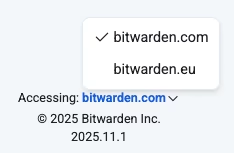
当您尝试登录时，请检查是否[选择了正确的服务器](/docs/security/server-geographies.md#choose-your-cloud-server)。Bitwarden 数据区域是独立的，您的账户只存在于最初创建它的区域中。在尝试以下步骤之前，选择您的服务器是必要的。

<div align="left" data-with-frame="true"><figure><img src="https://bitwarden.com/assets/3H5fN6yR90aKaTg7gaCruo/020b9ca668f037ed1e6450309b4041b4/2025-11-24_15-26-15.png?w=234&#x26;fm=avif" alt=""><figcaption><p>服务器地理位置</p></figcaption></figure></div>

## 使用其他 Bitwarden App 或设备 <a href="#use-a-different-bitwarden-app-or-device" id="use-a-different-bitwarden-app-or-device"></a>

尝试从其他设备或 Bitwarden App（例如移动 App 或浏览器扩展）登录。

接下来，检查您是否登录了另一个 Bitwarden App。如果您在该设备上设置了 [PIN 码](/docs/account/log-in-and-unlock/more-unlock-options/unlock-with-pin.md)或[生物识别](/docs/account/log-in-and-unlock/more-unlock-options/unlocking-with-biometrics.md)：

1. 使用之前设置的 PIN 码或生物识别解锁您的密码库。
2. 将密码库项目复制并粘贴到 [.csv 文件](/docs/password-manager/import-and-export/condition-bitwarden-import.md#condition-a-csv)中。
3. 创建一个新的 Bitwarden 账户然后[导入复制了数据的 .csv](/docs/password-manager/import-and-export/import-data.md)。

## 查看主密码提示 <a href="#review-master-password-hint" id="review-master-password-hint"></a>

通过访问 [https://vault.bitwarden.com/#/hint](https://vault.bitwarden.com/#/hinthttps://vault.bitwarden.com/#/hint) 或 [https://vault.bitwarden.eu/#/hint](https://vault.bitwarden.eu/#/hinthttps://vault.bitwarden.eu/#/hint) 获取主密码提示。如果您设置了提示，提示将通过电子邮件发送到您的收件箱。如果您没有设置提示，则会收到一封报告此情况的电子邮件。

## 使用紧急访问 <a href="#use-emergency-access" id="use-emergency-access"></a>

如果您启用了[紧急访问](/docs/account/log-in-and-unlock/more-log-in-options/emergency-access.md)，请联系您信任的紧急联系人以重新获得对您的密码库的读取或接管访问权限。

## 联系管理员恢复账户 <a href="#contact-administrator-for-account-recovery" id="contact-administrator-for-account-recovery"></a>

如果您的组织启用了[账户恢复](/docs/admin-console/manage-members/account-recovery/about-account-recovery.md)功能，请联系管理员重置您的主密码。

## 使用已知设备登录 <a href="#log-in-with-known-device" id="log-in-with-known-device"></a>

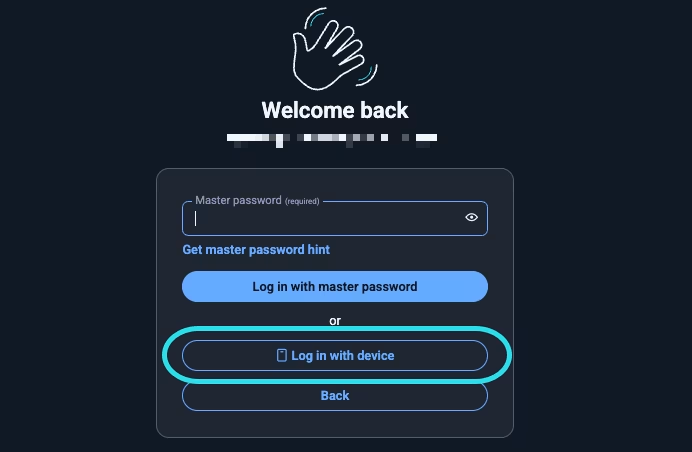
如果您使用的浏览器已设置为已知设备（即已通过[使用设备登录](/docs/account/log-in-and-unlock/more-log-in-options/log-in-with-device.md)注册过），请从网页 App 中选择使用设备登录，您可以使用其他应用程序批准该请求。

<div align="left" data-with-frame="true"><figure><img src="https://bitwarden.com/assets/7owqaTEe9Bo05wfLRZPhn8/38f1d0334964bb3d98a430b80b9d6b95/2025-09-09_10-03-52.png?w=692&#x26;fm=avif" alt=""><figcaption><p>使用设备登录</p></figcaption></figure></div>

## 使用通行密钥登录 <a href="#log-in-with-passkey" id="log-in-with-passkey"></a>

如果您的 Bitwarden 账户已经注册了启用加密 (PRF) 的[通行密钥登录](/docs/account/log-in-and-unlock/more-log-in-options/log-in-with-passkeys.md)，您可以使用该通行密钥登录。

## 如果这些选项均无法让您访问您的账户 <a href="#if-none-of-these-options-grant-you-access-to-your-account" id="if-none-of-these-options-grant-you-access-to-your-account"></a>

我们建议您仔细检查所有设备和浏览器，查看是否有任何已登录的 Bitwarden 会话。

如果以上方法均无法让您访问您的账户，Bitwarden 将无法恢复该账户及其数据。您需要[删除现有账户](/docs/plans-and-pricing/delete-an-account-or-organization.md#wu-xu-deng-lu)然后创建一个新账户。如果您删除的 Bitwarden 账户包含高级订阅，请[联系我们](https://bitwarden.com/contact/)，我们将把您现有的订阅应用到新账户中。

{% hint style="danger" %}
删除您的账户将删除其中存储的所有个人所有的项目，包括所有已保存的附件。

删除您的账户前，请检查您是否已登录任何 Bitwarden 移动 App、浏览器扩展或桌面 App。如果有，请手动整理您的数据，以便将其重新添加回新的账户中。
{% endhint %}

## 下一步 <a href="#next-steps" id="next-steps"></a>

* 如果您创建了一个新账户，Bitwarden 建议使用[安全准备工具包](https://bitwarden.com/resources/bitwarden-security-readiness-kit/)来为忘记主密码等事件做好准备。
* 如果您删除了与高级订阅相关联的 Bitwarden 账户，请[联系我们](https://bitwarden.com/contact/)，我们会将您现有的订阅重新应用到新的账户中。


---

# Agent Instructions: Querying This Documentation

If you need additional information that is not directly available in this page, you can query the documentation dynamically by asking a question.

Perform an HTTP GET request on the current page URL with the `ask` query parameter:

```
GET https://help.ppgg.in/docs/account/log-in-and-unlock/i-forgot-my-master-password.md?ask=<question>
```

The question should be specific, self-contained, and written in natural language.
The response will contain a direct answer to the question and relevant excerpts and sources from the documentation.

Use this mechanism when the answer is not explicitly present in the current page, you need clarification or additional context, or you want to retrieve related documentation sections.