> For the complete documentation index, see [llms.txt](https://help.ppgg.in/llms.txt). Markdown versions of documentation pages are available by appending `.md` to page URLs; this page is available as [Markdown](https://help.ppgg.in/docs/account/two-step-login/two-step-login-faq.md).

# 两步登录 FAQ

{% hint style="success" %}
对应的[官方文档地址](https://bitwarden.com/help/article/twostep-faqs/)
{% endhint %}

本文包含有关**两步登录**的常见问题解答 (FAQ)。

### 问：可以使用 SMS 2FA 吗？ <a href="#q-can-i-use-sms-2-fa" id="q-can-i-use-sms-2-fa"></a>

**答：**&#x9274;于 SIM 卡劫持等漏洞的存在，Bitwarden 不支持 SMS 2FA。我们也不建议其他账户使用 SMS 2FA，除非它是唯一可用的方法。虽然任何第二个因素都比没有更推荐，但大多数替代方案都比 SMS 2FA 更安全。

### 问：我可以要求我的组织用户使用两步登录吗？ <a href="#q-can-i-require-my-organizations-users-to-use-two-step-login" id="q-can-i-require-my-organizations-users-to-use-two-step-login"></a>

**答：**&#x60A8;可以通过启用[两步登录策略](/docs/admin-console/oversight-visibility/enterprise-policies.md#two-step-login)来要求组织用户使用两步登录。此外，您还可以设置[组织层面的 Duo 2FA](/docs/account/two-step-login/setup-two-step-login/two-step-login-via-duo.md)，以确保您的所有用户都拥有他们可以支配的安全的两步登录方式。

### 问：iOS 或 Android App 支持 FIDO U2F 或 FIDO2 WebAuthn 吗？ <a href="#q-is-fido-u-2-f-or-fido-2-webauthn-supported-on-my-ios-or-android-app" id="q-is-fido-u-2-f-or-fido-2-webauthn-supported-on-my-ios-or-android-app"></a>

**答：**&#x652F;持。请参阅 [FIDO2 WebAuthn 方式的两步登录](/docs/account/two-step-login/setup-two-step-login/two-step-login-via-fido.md)。

### 问：为什么 Bitwarden 没有询问我已启用的两步登录方式？ <a href="#q-why-is-bitwarden-not-asking-for-my-enabled-two-step-login-method" id="q-why-is-bitwarden-not-asking-for-my-enabled-two-step-login-method"></a>

**答：**&#x5927;多数情况下，可能是以下两种情况之一：

1、您可能已经登录了 Bitwarden，而您只是解锁您的密码库。**登录**您的密码库需要两步登录但**解锁**不需要。有关登录与解锁之间的区别的更多信息，请参阅[密码库超时行为](/docs/account/log-in-and-unlock/vault-timeout-options.md#vault-timeout-action)。

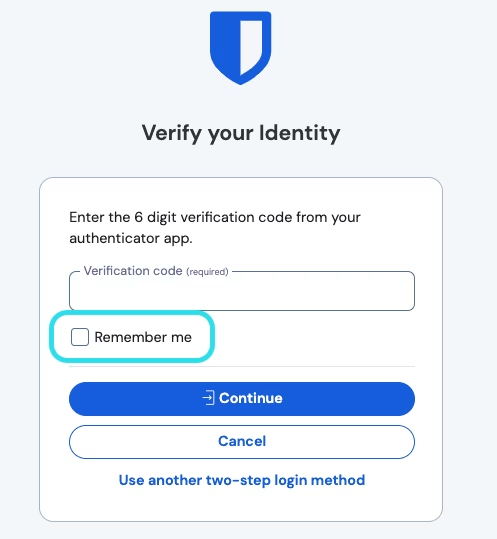
2、在使用两步登录访问您的密码库时，您可能已经在设备上勾选了**记住我**复选框。

<div align="left" data-with-frame="true"><figure><img src="https://bitwarden.com/assets/6ZKXQZRh1riGuGy44rlebh/7985d990f64c1ee20556aa88b63b591a/2024-12-02_11-26-14.png?w=497&#x26;fm=avif" alt=""><figcaption><p>记住我选项</p></figcaption></figure></div>

如果您使用了**记住我**选项，需要从您的网页密码库（**设置** → **我的账户**）中**取消会话授权**，以便该设备继续询问您的两步登录方式。

### 问：设备登录是否适用于两步登录？ <a href="#q-does-log-in-with-device-work-with-two-step-login" id="q-does-log-in-with-device-work-with-two-step-login"></a>

**答：**&#x662F;的。设备登录将取代输入您的主密码，但如果在账户上启用了该功能并且之前未为该设备选中「记住我」，则用户仍需要完成两步登录。


---

# Agent Instructions
This documentation is published with GitBook. GitBook is the documentation platform designed so that both humans and AI agents can read, navigate, and reason over technical content effectively. Learn more at gitbook.com.

## Querying This Documentation
If you need additional information that is not directly available in this page, you can query the documentation dynamically by asking a question.

Perform an HTTP GET request on the current page URL with the `ask` query parameter, and the optional `goal` query parameter:

```
GET https://help.ppgg.in/docs/account/two-step-login/two-step-login-faq.md?ask=<question>&goal=<endgoal>
```

`ask` is the immediate question: it should be specific, self-contained, and written in natural language.
`goal` is optional and describes the broader end goal you are ultimately trying to accomplish on behalf of the user. GitBook uses it to tailor the answer towards what is most useful for that goal.

The response will contain a direct answer to the question and relevant excerpts and sources from the documentation.

Use this mechanism when the answer is not explicitly present in the current page, you need clarification or additional context, or you want to retrieve related documentation sections.