# 通用 SAML

{% hint style="success" %}
对应的[官方文档地址](https://bitwarden.com/help/article/configure-sso-saml/)
{% endhint %}

## 第 1 步：设置 SSO 标识符 <a href="#step-1-set-an-sso-identifier" id="step-1-set-an-sso-identifier"></a>

[使用 SSO 验证身份](/docs/account/log-in-and-unlock/using-single-sign-on/using-login-with-sso.md#login-using-sso)的用户将被要求输入一个 **SSO 标识符**，该标识符指示了要验证的组织（即 SSO 集成）。要设置唯一的 SSO 标识符：

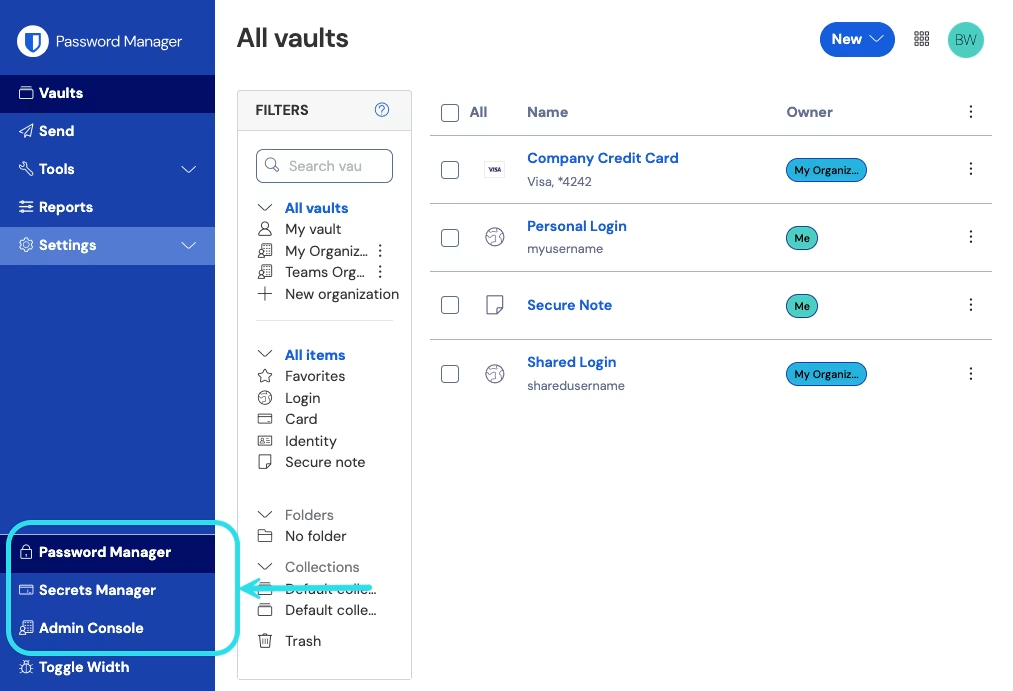
1、登录到 Bitwarden [网页 App](https://bitwarden.com/help/getting-started-webvault/)，然后使用产品切换器打开管理控制台：

<div align="left" data-with-frame="true"><figure><img src="https://bitwarden.com/assets/2uxBDdQa6lu0IgIEfcwMPP/e3de3361749b6496155e25edcfdcf08b/2024-12-02_11-19-56.png?w=1013&#x26;fm=avif" alt=""><figcaption><p>产品切换器</p></figcaption></figure></div>

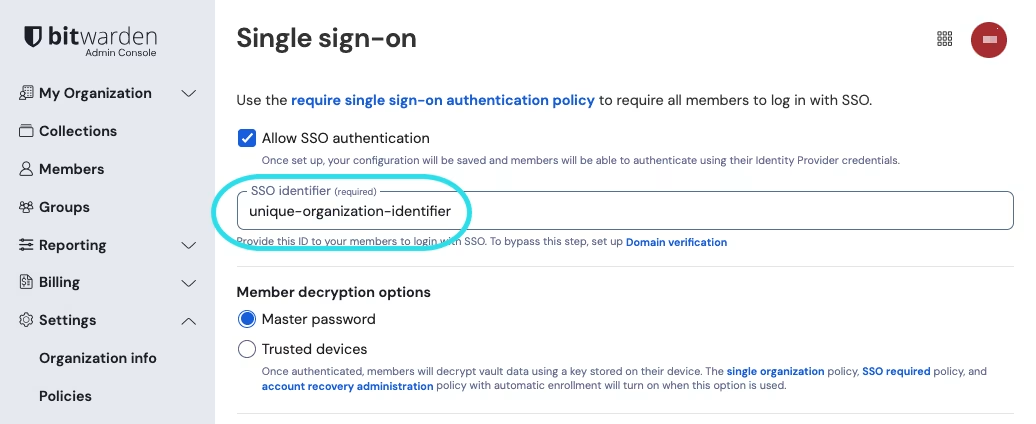
2、导航到 **设置** → **单点登录**，然后为您的组织输入一个唯一的 **SSO 标识符**：

<div align="left" data-with-frame="true"><figure><img src="https://bitwarden.com/assets/6pr4tqMnrLCvwDBMlba5x7/7ef7563f7017f58adffff5d15ac68512/2024-12-04_09-39-25.png?w=1036&#x26;fm=avif" alt=""><figcaption><p>输入标识符</p></figcaption></figure></div>

3、继续执行**第 2 步：启用 SSO 登录**。

{% hint style="success" %}
配置完成后，您需要将这个值分享给用户。
{% endhint %}

## 第 2 步：启用 SSO 登录 <a href="#step-2-enable-login-with-sso" id="step-2-enable-login-with-sso"></a>

拥有 SSO 标识符后，您就可以继续启用和配置您的集成了。要启用 SSO 登录：

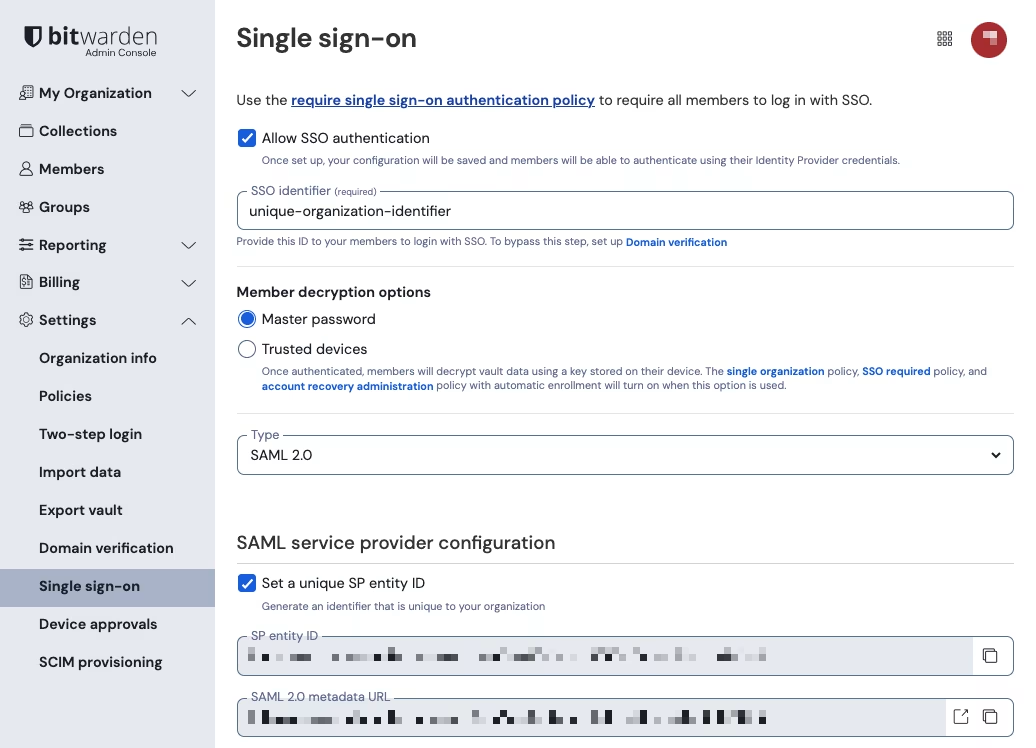
1、在 **设置** → **单点登录**视图中，勾选**允许 SSO 身份验证**复选框：

<div align="left" data-with-frame="true"><figure><img src="https://bitwarden.com/assets/20720mRAluo6crSdTiYJrn/1175889d7f6ab42fe7614f34cdd1dcdd/2024-12-04_09-41-15.png?w=1036&#x26;fm=avif" alt=""><figcaption><p>SAML 2.0 配置</p></figcaption></figure></div>

2、从**类型**下拉菜单中，选择 **SAML 2.0** 选项。如果您打算改用 OIDC，请切换到 [OIDC 配置指南](/docs/admin-console/login-with-sso/sso-guides/generic-oidc.md)。

如果您愿意，可以在此阶段关闭**设置唯一的 SP 实体 ID** 选项。这样做将从 SP 实体 ID 值中移除您的组织 ID，但在几乎所有情况下，建议保留此选项。

{% hint style="success" %}
还可以选择使用**成员解密选项**。了解如何开始使用[受信任设备 SSO](/docs/admin-console/login-with-sso/trusted-devices/about-trusted-devices.md) 或 [Key Connector](/docs/self-hosting/key-connector/about-key-connector.md)。
{% endhint %}

## 第 3 步：配置 <a href="#step-3-configuration" id="step-3-configuration"></a>

从这一步开始，具体实施方式会因提供程序而异。跳转到我们的具体**实施指南**之一，以帮助完成配置过程：

| 提供程序         | 指南                                                                                     |
| ------------ | -------------------------------------------------------------------------------------- |
| AD FS        | [AD FS 实施指南](/docs/admin-console/login-with-sso/sso-guides/adfs-saml.md)               |
| Auth0        | [Auth0 实施指南](/docs/admin-console/login-with-sso/sso-guides/auth0-saml.md)              |
| AWS          | [AWS 实施指南](/docs/admin-console/login-with-sso/sso-guides/aws-saml.md)                  |
| Azure        | [Azure 实施指南](/docs/admin-console/login-with-sso/sso-guides/microsoft-entra-id-saml.md) |
| Duo          | [Duo 实施指南](/docs/admin-console/login-with-sso/sso-guides/duo-saml.md)                  |
| Google       | [Google 实施指南](/docs/admin-console/login-with-sso/sso-guides/google-saml.md)            |
| JumpCloud    | [JumpCloud 实施指南](/docs/admin-console/login-with-sso/sso-guides/jumpcloud-saml.md)      |
| Keycloak     | [Keycloak 实施指南](/docs/admin-console/login-with-sso/sso-guides/keycloak-saml.md)        |
| Okta         | [Okta 实施指南](/docs/admin-console/login-with-sso/sso-guides/okta-saml.md)                |
| OneLogin     | [OneLogin 实施指南](/docs/admin-console/login-with-sso/sso-guides/onelogin-saml.md)        |
| PingFederate | [PingFederate 实施指南](/docs/admin-console/login-with-sso/sso-guides/adfs-oidc.md)        |

以下部分将定义单点登录配置过程中可用的字段，其与您要集成的 IdP 无关。必须配置的字段将被标记（**必填**）。

{% hint style="success" %}
**除非您对 SAML 2.0 非常熟悉**，否则我们建议使用[上述实施指南](/docs/admin-console/login-with-sso/sso-guides/generic-saml.md#step-3-configuration)之一，而不是以下的通用素材。
{% endhint %}

单点登录界面将配置分为两个部分：

* &#x20;**SAML 服务提供程序配置**将决定 SAML 请求的格式。
* &#x20;**SAML 身份提供程序配置**将决定用于 SAML 响应的预期格式。

### 服务提供程序配置 <a href="#service-provider-configuration" id="service-provider-configuration"></a>

| 字段                                   | 描述                                                                                                                                                                                                                                                 |
| ------------------------------------ | -------------------------------------------------------------------------------------------------------------------------------------------------------------------------------------------------------------------------------------------------- |
| SP Entity ID                         | <p>（<strong>自动生成</strong>）用于身份验证请求的 Bitwarden 端点。</p><p></p><p>这个自动生成的值可以从组织的<strong>设置</strong> → <strong>单点登录</strong>界面复制，并基于您的设置而有所不同。</p>                                                                                                     |
| SAML 2.0 Metadata URL                | <p>（<strong>自动生成</strong>）Bitwarden 端点的元数据 URL。</p><p></p><p>这个自动生成的值可以从组织的<strong>设置</strong> → <strong>单点登录</strong>界面复制，并基于您的设置而有所不同。</p>                                                                                                       |
| Assertion Consumer Service (ACS) URL | <p>（<strong>自动生成</strong>）从 IdP 发送 SAML 断言的位置。</p><p></p><p>这个自动生成的值可以从组织的<strong>设置</strong> → <strong>单点登录</strong>界面复制，并基于您的设置而有所不同。</p>                                                                                                        |
| Name ID Format                       | <p>Bitwarden 请求 SAML 断言的格式。选项包括：</p><p>-Unspecified（默认）</p><p>-Email Address</p><p>-X.509 Subject Name</p><p>-Windows Domain Qualified Name</p><p>-Kerberos Principal Name</p><p>-Entity Identifier</p><p>-Persistent</p><p>-Transient</p>         |
| Outbound Signing Algorithm           | <p>Bitwarden 用于签署 SAML 请求的算法。选项包括：<br>- <code><http://www.w3.org/2001/04/xmldsig-more#rsa-sha256></code>（默认）<br>- <code><http://www.w3.org/2000/09/xmldsig#rsa-sha384></code><br>- <code><http://www.w3.org/2000/09/xmldsig#rsa-sha512></code></p> |
| Signing Behavior                     | <p>是否/何时签署 SAML 请求。选项包括：<br>-If IdP Wants Authn Requests Signed（默认）<br>-Always<br>-Never</p>                                                                                                                                                       |
| Minimum Incoming Signing Algorithm   | Bitwarden 将在 SAML 响应中接受的算法的最小强度。                                                                                                                                                                                                                   |
| Want Assertions Signed               | 如果 Bitwarden 期望来自 IdP 的响应被签名，请选中此复选框。                                                                                                                                                                                                              |
| Validate Certificates                | 当使用来自你的 IdP 的通过受信任的 CA 颁发的受信任和有效的证书时，请选中此复选框。自签名证书可能会失败，除非在 Bitwarden SSO 登录 docker 镜像中配置了正确的信任链。                                                                                                                                                  |

### 身份提供程序配置 <a href="#identity-provider-configuration" id="identity-provider-configuration"></a>

| 字段                                  | 描述                                                                                                                                                                                                                                                    |
| ----------------------------------- | ----------------------------------------------------------------------------------------------------------------------------------------------------------------------------------------------------------------------------------------------------- |
| Entity ID                           | （**必填**）您的身份服务器或 IdP 实体 ID 的地址或 URL。                                                                                                                                                                                                                  |
| Binding Type                        | <p>IdP 用于响应 Bitwarden SAML 请求的方法。选项包括：<br>-Redirect（推荐）<br>-HTTP POST<br>-Artifact</p>                                                                                                                                                                |
| Single Sign On Service URL          | （**如果 Entity ID 不是 URL 则必填**）您的 IdP 发布的 SSO URL。                                                                                                                                                                                                      |
| Single Log Out Service URL          | SSO 登录目前**不支持** SLO。该选项计划在未来使用，但我们强烈建议预先配置该字段。                                                                                                                                                                                                        |
| X509 Public Certificate             | <p>（<strong>必填</strong>）X.509 Base-64 编码的证书的主体部分。不要包括 CER/PEM 格式的证书的 <code>-----BEGIN CERTIFICATE-----</code> 与 <code>-----END CERTIFICATE-----</code> 之间的行或部分。</p><p></p><p>此字段中额外的空格、回车符和其他无关字符将导致证书验证失败。<strong>仅</strong>复制证书数据到此字段中。</p>         |
| Outbound Signing Algorithm          | <p>您的 IdP 用于签署 SAML 响应/断言所使用的算法。选项包括：<br>- <code><http://www.w3.org/2001/04/xmldsig-more#rsa-sha256></code>（默认）<br>- <code><http://www.w3.org/2000/09/xmldsig#rsa-sha384></code><br>- <code><http://www.w3.org/2000/09/xmldsig#rsa-sha512></code></p> |
| Allow outbound logout requests      | SSO 登录目前**不支持** SLO。该选项计划在未来使用，但我们强烈建议预先配置该字段。                                                                                                                                                                                                        |
| Want Authentication Requests Signed | 如果您的 IdP 希望来自 Bitwarden SAML 的请求被签名，请选中此复选框。                                                                                                                                                                                                          |

{% hint style="info" %}
填写 X509 证书时，请注意到期日期。 证书必须更新，以防止向 SSO 最终用户提供的服务中断。如果证书过期，管理员和所有者账户将始终可以使用电子邮箱地址和主密码登录。
{% endhint %}

### SAML 属性 & 声明 <a href="#saml-attributes-and-claims" id="saml-attributes-and-claims"></a>

**账户布建要求一个电子邮箱地址**，它可以作为下表中的任何属性或声明被传递。

还强烈建议使用一个唯一的用户标识符。如果没有，将使用电子邮箱来链接用户。

属性/声明按优先匹配的顺序排列，包括适用的 Fallback：

| 值          | 声明/属性                                                                                                                                                    | Fallback 声明/属性                                                         |
| ---------- | -------------------------------------------------------------------------------------------------------------------------------------------------------- | ---------------------------------------------------------------------- |
| Unique ID  | <p>NameID (when not Transient)<br>urn:oid:0.9.2342.19200300.100.1.1<br>Sub<br>UID<br>UPN<br>EPPN</p>                                                     |                                                                        |
| Email      | <p>Email<br><http://schemas.xmlsoap.org/ws/2005/05/identity/claims/emailaddress><br>urn:oid:0.9.2342.19200300.100.1.3<br>Mail<br>EmailAddress</p>        | <p>Preferred\_Username<br>Urn:oid:0.9.2342.19200300.100.1.1<br>UID</p> |
| Name       | <p>Name<br><http://schemas.xmlsoap.org/ws/2005/05/identity/claims/name><br>urn:oid:2.16.840.1.113730.3.1.241<br>urn:oid:2.5.4.3<br>DisplayName<br>CN</p> | First Name + “ “ + Last Name (see below)                               |
| First Name | <p>urn:oid:2.5.4.42<br>GivenName<br>FirstName<br>FN<br>FName<br>Nickname</p>                                                                             |                                                                        |
| Last Name  | <p>urn:oid:2.5.4.4<br>SN<br>Surname<br>LastName</p>                                                                                                      |                                                                        |


---

# Agent Instructions: Querying This Documentation

If you need additional information that is not directly available in this page, you can query the documentation dynamically by asking a question.

Perform an HTTP GET request on the current page URL with the `ask` query parameter:

```
GET https://help.ppgg.in/docs/admin-console/login-with-sso/sso-guides/generic-saml.md?ask=<question>
```

The question should be specific, self-contained, and written in natural language.
The response will contain a direct answer to the question and relevant excerpts and sources from the documentation.

Use this mechanism when the answer is not explicitly present in the current page, you need clarification or additional context, or you want to retrieve related documentation sections.
