# 恢复成员账户

{% hint style="success" %}
对应的[官方文档地址](https://bitwarden.com/help/recover-a-member-account/)
{% endhint %}

要恢复忘记了主密码或丢失了信任设备的成员的账户：

* 您必须是[所有者、管理员或允许的自定义角色成员](/docs/admin-console/manage-members/member-roles.md)。
* 您的组织必须已开启[账户恢复管理策略](/docs/admin-console/oversight-visibility/enterprise-policies.md#setting-enterprise-policies)。
* 您要恢复其账户的成员必须[已注册](/docs/admin-console/manage-members/account-recovery/account-recovery-enrollment.md)。

{% hint style="success" %}
您可以在**成员**页面上查看哪些成员已注册账户恢复。**策略**栏中显示一个钥匙图标 (**🔑**)。
{% endhint %}

要帮助您的组织成员通过账户恢复重新获得访问权限：

1、在 Admin Console 中，导航至**成员**。

2、（可选）如果账户已撤销，请选择**已撤销**。

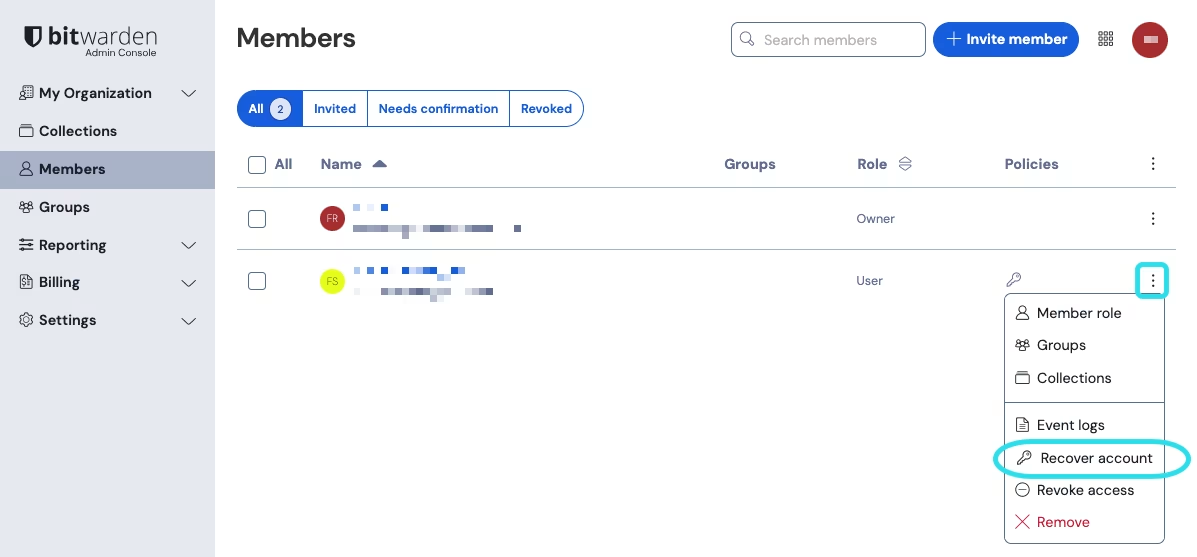
3、对于要恢复其账户的成员，请选择与其账户同一行中的 **≡**&#x83DC;单图标。

4、选择 **🔑恢复账户**：

<div align="left" data-with-frame="true"><figure><img src="https://bitwarden.com/assets/26oD8iqDY15SNJXCJlQE71/22e66b7e11a56d99c13ac41a1236c4e7/2024-12-03_15-35-51.png?w=1197&#x26;fm=avif" alt=""><figcaption><p>恢复账户</p></figcaption></figure></div>

5、在出现的**恢复账户**窗口中，选中您要重置哪种凭据：

* 选中**重置主密码**，以创建新的临时密码，如果启用了[主密码要求策略](/docs/admin-console/oversight-visibility/enterprise-policies.md#master-password-requirements)，则该密码必须满足您组织的要求。复制新的主密码并安全地与成员共享，例如使用 [Bitwarden Send](/docs/password-manager/bitwarden-send/create-a-send.md)。
* 选中**重置两步登录**，以删移除为 Bitwarden（不是您的 IdP）设置的双重身份验证。如果成员未设置任何两步登录方式，则无法勾选此选项。

{% hint style="info" %}
如果启用了[要求两步登录策略](/docs/admin-console/oversight-visibility/enterprise-policies.md#require-two-step-login)，重置成员的两步登录方式将自动[撤销](/docs/admin-console/manage-members/revoke-remove/temporarily-revoke-access.md)它们，因为它们将不再合规。提醒他们在设置新的两步登录方式以[恢复访问权限](/docs/admin-console/manage-members/revoke-remove/temporarily-revoke-access.md#restore-access)后通知您。
{% endhint %}

6、选择**保存**。这将向成员的账户电子邮箱发送一封电子邮件，其中包含[后续步骤](/docs/admin-console/manage-members/account-recovery/my-account-was-recovered.md)，这也会将用户从当前会话中注销。某些客户端应用程序（比如移动 App）上的活动会话可能会保持活动长达一小时。


---

# Agent Instructions: Querying This Documentation

If you need additional information that is not directly available in this page, you can query the documentation dynamically by asking a question.

Perform an HTTP GET request on the current page URL with the `ask` query parameter:

```
GET https://help.ppgg.in/docs/admin-console/manage-members/account-recovery/recover-a-member-account.md?ask=<question>
```

The question should be specific, self-contained, and written in natural language.
The response will contain a direct answer to the question and relevant excerpts and sources from the documentation.

Use this mechanism when the answer is not explicitly present in the current page, you need clarification or additional context, or you want to retrieve related documentation sections.