> For the complete documentation index, see [llms.txt](https://help.ppgg.in/llms.txt). Markdown versions of documentation pages are available by appending `.md` to page URLs; this page is available as [Markdown](https://help.ppgg.in/docs/admin-console/manage-members/directory-connector/sync-with-ldap-or-ad.md).

# 使用 LDAP 或 AD 同步

{% hint style="success" %}
对应的[官方文档地址](https://bitwarden.com/help/article/ldap-directory/)
{% endhint %}

本文将帮助您使用 Directory Connector 将您的 LDAP 或 Active Directory 服务中的用户和群组同步到您的 Bitwarden 组织。Bitwarden 为最流行的 LDAP 目录服务器提供了内置连接器，这些目录服务器包括：

* Microsoft Active Directory
* Apache Directory Server (ApacheDS)
* Apple Open Directory
* Fedora Directory Server
* Novell eDirectory
* OpenDS
* OpenLDAP
* Sun Directory Server Enterprise Edition (DSEE)
* 任何通用 LDAP 目录服务器

## 连接到您的服务器 <a href="#connect-to-your-server" id="connect-to-your-server"></a>

完成以下步骤，以将 Directory Connector 配置为使用 LDAP 或 Active Directory：

1. 打开 Directory Connector [桌面 App](/docs/admin-console/manage-members/directory-connector/directory-connector-desktop-app.md)。
2. 导航到 **Setting** 选项卡。
3. 从 **Type** 下拉菜单中，选择 **Active Directory / LDAP**。\
   此部分中的可用字段将根据您选择的类型而变化。
4. 配置以下选项：

| 选项                                       | 描述                                                                                                                                                                                                                  | 示例                                                                                                                                                                                                             |
| ---------------------------------------- | ------------------------------------------------------------------------------------------------------------------------------------------------------------------------------------------------------------------- | -------------------------------------------------------------------------------------------------------------------------------------------------------------------------------------------------------------- |
| Server Hostname                          | 目录服务器的主机名。                                                                                                                                                                                                          | <p><code>ad.example.com</code>，</p><p><code>ldap.company.local</code></p>                                                                                                                                      |
| Server Port                              | 目录服务器侦听的端口。                                                                                                                                                                                                         | `389` 或 `10389`                                                                                                                                                                                                |
| Root Path                                | Directory Connector 应在其中开始查询的根路径。                                                                                                                                                                                   | <p><code>cn=users</code>，</p><p><code>dc=ad</code>，</p><p><code>dc=example</code></p><p>或者</p><p><code>dc=com</code>，</p><p><code>dc=ldap</code>，</p><p><code>dc=company</code>，</p><p><code>dc=org</code></p> |
| This server uses Active Directory        | 如果服务器是活动目录服务器，请选中此框。                                                                                                                                                                                                |                                                                                                                                                                                                                |
| This server pages search results         | 如果服务器对搜索结果进行分页，请选中此框（仅限 LDAP）。                                                                                                                                                                                      |                                                                                                                                                                                                                |
| This server uses an encrypted connection | <p>选中此框将提示您选择以下选项之一：</p><p></p><p><strong>Use SSL</strong> (LDAPS) - 如果您的 LDAPS 服务器使用不受信任的证书，则可以在此界面上配置证书选项。</p><p></p><p><strong>Use TLS</strong> (STARTTLS) - 如果您的 LDAP 服务器使用 STARTTLS 的自签名证书，则可以在此界面上配置证书选项。</p> |                                                                                                                                                                                                                |
| Username                                 | 应用程序在连接到目录服务器时，使用管理用户的专有名称。对于 **Active Directory**，如果希望同步从目录中已移除的用户的状态，该用户应为内置管理员组的成员。                                                                                                                              |                                                                                                                                                                                                                |
| Password                                 | 上面指定的用户的密码。此密码安全地存储在操作系统的本地凭据管理器中。                                                                                                                                                                                  |                                                                                                                                                                                                                |

## 配置同步选项 <a href="#configure-sync-options" id="configure-sync-options"></a>

{% hint style="success" %}
完成配置后，请导航至 **More** 标签页，然后选择 **Clear Sync Cache** 按钮，以防止与先前的同步操作发生潜在的冲突。更多信息，请参阅[清除同步缓存](/docs/admin-console/manage-members/directory-connector/clear-sync-cache.md)。
{% endhint %}

完成以下步骤，以配置当使用 Directory Connector 同步时的设置：

{% hint style="info" %}
如果您使用的是 Active Directory，许多设置已为您预先确定，因此不会显示。
{% endhint %}

1. 打开 Directory Connector [桌面 App](/docs/admin-console/manage-members/directory-connector/directory-connector-desktop-app.md)。
2. 导航到 **Setting** 选项卡。
3. 在 **Sync** 部分，根据需要配置如下选项：

| 选项                                                                                             | 描述                                                                                                                                                                                               |
| ---------------------------------------------------------------------------------------------- | ------------------------------------------------------------------------------------------------------------------------------------------------------------------------------------------------ |
| Interval                                                                                       | 自动同步检查的时间间隔（以分钟为单位）。                                                                                                                                                                             |
| Remove disabled users during sync（**不适用于 LDAP**）                                               | 选中此框以从 Bitwarden 组织中移除已在您的组织中禁用的用户。                                                                                                                                                              |
| More than 2000 users or groups are expected to sync                                            | 如果预计同步 2000 个以上用户或群组，请选中此框。如果不勾选此框，Directory Connector 会将同步限制在 2000 个用户或群组。                                                                                                                      |
| Member Attribute                                                                               | 目录用此属性名称来定义群组的成员资格（例如 `uniqueMember`）                                                                                                                                                            |
| Creation Date Attribute                                                                        | 目录用此属性名称来指定条目创建的时间（例如 `whenCreated`）                                                                                                                                                             |
| Revision Date Attribute                                                                        | 目录用此属性名称来指定条目上次的修改时间（例如 `whenChanged`）                                                                                                                                                           |
| If a user has no email address, combine a username prefix with a suffix value to form an email | <p>选中此框可为没有电子邮箱地址的用户生成有效的电子邮箱选项。<strong>没有真实或没有生成电子邮箱地址的用户将被 Directory Connector 跳过。</strong></p><p></p><p>生成的电子邮箱 = <strong>Email Prefix Attribute</strong> + <strong>Email Suffix</strong></p> |
| Email Prefix Attribute                                                                         | 用于生成电子邮箱地址时创建前缀。                                                                                                                                                                                 |
| Email Suffix                                                                                   | 用于生成电子邮箱地址时创建后缀的字符串 (`@example.com`)。                                                                                                                                                            |
| Sync Users                                                                                     | <p>选中此框以将用户同步到您的组织。</p><p></p><p>选中此框将允许您指定<strong>用户筛选器</strong>、<strong>用户路径</strong>、<strong>用户对象类</strong>以及<strong>用户电子邮箱属性</strong>。</p>                                                   |
| User Filter                                                                                    | 参阅[指定同步筛选器](/docs/admin-console/manage-members/directory-connector/sync-with-ldap-or-ad.md#specify-sync-filters)。                                                                                |
| User Path                                                                                      | 与指定的**根路径**一起使用的属性，用于搜索用户（例如 `ou=users`）。如果未提供任何值，则子树搜索将从根路径开始。                                                                                                                                  |
| User Object Class                                                                              | 用于 LDAP 用户对象类的名称（例如 `user`）。                                                                                                                                                                     |
| User Email Attribute                                                                           | 用于加载用户电子邮箱地址时使用的属性。                                                                                                                                                                              |
| Sync Groups                                                                                    | <p>选中此框以将群组同步到您的组织。</p><p></p><p>选中此框将允许您指定<strong>群组筛选器</strong>、<strong>群组路径</strong>、<strong>群组对象类</strong>以及<strong>群组名称属性</strong>。</p>                                                     |
| Group Filter                                                                                   | 参阅[指定同步筛选器](/docs/admin-console/manage-members/directory-connector/sync-with-ldap-or-ad.md#specify-sync-filters)。                                                                                |
| Group Path                                                                                     | 与指定的**根路径**一起使用的属性，用于搜索群组（例如 `ou=groups`）。如果未提供任何值，则子树搜索将从根路径开始。                                                                                                                                 |
| Group Object Class                                                                             | 用于 LDAP 群组对象类的名称（例如 `groupOfUniqueNames`）。                                                                                                                                                       |
| Group Name Attribute                                                                           | 目录使用此属性名称来定义群组的名称（例如 `name`）                                                                                                                                                                     |

### 指定同步筛选器 <a href="#specify-sync-filters" id="specify-sync-filters"></a>

用户和群组筛选器可以是任何 LDAP 兼容的搜索筛选器形式。

与标准 LDAP 指令相比，Active Directory 提供了一些用于编写搜索筛选器时使用的高级选项和限制。在[此处](https://docs.microsoft.com/en-us/windows/win32/adsi/search-filter-syntax?redirectedfrom=MSDN)了解有关编写 Active Directory 搜索筛选器的更多信息。

{% hint style="info" %}
嵌套的群组可以在 Directory Connector 中使用单个引用同步多个群组对象。具体方法是创建一个其成员属于其他群组的群组。
{% endhint %}

### 示例 <a href="#samples" id="samples"></a>

要为具有包含 `Marketing` 的 `cn`（通用名称）以及具有 `objectClass=user` 的所有条目筛选同步：

```systemd
(&(objectClass=user)(cn=*Marketing*))
```

&#x20;（**仅适用于 LDAP**）要为具有 \
`ou`（组织单元）组件（他们的 `dn`（专有名词）是 `Miami` 或 `Orlando`）的所有条目筛选同步：

```systemd
(|(ou:dn:=Miami)(ou:dn:=Orlando))
```

（**仅适用于 LDAP**）要排除与表达式相匹配的条目，例如所有 `ou=Chicago` 但排除同样匹配 `ou=Wrigleyville` 的条目：

```systemd
(&(ou:dn:=Chicago)(!(ou:dn:=Wrigleyville)))
```

（**仅适用于** **AD**）要为 `Heroes` 群组中的用户筛选同步：

```systemd
(&(objectCategory=Person)(sAMAccountName=*)(memberOf=cn=Heroes,ou=users,dc=company,dc=com))
```

&#x20;（**仅适用于** **AD**）要通过目录或嵌套为 `Heroes` 群组成员的用户筛选同步：

```systemd
(&(objectCategory=Person)(sAMAccountName=*)(memberOf:1.2.840.113556.1.4.1941:=cn=Heroes,ou=users,dc=company,dc=com))
```

## 测试同步 <a href="#test-a-sync" id="test-a-sync"></a>

{% hint style="success" %}
在测试或执行同步之前，请检查 Directory Connector 是否连接到正确的云服务器（如 US 或 EU）或自托管服务器。了解如何使用[桌面 App](/docs/admin-console/manage-members/directory-connector/directory-connector-desktop-app.md) 或 [CLI](/docs/admin-console/manage-members/directory-connector/directory-connector-cli.md) 进行检查。
{% endhint %}

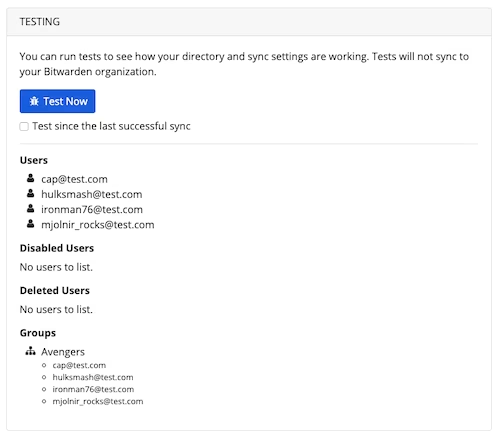
要测试 Directory Connector 是否成功连接到您的目录并返回所需的用户和群组，导航到 **Dashboard** 选项卡，然后选择 **Test Now** 按钮。如果成功，则用户和群组将根据指定的[同步选项](/docs/admin-console/manage-members/directory-connector/sync-with-ldap-or-ad.md#configure-sync-options)和[筛选器](/docs/admin-console/manage-members/directory-connector/sync-with-ldap-or-ad.md#specify-sync-filters)显示在 Directory Connector 窗口中：

<div align="left" data-with-frame="true"><figure><img src="https://bitwarden.com/assets/5QYMxvtCPhjbluuoLcCapD/96e9c630ead9ceba5124b55f9d2764a3/dc-okta-test.png?w=500&#x26;fm=avif" alt=""><figcaption><p>测试同步的结果</p></figcaption></figure></div>

## 启动自动同步 <a href="#start-automatic-sync" id="start-automatic-sync"></a>

配置并测试[同步选项](/docs/admin-console/manage-members/directory-connector/sync-with-ldap-or-ad.md#configure-sync-options)和[筛选器](/docs/admin-console/manage-members/directory-connector/sync-with-ldap-or-ad.md#specify-sync-filters)后，就可以开始同步了。完成以下步骤以使用 Directory Connector 启动自动同步：

1. 打开 Directory Connector [桌面 App](/docs/admin-console/manage-members/directory-connector/directory-connector-desktop-app.md)。
2. 导航到 **Dashboard** 选项卡。
3. 在 **Sync** 部分，选择 **Start Now** 按钮。\
   或者您可以选择 **Sync Now** 按钮以运行一次性手动同步。

Directory Connector 将根据配置的[同步选项](/docs/admin-console/manage-members/directory-connector/sync-with-ldap-or-ad.md#configure-sync-options)和[筛选器](/docs/admin-console/manage-members/directory-connector/sync-with-ldap-or-ad.md#specify-sync-filters)开始轮询您的目录。

如果您退出或关闭了 Directory Connector，自动同步将停止。最小化或隐藏此程序到系统托盘，以保持后台运行。

{% hint style="info" %}
如果您使用的是[团队入门版](/docs/plans-and-pricing/password-manager/about-bitwarden-plans.md#teams-starter-organizations)方案，则成员数量限制为 10 人。如果您尝试同步超过 10 名成员，Directory Connector 将显示错误并停止同步。

**该方案已不再提供购买**。此错误不适用于团队版方案。
{% endhint %}

## Active Directory 同步故障排除 <a href="#sync-with-active-directory-troubleshooting" id="sync-with-active-directory-troubleshooting"></a>

**Value limit reached when synchronizing from an Active Directory instance**（从 Active Directory 实例同步时达到值限制）：

Active Directory 的 `MaxValRange` 的默认设置为 1500。如果某个属性（如群组中的 `members`）的值超过 1500，Active Directory 将同时返回空白的成员属性和单独属性上成员的截断列表，最多可达到 `MaxValRange` 的值。

* 您可以调整 `MaxValRange` 策略，使其值高于 Active Directory 中最大群组的成员数量的值。请参阅 Microsoft 文档，了解如何使用 [ntdsutll.exe](https://learn.microsoft.com/zh-cn/troubleshoot/windows-server/active-directory/view-set-ldap-policy-using-ntdsutil) 实用程序设置 Active Directory LDAP 策略。


---

# Agent Instructions
This documentation is published with GitBook. GitBook is the documentation platform designed so that both humans and AI agents can read, navigate, and reason over technical content effectively. Learn more at gitbook.com.

## Querying This Documentation
If you need additional information that is not directly available in this page, you can query the documentation dynamically by asking a question.

Perform an HTTP GET request on the current page URL with the `ask` query parameter, and the optional `goal` query parameter:

```
GET https://help.ppgg.in/docs/admin-console/manage-members/directory-connector/sync-with-ldap-or-ad.md?ask=<question>&goal=<endgoal>
```

`ask` is the immediate question: it should be specific, self-contained, and written in natural language.
`goal` is optional and describes the broader end goal you are ultimately trying to accomplish on behalf of the user. GitBook uses it to tailor the answer towards what is most useful for that goal.

The response will contain a direct answer to the question and relevant excerpts and sources from the documentation.

Use this mechanism when the answer is not explicitly present in the current page, you need clarification or additional context, or you want to retrieve related documentation sections.
