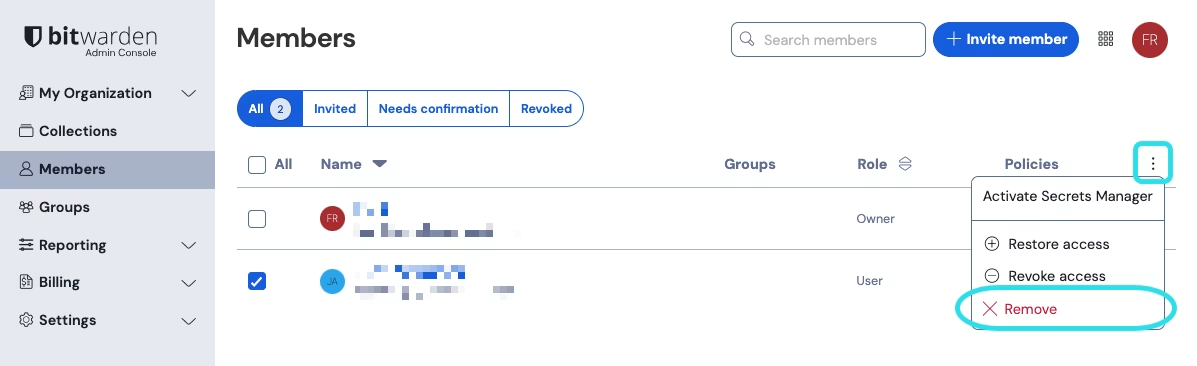
移除成员
移除成员
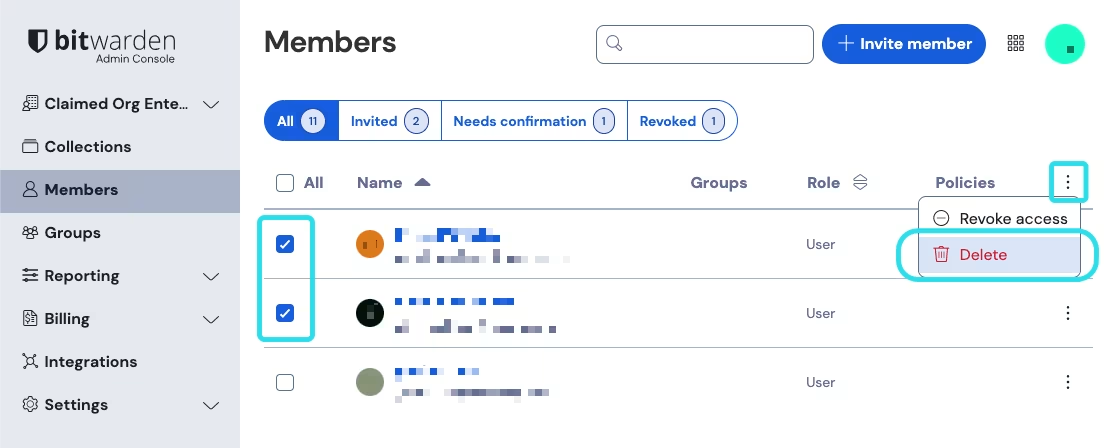 {% endhint %}
脱机设备会缓存数据的只读副本,包括组织项目。移除成员后,某些客户端可能会在短时间内保留对只读数据的访问权限。如果预计会有人恶意利用这一点,那么在您将成员从组织中移除时,就应该更新该成员拥有访问权限的凭据。
{% hint style="warning" %}
对于那些使用[受信任设备 SSO](/docs/admin-console/login-with-sso/trusted-devices.md) 而没有主密码的成员账户:
* [从您的组织中移除它们](/docs/admin-console/manage-members/revoke-remove/permanently-remove-access.md)将切断它们对 Bitwarden 账户的所有访问权限,除非该账户此前通过[账户恢复](/docs/admin-console/manage-members/account-recovery/about-account-recovery.md)功能设置过主密码,且在移除前至少使用该主密码登录过一次。
除非在用户被从组织中移除**之前**采取了上述步骤,否则用户将无法重新加入您的组织。如果没有采取上述步骤,每个被移除的用户都必须[删除自己的账户](/docs/plans-and-pricing/delete-an-account-or-organization.md#delete-your-personal-account),然后重新获得邀请才能创建账户和加入组织。
* [撤销对组织的访问权限](/docs/admin-console/manage-members/revoke-remove/temporarily-revoke-access.md),但不会从组织中移除他们,仍会使其账户被完全锁定,直到恢复其对组织的访问权限为止。
{% endhint %}
## 已移除成员的数据会怎样
所有[集合](/docs/admin-console/manage-shared-items/collections/about-collections.md)均归组织所有。当您移除对集合中唯一拥有完整的[管理集合权限](/docs/admin-console/manage-shared-items/collections/collection-permissions.md)的成员时,所有者和管理员可以授予现有成员对[该集合的访问权限](/docs/admin-console/manage-shared-items/collections/assign-users-to-collections.md#assign-access-to-un-managed-collections)。
「我的密码库」中保存的项目归个人用户所有。当成员从组织中移除时,该用户仍保留其「我的密码库」中的所有项目。
相比之下,使用[强制组织所有权策略](/docs/admin-console/oversight-visibility/enterprise-policies.md#enforce-organization-data-ownership)的组织在成员移除后仍可访问数据。此策略会将个人拥有的「我的密码库」替换为组织拥有的「[我的项目](/docs/password-manager/organization-members/my-items.md)」。当「我的项目」中包含数据的成员被移除时,其「我的项目」会自动转换为以该用户电子邮件地址命名的集合。然后,所有者和管理员可以[分配对该集合的访问权限](/docs/admin-console/manage-shared-items/collections/assign-users-to-collections.md#assign-access-to-un-managed-collections)。现有成员获得[管理集合权限](/docs/admin-console/manage-shared-items/collections/collection-permissions.md)后,即可像访问标准 Bitwarden 集合一样访问、编辑和重新分配项目。
{% endhint %}
脱机设备会缓存数据的只读副本,包括组织项目。移除成员后,某些客户端可能会在短时间内保留对只读数据的访问权限。如果预计会有人恶意利用这一点,那么在您将成员从组织中移除时,就应该更新该成员拥有访问权限的凭据。
{% hint style="warning" %}
对于那些使用[受信任设备 SSO](/docs/admin-console/login-with-sso/trusted-devices.md) 而没有主密码的成员账户:
* [从您的组织中移除它们](/docs/admin-console/manage-members/revoke-remove/permanently-remove-access.md)将切断它们对 Bitwarden 账户的所有访问权限,除非该账户此前通过[账户恢复](/docs/admin-console/manage-members/account-recovery/about-account-recovery.md)功能设置过主密码,且在移除前至少使用该主密码登录过一次。
除非在用户被从组织中移除**之前**采取了上述步骤,否则用户将无法重新加入您的组织。如果没有采取上述步骤,每个被移除的用户都必须[删除自己的账户](/docs/plans-and-pricing/delete-an-account-or-organization.md#delete-your-personal-account),然后重新获得邀请才能创建账户和加入组织。
* [撤销对组织的访问权限](/docs/admin-console/manage-members/revoke-remove/temporarily-revoke-access.md),但不会从组织中移除他们,仍会使其账户被完全锁定,直到恢复其对组织的访问权限为止。
{% endhint %}
## 已移除成员的数据会怎样
所有[集合](/docs/admin-console/manage-shared-items/collections/about-collections.md)均归组织所有。当您移除对集合中唯一拥有完整的[管理集合权限](/docs/admin-console/manage-shared-items/collections/collection-permissions.md)的成员时,所有者和管理员可以授予现有成员对[该集合的访问权限](/docs/admin-console/manage-shared-items/collections/assign-users-to-collections.md#assign-access-to-un-managed-collections)。
「我的密码库」中保存的项目归个人用户所有。当成员从组织中移除时,该用户仍保留其「我的密码库」中的所有项目。
相比之下,使用[强制组织所有权策略](/docs/admin-console/oversight-visibility/enterprise-policies.md#enforce-organization-data-ownership)的组织在成员移除后仍可访问数据。此策略会将个人拥有的「我的密码库」替换为组织拥有的「[我的项目](/docs/password-manager/organization-members/my-items.md)」。当「我的项目」中包含数据的成员被移除时,其「我的项目」会自动转换为以该用户电子邮件地址命名的集合。然后,所有者和管理员可以[分配对该集合的访问权限](/docs/admin-console/manage-shared-items/collections/assign-users-to-collections.md#assign-access-to-un-managed-collections)。现有成员获得[管理集合权限](/docs/admin-console/manage-shared-items/collections/collection-permissions.md)后,即可像访问标准 Bitwarden 集合一样访问、编辑和重新分配项目。