> For the complete documentation index, see [llms.txt](https://help.ppgg.in/llms.txt). Markdown versions of documentation pages are available by appending `.md` to page URLs; this page is available as [Markdown](https://help.ppgg.in/docs/admin-console/manage-members/revoke-remove/temporarily-revoke-access.md).
# 临时撤销访问权限
{% hint style="success" %}
对应的[官方文档地址](https://bitwarden.com/help/revoke-users/)
{% endhint %}
撤销成员是指将某人从您的组织中临时移除。之后您可以[恢复其访问权限](#restore-access)或将其[永久移除](/docs/admin-console/manage-members/revoke-remove/permanently-remove-access.md)出您的组织。成员被撤销后,该成员将:
* 无法访问任何组织密码库项目或集合。
* 无法使用您的组织 [SSO](/docs/admin-console/login-with-sso/about-sso.md) 登录。
{% hint style="warning" %}
**没有主密码的**成员(例如,在使用[受信任设备](/docs/admin-console/login-with-sso/trusted-devices/about-trusted-devices.md)或 [Key Connector](/docs/self-hosting/key-connector/about-key-connector.md) 的组织中的成员)如果被撤销,其将被完全锁定在他们的账户之外。
{% endhint %}
* 不受您的组织[策略](/docs/admin-console/oversight-visibility/enterprise-policies.md)的约束。
* 不占用[订阅席位](/docs/plans-and-pricing/manage-subscription-seats-in-your-organization.md)。
## 撤销访问权限
撤销成员有好几种方法。当成员违反某些[企业策略](/docs/admin-console/oversight-visibility/enterprise-policies.md),或者成员在用于其组织 [SCIM](/docs/admin-console/manage-members/scim/about-scim.md) 的 IdP 中被暂停或停用时,成员将被**自动**撤销。
或者,拥有**管理用户**权限的[所有者、管理员或自定义角色成员](/docs/admin-console/manage-members/member-roles.md)可以**手动**撤销用户:
1、在Admin Console 中,选择**成员**。
2、勾选您想要撤销的成员。
3、选择 :ellipsis-vertical:选项菜单。
4、选择**撤销访问权限**:
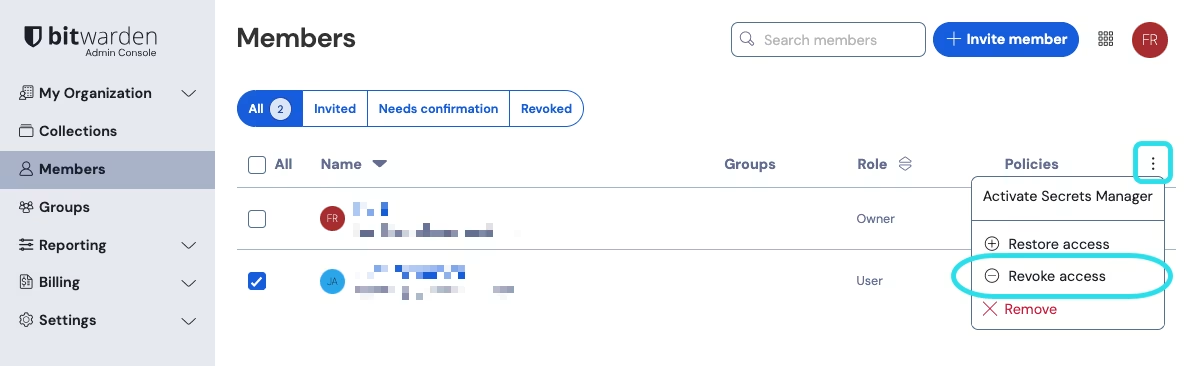
撤销访问权限
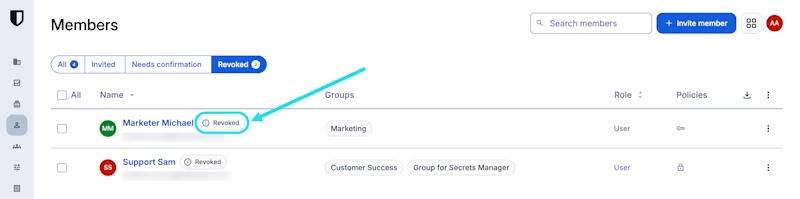 如果显示「Unknown reason」,则说明该成员在[版本 2026.5.0](https://help.ppgg.in/docs/admin-console/manage-members/revoke-remove/pages/-MNXLa0A2fbW2RZGFkwT#id-2026.5.0) 发布之前已被撤销。
{% endhint %}
## 恢复访问权限
拥有**管理用户**权限的[所有者、管理员或自定义角色](/docs/admin-console/manage-members/member-roles.md)成员可以快速恢复成员的访问权限。恢复已撤销成员的访问权限不需要他们采取任何步骤来重新加入组织,也就是说他们不需要[被重新邀请、接受邀请和被确认](/docs/admin-console/manage-members/user-management.md#add-new-members)。
{% hint style="info" %}
不符合某些[企业策略](/docs/admin-console/oversight-visibility/enterprise-policies.md)的成员,在他们采取措施遵守这些策略之前,将无法恢复到您的组织中。
{% endhint %}
要恢复成员的访问权限:
1、在 Admin Console 中,选择**成员**。
2、选择**已撤销**。
3、勾选您想要将其返回您组织的成员。
4、选择 :ellipsis-vertical:选项菜单。
5、选择**恢复访问权限**:
如果显示「Unknown reason」,则说明该成员在[版本 2026.5.0](https://help.ppgg.in/docs/admin-console/manage-members/revoke-remove/pages/-MNXLa0A2fbW2RZGFkwT#id-2026.5.0) 发布之前已被撤销。
{% endhint %}
## 恢复访问权限
拥有**管理用户**权限的[所有者、管理员或自定义角色](/docs/admin-console/manage-members/member-roles.md)成员可以快速恢复成员的访问权限。恢复已撤销成员的访问权限不需要他们采取任何步骤来重新加入组织,也就是说他们不需要[被重新邀请、接受邀请和被确认](/docs/admin-console/manage-members/user-management.md#add-new-members)。
{% hint style="info" %}
不符合某些[企业策略](/docs/admin-console/oversight-visibility/enterprise-policies.md)的成员,在他们采取措施遵守这些策略之前,将无法恢复到您的组织中。
{% endhint %}
要恢复成员的访问权限:
1、在 Admin Console 中,选择**成员**。
2、选择**已撤销**。
3、勾选您想要将其返回您组织的成员。
4、选择 :ellipsis-vertical:选项菜单。
5、选择**恢复访问权限**:
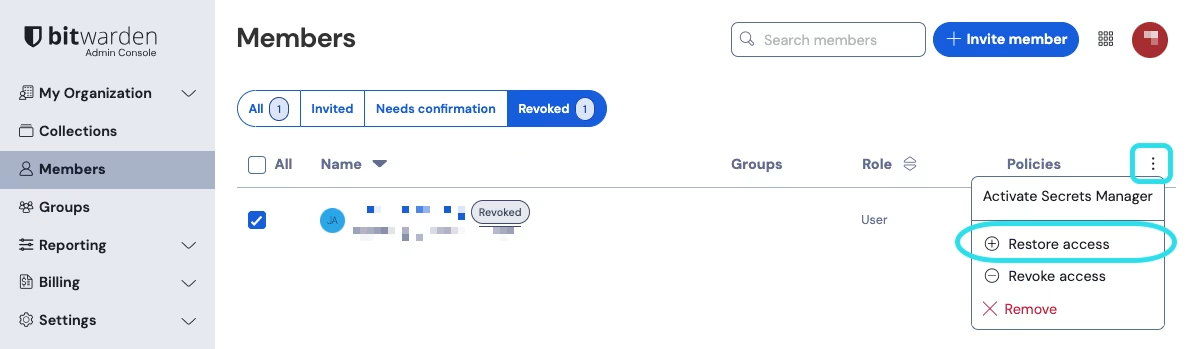
恢复访问权限