> For the complete documentation index, see [llms.txt](https://help.ppgg.in/llms.txt). Markdown versions of documentation pages are available by appending `.md` to page URLs; this page is available as [Markdown](https://help.ppgg.in/docs/admin-console/manage-members/sponsored-families/sponsored-families-for-non-members.md).

# 适用于非成员的赞助家庭

{% hint style="success" %}
对应的[官方文档地址](https://bitwarden.com/help/organization-sponsored-families-plans/)
{% endhint %}

作为一项员工福利，企业版组织可以提供免费的家庭版组织赞助。赞助的家庭版组织允许用户安全地与最多 5 位家庭成员或朋友共享个人凭据，从而鼓励员工在家中和工作中养成良好的安全习惯。

本文适用于目前不是 Bitwarden 组织成员的员工的家庭版赞助，但组织也可以[赞助成员](/docs/admin-console/manage-members/sponsored-families/sponsored-families-for-members.md)。

与[适用于成员的赞助](/docs/admin-console/manage-members/sponsored-families/sponsored-families-for-members.md)不同，**适用于非成员**的赞助家庭版组织：

* 要求组织所有者[联系 Bitwarden](https://bitwarden.com/contact/) 以启用该功能。
* 要求[所有者、管理员或允许的自定义角色成员](/docs/admin-console/manage-members/member-roles.md)为他们希望向其提供福利的每位员工发放赞助。
* 获得赞助的每位员工将在企业版组织中占据一个席位。

{% hint style="success" %}
如果您的企业版组织是自托管的，则管理员需要先完成[这些步骤](/docs/self-hosting/deploy-and-configure/optional-features/self-hosting-families-sponsorships.md)，然后员工才能兑换其家庭版赞助。
{% endhint %}

此页面上的其余说明将帮助管理员发放赞助和帮助成员兑换其获得的赞助。

## 发放赞助 <a href="#issue-a-sponsorship" id="issue-a-sponsorship"></a>

{% hint style="success" %}
如果您想要为其赞助家庭版组织的员工**已经是企业版组织的成员**，他们可以[兑换赞助而无需管理员手动发放](/docs/admin-console/manage-members/sponsored-families/sponsored-families-for-members.md#redeem-a-sponsorship)。
{% endhint %}

要向非企业版组织成员的员工发放家庭赞助：

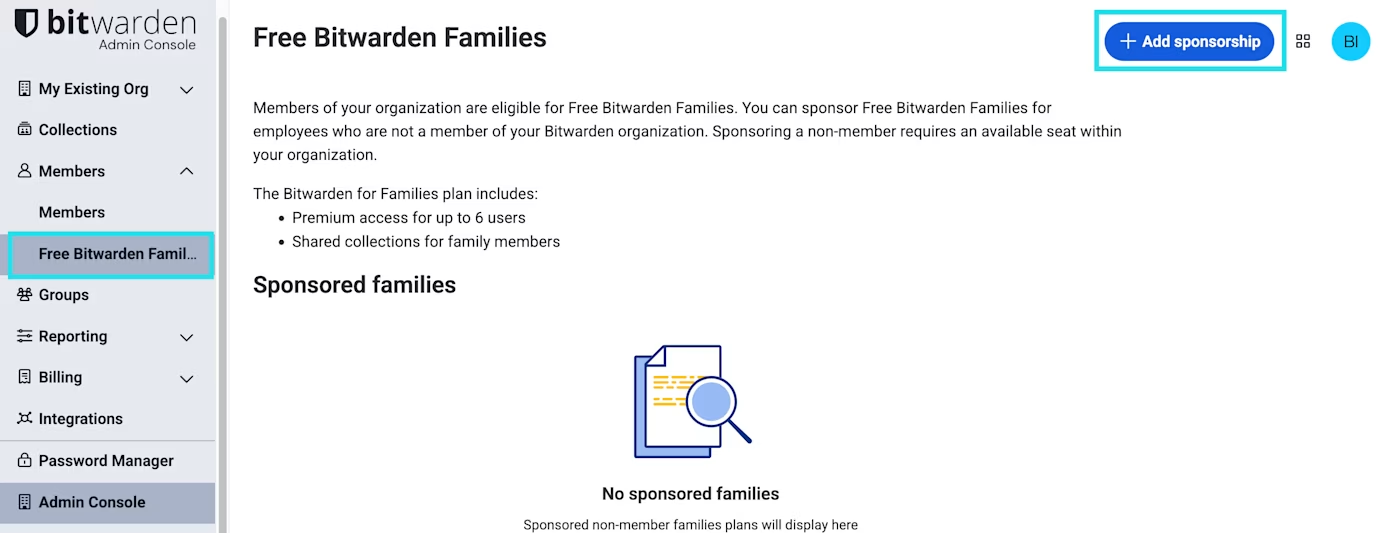
1、在 Admin Console 中，导航到**成员** → **免费 Bitwarden 家庭**，然后选择 **✚添加赞助**：

<div align="left" data-with-frame="true"><figure><img src="https://bitwarden.com/assets/3ZLi9Ap4Hk44fCNWHvvrFY/b3e4a05fd72aa106e938295d27e0d37a/2025-05-21_11-35-45.png?w=1400&#x26;fm=avif" alt=""><figcaption><p>免费 Bitwarden 家庭</p></figcaption></figure></div>

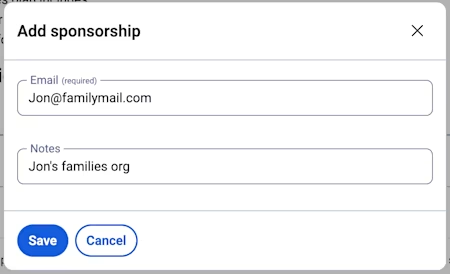
2、在**添加赞助**对话框中，输入员工的电子邮箱地址以及关于赞助的任何备注，然后选择**保存**以向该员工的收件箱发送赞助邀请：

<div align="left" data-with-frame="true"><figure><img src="https://bitwarden.com/assets/2bYAYxzbgIJqshhOIgNQtX/c35a70ea7ee48f4b4114ce86401caefe/2025-05-21_16-43-35.png?w=450&#x26;fm=avif" alt=""><figcaption><p>添加赞助</p></figcaption></figure></div>

{% hint style="info" %}
您可以随时使用此页面上的 **≡**&#x9009;项菜单重新发送邀请，或移除员工的赞助。
{% endhint %}

使用此方式获得赞助的每位员工将在企业版组织中占据一个席位。

## 兑换赞助 <a href="#redeem-a-sponsorship" id="redeem-a-sponsorship"></a>

要接受雇主向您发放的家庭赞助：

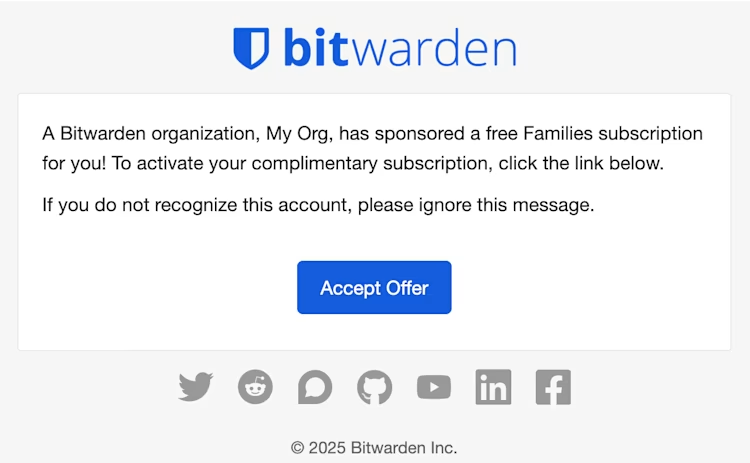
1、检查您的个人电子邮箱收件箱，当您收到一封邀请您激活免费家庭版订阅的电子邮件时，请选择**接受邀请**：

<div align="left" data-with-frame="true"><figure><img src="https://bitwarden.com/assets/3oF2ARkXDOM7xMr8X1YdMS/d873a82a1ed8b129549731bb0c419673/2025-05-21_16-55-45.png?w=750&#x26;fm=avif" alt=""><figcaption><p>接受企业提供的家庭</p></figcaption></figure></div>

2、按照屏幕上的提示使用您的个人 Bitwarden 账户登录或创建一个新的账户。

{% hint style="success" %}
如果您已经拥有 Bitwarden 家庭版组织，您可以将赞助应用到该组织。确保您使用家庭组织所有者的账户登录。
{% endhint %}

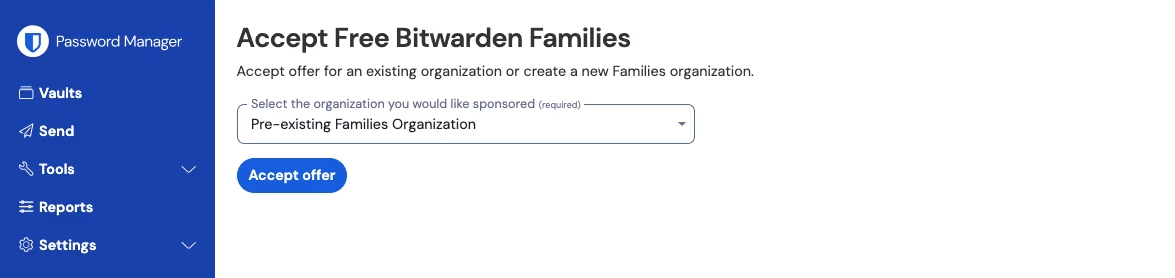
3、登录后，您将被定向到一个界面，在此界面您可以在其中兑换**新的家庭版组织**赞助或将赞助应用到**现有的家庭版组织**：

{% tabs %}
{% tab title="新的家庭版组织" %}
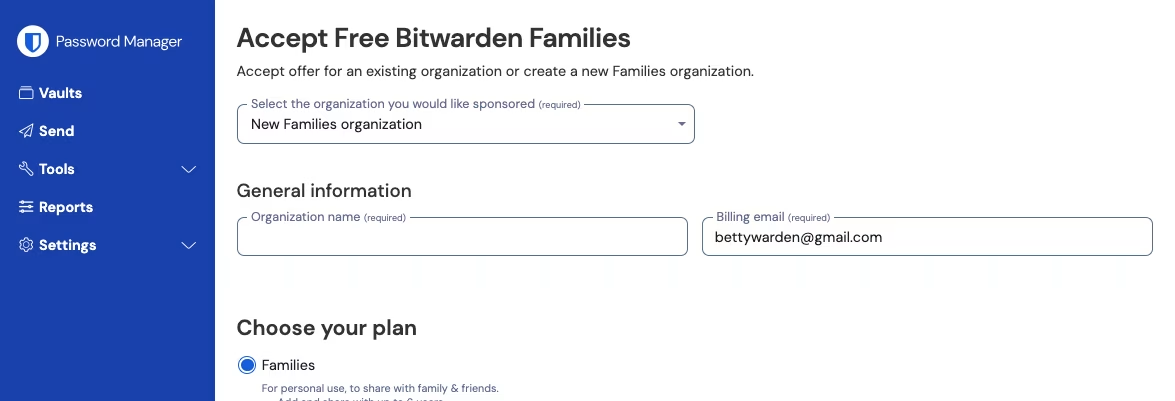
从下拉列表中选择**新增家庭组织**：

<div align="left" data-with-frame="true"><figure><img src="https://bitwarden.com/assets/3NnhjGPkYir4aMCLzvmJf1/db51c17a40db8d7a399ed49ec65d98f5/2024-12-04_10-24-32.png?w=1175&#x26;fm=avif" alt=""><figcaption><p>新增免费 Bitwarden 家庭</p></figcaption></figure></div>

填写以下信息：

* **组织名称**
* **计费电子邮箱**
* 是否要添加**额外的存储空间 (GB)**。您的赞助包含 5 GB 免费存储空间。
* **付款信息**

只要您是赞助组织的活跃成员，您就不必为家庭组织支付任何费用，除非您添加了**额外的存储空间**。填写完您的信息后，选择**提交**。
{% endtab %}

{% tab title="现有的家庭版组织" %}
从下拉列表中选择组织，然后选择**接受邀请**：

<div align="left" data-with-frame="true"><figure><img src="https://bitwarden.com/assets/5HIpHzcAzTsBjE4UZhjCV0/1f3ce019f188b2a1be20cc1587534864/2024-12-04_10-24-53.png?w=1175&#x26;fm=avif" alt=""><figcaption><p>现有的免费 Bitwarden 家庭</p></figcaption></figure></div>

接受邀请后，您的旧订阅将被企业赞助取代。只要您是赞助组织的活跃成员，您就不必为家庭版组织支付任何费用，除非您添加了**额外的存储空间**。

{% hint style="info" %}
如果您使用 [2019 家庭版方案](/docs/plans-and-pricing/updates-to-plans.md)，您仍然可以兑换赞助，但您的组织不会自动包含 2020 年之后发布的所有功能。要升级当前方案，请导航至**订阅** → **计费**页面，然后选择**升级方案** 。
{% endhint %}
{% endtab %}
{% endtabs %}

{% hint style="info" %}
兑换赞助后，您仍可能会在个人收件箱中收到有关您的家庭版组织的续订提醒电子邮件。只要您仍然是该赞助企业版组织的活跃成员，您就可以忽略这些电子邮件。如果您不再是其成员，请导航至**计费** → **付款方式**，然后检查付款方式是否有效。
{% endhint %}


---

# Agent Instructions
This documentation is published with GitBook. GitBook is the documentation platform designed so that both humans and AI agents can read, navigate, and reason over technical content effectively. Learn more at gitbook.com.

## Querying This Documentation
If you need additional information that is not directly available in this page, you can query the documentation dynamically by asking a question.

Perform an HTTP GET request on the current page URL with the `ask` query parameter, and the optional `goal` query parameter:

```
GET https://help.ppgg.in/docs/admin-console/manage-members/sponsored-families/sponsored-families-for-non-members.md?ask=<question>&goal=<endgoal>
```

`ask` is the immediate question: it should be specific, self-contained, and written in natural language.
`goal` is optional and describes the broader end goal you are ultimately trying to accomplish on behalf of the user. GitBook uses it to tailor the answer towards what is most useful for that goal.

The response will contain a direct answer to the question and relevant excerpts and sources from the documentation.

Use this mechanism when the answer is not explicitly present in the current page, you need clarification or additional context, or you want to retrieve related documentation sections.