> For the complete documentation index, see [llms.txt](https://help.ppgg.in/llms.txt). Markdown versions of documentation pages are available by appending `.md` to page URLs; this page is available as [Markdown](https://help.ppgg.in/docs/admin-console/manage-shared-items/collections/create-collections.md).

# 创建集合

{% hint style="success" %}
对应的[官方文档地址](https://bitwarden.com/help/create-collections/)
{% endhint %}

{% hint style="info" %}
只有组织的[集合管理设置](/docs/admin-console/manage-shared-items/collections/collection-settings.md)允许的用户才能通过 Password Manager 网页 App 创建集合。
{% endhint %}

要创建集合：

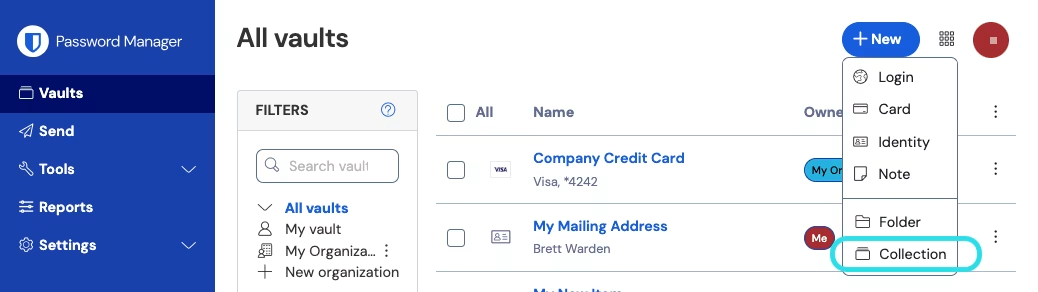
1、登录到 Bitwarden 网页 App，选择 ✚**新增**按钮，然后从下拉菜单选择**集合**：

<div align="left" data-with-frame="true"><figure><img src="https://bitwarden.com/assets/3rq5lVSQlvNT9gu2M2bCbk/8741dc155e8f2fa83d2caeb69218ce64/2024-12-02_15-35-48.png?w=1038&#x26;fm=avif" alt=""><figcaption><p>创建新的集合</p></figcaption></figure></div>

{% hint style="success" %}
组织的[所有者、管理员和某些自定义用户](/docs/admin-console/manage-members/member-roles.md)也可以直接从**管理控制台**执行此步骤，以跳过此过程中的某些步骤。
{% endhint %}

2、在**新增集合**面板中：

* 为您的集合指定一个**名称**
* 选择它应属于的**组织**
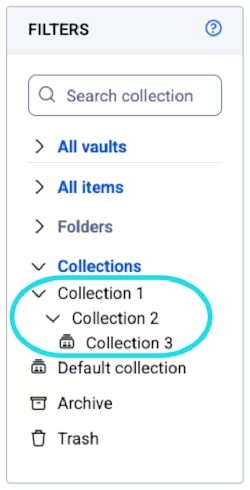
* 或者，选择一个集合来嵌套该集合。集合可以被嵌套，以将其逻辑地组织在您的密码库中：

<div align="left" data-with-frame="true"><figure><img src="https://bitwarden.com/assets/7EXnVptHEKQkSfKY1FsOmI/7ffee8ed6f5712cc9fa4419c4eb88b11/Nested_collections_in_filter_column.png?w=250&#x26;fm=avif" alt=""><figcaption><p>筛选器列中的嵌套集合</p></figcaption></figure></div>

3、在**访问权限**选项卡中，[为现有的成员或群组分配访问权限](/docs/admin-console/manage-shared-items/collections/assign-users-to-collections.md)。对于每个选择，分配适当的[权限](/docs/admin-console/manage-shared-items/collections/collection-permissions.md)级别。作为集合的创建者，您将拥有「**管理集合**」权限。

4、选择**保存**以完成集合的创建。

{% hint style="success" %}
**外部 ID** (External Id) 字段只有在使用 [Directory Connector](/docs/admin-console/manage-members/directory-connector/about-directory-connector.md) 时才相关，使用 [SCIM](/docs/admin-console/manage-members/scim/about-scim.md)、Directory Connector 或 API 进行配置时，该字段将在对话框中显示。
{% endhint %}

## 下一步 <a href="#next-steps" id="next-steps"></a>

* 从概念层面[了解集合](/docs/admin-console/manage-shared-items/collections/about-collections.md)。
* 通过新的集合[与组织成员共享项目](/docs/password-manager/organization-members/sharing.md)。
* 为新集合[分配群组和成员访问权限](/docs/admin-console/manage-shared-items/collections/assign-users-to-collections.md)。
* 为集合[配置群组和成员权限](/docs/admin-console/manage-shared-items/collections/collection-permissions.md)。
* 为组织[配置集合管理设置](/docs/admin-console/manage-shared-items/collections/collection-settings.md)。


---

# Agent Instructions
This documentation is published with GitBook. GitBook is the documentation platform designed so that both humans and AI agents can read, navigate, and reason over technical content effectively. Learn more at gitbook.com.

## Querying This Documentation
If you need additional information that is not directly available in this page, you can query the documentation dynamically by asking a question.

Perform an HTTP GET request on the current page URL with the `ask` query parameter, and the optional `goal` query parameter:

```
GET https://help.ppgg.in/docs/admin-console/manage-shared-items/collections/create-collections.md?ask=<question>&goal=<endgoal>
```

`ask` is the immediate question: it should be specific, self-contained, and written in natural language.
`goal` is optional and describes the broader end goal you are ultimately trying to accomplish on behalf of the user. GitBook uses it to tailor the answer towards what is most useful for that goal.

The response will contain a direct answer to the question and relevant excerpts and sources from the documentation.

Use this mechanism when the answer is not explicitly present in the current page, you need clarification or additional context, or you want to retrieve related documentation sections.