> For the complete documentation index, see [llms.txt](https://help.ppgg.in/llms.txt). Markdown versions of documentation pages are available by appending `.md` to page URLs; this page is available as [Markdown](https://help.ppgg.in/docs/admin-console/manage-shared-items/export-organization-items/export-organization-items.md).
# 导出组织项目
{% hint style="success" %}
对应的[官方文档地址](https://bitwarden.com/help/encrypted-export/)
{% endhint %}
对于组织而言,导出数据并存储在安全位置是确保备份访问的一种好方法。组织可以从网页 App 和 CLI 导出数据。在导出前,密码库数据在导出前会在客户端本地解密,这意味着在创建导出时,不会在互联网上传输未加密的数据。导出组织数据有两种方式:
* 具有[管理集合权限](/docs/admin-console/manage-shared-items/collections/collection-permissions.md)的组织成员可以按照此流程导从他们拥有权限的集合中导出项目数据。
* 组织的[管理员、所有者和具有合适权限的自定义用户](/docs/admin-console/manage-members/member-roles.md)可以按照本文中的说明导出所有组织项目数据。
* 当用户在组织中处于活动状态时,已启用[强制组织数据所有权](/docs/admin-console/oversight-visibility/enterprise-policies.md#enforce-organization-data-ownership)策略的组织无法导出组织成员的「我的项目」。
可以采用几种不同的格式进行导出,但 Bitwarden 推荐使用[加密的 .json 选项](/docs/password-manager/import-and-export/encrypted-exports.md)以获得最佳安全性和更完整的导出,因为 `.csv` 文件当前不会导出支付卡或身份,并且只有 `.json` 导出包含[存储的通行密钥](/docs/password-manager/autofill/more-autofill-options/autofill-passkeys.md)和 [SSH 密钥](/docs/password-manager/developer-tools/ssh/ssh-agent.md)。有关组织密码库导出中包含的所有项目和字段的完整列表,请参阅此 **⬇️**[JSON 示例 ](https://bitwarden.com/assets/2oQPd5ZsY1N0hph4N6pBrY/b5fc7c05ac238d71d9a1902a58559cc6/Organization_vault_export.json)。
{% tabs %}
{% tab title="网页 App" %}
要从网页 App 导出您的组织数据:
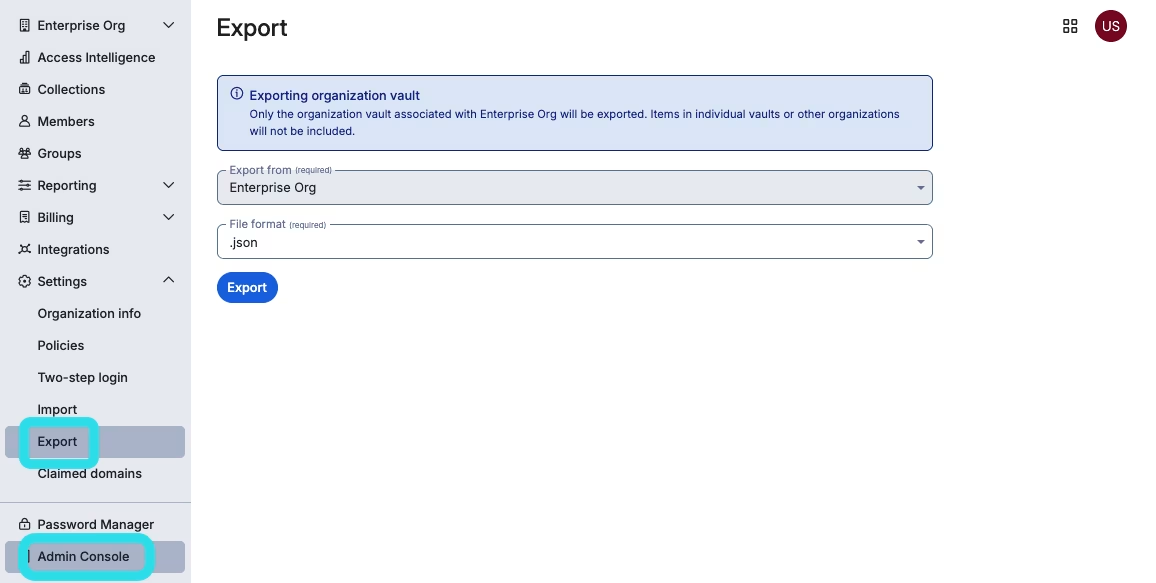
1、使用产品切换器打开 **Admin Console**:
2、从导航栏选择**导出** → **导出**:
导出组织数据
3、在导出密码库页面,选择一个**文件格式**(`.json`、`.csv` 或 `.json (Encrypted)`),然后选择**确认格式**按钮。
{% hint style="danger" %}
除非您使用[加密导出](/docs/password-manager/import-and-export/encrypted-exports.md),否则请勿通过不安全的渠道(例如电子邮件)存储或发送导出的文件,用完后请立即将其删除。
{% endhint %}
4、输入您的主密码然后选择**导出**按钮。
{% hint style="info" %}
导出组织密码库数据将被事件日志捕获。[了解更多](/docs/admin-console/oversight-visibility/event-logging/event-logs.md)。
{% endhint %}
{% endtab %}
{% tab title="CLI" %}
{% hint style="success" %}
在导出之前请使用 `bw sync` 同步您的密码库,以确保包含最新的信息。
{% endhint %}
要通过 CLI 导出您的组织密码库,需使用带 `--organizationid ` 选项的 `export` 命令。默认情况下,`export` 导出密码库为 `.csv` 文件并保存在工作目录下,然而,这种行为可以通过使用选项来更改:
```batch
bw export my-master-password --organizationid 7063feab-4b10-472e-b64c-785e2b870b92 --output /users/me/documents/ --format json
```
{% hint style="success" %}
如果您一时不知道您的 `organizationid` 值,可以在命令行使用 `bw list organizations` 来获取它。
{% endhint %}
更多详情,请参阅 Bitwarden [CLI 文档](/docs/password-manager/developer-tools/cli/password-manager-cli.md)。
{% hint style="info" %}
导出组织密码库数据将被事件日志捕获。[了解更多](/docs/admin-console/oversight-visibility/event-logging/event-logs.md)。
{% endhint %}
{% endtab %}
{% endtabs %}
---
# Agent Instructions
This documentation is published with GitBook. GitBook is the documentation platform designed so that both humans and AI agents can read, navigate, and reason over technical content effectively. Learn more at gitbook.com.
## Querying This Documentation
If you need additional information that is not directly available in this page, you can query the documentation dynamically by asking a question.
Perform an HTTP GET request on the current page URL with the `ask` query parameter:
```
GET https://help.ppgg.in/docs/admin-console/manage-shared-items/export-organization-items/export-organization-items.md?ask=
```
The question should be specific, self-contained, and written in natural language.
The response will contain a direct answer to the question and relevant excerpts and sources from the documentation.
Use this mechanism when the answer is not explicitly present in the current page, you need clarification or additional context, or you want to retrieve related documentation sections.