# 组织 FAQ

{% hint style="info" %}
对应的[官方文档地址](https://bitwarden.com/help/article/org-faqs/)
{% endhint %}

本文包含有关**组织**的常见问答解答 (FAQ)。

有关**组织**的更多高级信息，请参阅以下文章：

* [关于组织](/docs/admin-console/organizations-overview.md)
* [关于集合](/docs/admin-console/manage-shared-items/collections/about-collections.md)
* [关于群组](/docs/admin-console/manage-members/groups.md)

## 组织通用 <a href="#organizations-general" id="organizations-general"></a>

### 问：组织和高级版之间有什么区别？ <a href="#q-whats-the-difference-between-organizations-and-premium" id="q-whats-the-difference-between-organizations-and-premium"></a>

**答：**&#x7EC4;织支持从组织到组织用户的安全共享。

高级个人版方案可解锁高级密码安全和管理功能，包括高级 2FA 选项、Bitwarden 验证器 (TOTP)、加密文件附件等。高级个人版方案不包括安全数据共享功能。

付费版组织（家庭版、团队版或企业版）自动为组织中已注册的每个用户提供高级功能（高级 2FA 选项、Bitwarden 验证器等）。

## 组织管理 <a href="#organization-administration" id="organization-administration"></a>

### 问：我的组织的所有者不再在公司任职，可以创建新的所有者吗？ <a href="#q-my-organizations-owner-is-no-longer-with-the-company-can-a-new-owner-be-created" id="q-my-organizations-owner-is-no-longer-with-the-company-can-a-new-owner-be-created"></a>

**答：**&#x53EA;有组织的所有者才能创建新的所有者或将所有者分配给现有用户。出于故障转移考虑，Bitwarden 建议创建多个所有者用户。如果您的唯一所有者离开了公司，请[联系我们](https://bitwarden.com/contact)。

### 问：我已邀请用户，但他们看不到共享的项目，我该怎么办？ <a href="#q-i-have-invited-users-but-they-cannot-see-shared-items-what-do-i-do" id="q-i-have-invited-users-but-they-cannot-see-shared-items-what-do-i-do"></a>

**答：**&#x88AB;邀请的用户会收到一封邀请加入组织的电子邮件。首先，确保他们已经接受了邀请。如果他们接受了邀请，管理员或所有者应导航到**成员**界面，然后使用 **≡**&#x9009;项菜单选择**确认**。

### 问：我的组织可以审计哪些事件？ <a href="#q-what-events-are-auditing-for-my-organization" id="q-what-events-are-auditing-for-my-organization"></a>

**答：**&#x6709;关 Bitwarden 事件日志中包含的内容的完整列表，请参阅[事件日志](/docs/admin-console/oversight-visibility/event-logging/event-logs.md)。

### 问：我可以阻止用户自行注册到我的组织吗？ <a href="#q-can-i-prevent-users-from-self-registering-into-my-organization" id="q-can-i-prevent-users-from-self-registering-into-my-organization"></a>

**答：**&#x5982;果您是自托管，请[配置环境变量](/docs/self-hosting/deploy-and-configure/configuration-options/environment-variables.md) `globalSettings__disableUserRegistration=` 为 `true`，以防止用户通过注册页面注册账户。配置后，组织管理员或所有者必须邀请用户才能在自托管的实例上注册账户。

### 问：如何更改组织名称？ <a href="#q-how-do-i-change-the-name-of-my-organization" id="q-how-do-i-change-the-name-of-my-organization"></a>

**答：**&#x8981;更改组织名称：

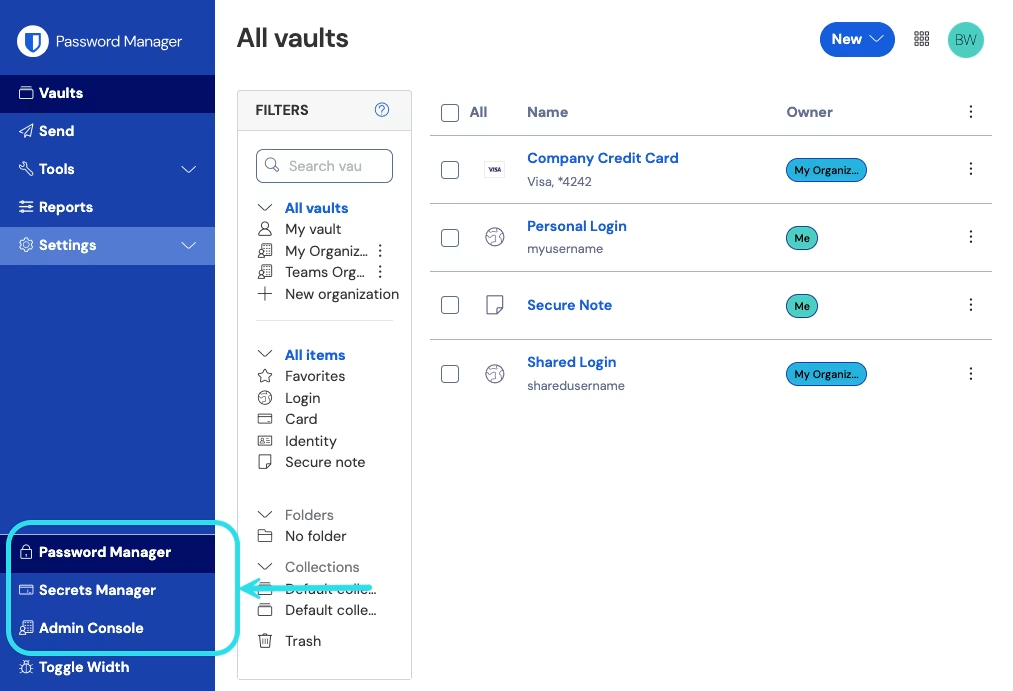
1、在网页 App 中，使用产品切换器打开管理控制台：

<div align="left" data-with-frame="true"><figure><img src="https://bitwarden.com/assets/2uxBDdQa6lu0IgIEfcwMPP/e3de3361749b6496155e25edcfdcf08b/2024-12-02_11-19-56.png?w=1013&#x26;fm=avif" alt=""><figcaption><p>产品切换器</p></figcaption></figure></div>

2、导航到 **⚙️设置** → **组织信息**界面。

3、编辑**组织名称**字段，然后选择**保存**按钮。

**如果您是自托管**，您还需要：

1、导航到 **⚙️计费 → 订阅**页面。

2、选择**下载许可证**按钮来下载更新了组织名称的许可证。

3、[上传新的许可证](/docs/self-hosting/licensing-on-premise.md#organization-license)到您的自托管服务器。

### 问：如何优化包含大量项目的密码库的性能？ <a href="#q-how-do-i-optimize-performance-for-a-vault-with-lots-of-items" id="q-how-do-i-optimize-performance-for-a-vault-with-lots-of-items"></a>

**答：**&#x7531;于密码库项目的解密是在本地完成的，而不是在我们的服务器中完成，因此对于包含大量项目的密码库，加载时间有时可能会更长。我们的团队始终致力于性能优化，但是这里有一些可以帮助减少加载时间的提示：

* 遵循最小权限原则，例如使用集合来组织密码库项目。减少用户可以访问的项目数量将减少应用程序加载时要解密的项目数量。
* 对于所有者和管理员，请勿使用**此用户可以访问和修改所有项目**选项。无论如何，这些用户角色都可以通过组织密码库访问所有内容，因此选择此选项只会将其他项目也添加到其密码库视图中，并增加应用程序加载时要解密的项目数量。
* 如果您管理多个组织，请考虑联系我们成为[提供商](/docs/provider-portal/provider-portal-overview.md)。从提供商门户访问组织将稍微减少解密所有托管项目所需的数量。

### 问：如何退出组织？ <a href="#q-how-do-i-leave-an-organization" id="q-how-do-i-leave-an-organization"></a>

**答：**&#x8981;退出组织，请使用网页 App，选择您要退出的组织的 **≡**&#x9009;项菜单。从下拉菜单中选择 **→退出**：

<div align="left" data-with-frame="true"><figure><img src="https://bitwarden.com/assets/2MP5ZWZbCJe6ArraaEMku9/eda75c81ab46706bd8ef373a395bd78b/2025-04-01_14-59-09.png?w=1094&#x26;fm=avif" alt=""><figcaption><p>退出组织</p></figcaption></figure></div>

## 组织共享 <a href="#sharing-with-an-organization" id="sharing-with-an-organization"></a>

### 问：如何「取消共享」组织中的项目？ <a href="#q-how-do-i-unshare-an-item-from-my-organization" id="q-how-do-i-unshare-an-item-from-my-organization"></a>

**答：**&#x8981;取消共享一个项目：

1. 通过使用 **≡**&#x9009;项菜单选择**克隆**，将项目克隆回您的个人密码库。此操作可在管理控制台中完成，或者如果您是所有者、管理员或对项目所在集合拥有「管理集合」访问权限，也可以从您的密码库视图中完成。
2. 从 **≡**&#x9009;项菜单中选择**删除**，以从组织密码库中删除该项目。

或者，您也可以通过将项目移动到具有更高访问控制限制的其他集合来取消共享项目。

### 问：如何对组织用户隐藏密码？ <a href="#q-how-do-i-hide-a-password-from-my-organizations-users" id="q-how-do-i-hide-a-password-from-my-organizations-users"></a>

**答：**&#x4E3A;您想要对其隐藏密码的用户分配对相关集合的「**查看项目，隐藏密码**」或「编**辑项目，隐藏密码**」[权限](/docs/admin-console/manage-members/member-roles.md#permissions)。

### 问：我退出后，移动到组织的项目是否会被保留？ <a href="#q-does-an-item-i-share-with-the-organization-stay-after-i-leave" id="q-does-an-item-i-share-with-the-organization-stay-after-i-leave"></a>

**答：**&#x662F;的！当用户与组织共享项目时，组织将获得该项目的所有权。即使用户退出组织或删除其账户，该项目仍将保留在组织密码库中。

## 组织安装 <a href="#organization-installations" id="organization-installations"></a>

### 问：我可以为我的用户静默安装 Bitwarden 桌面 App 吗？ <a href="#q-can-i-silently-install-the-bitwarden-desktop-app-for-my-users" id="q-can-i-silently-install-the-bitwarden-desktop-app-for-my-users"></a>

**答：**&#x53EF;以。跨工作站静默安装桌面 App 时，请以管理员等特权账户身份执行此操作，并除了 `/S` 之外还要使用 `/allusers` 开关。对于单用户安装，或者系统支持 `Logged on User`，请使用不带 `/allusers` 的 `/S`。


---

# Agent Instructions: Querying This Documentation

If you need additional information that is not directly available in this page, you can query the documentation dynamically by asking a question.

Perform an HTTP GET request on the current page URL with the `ask` query parameter:

```
GET https://help.ppgg.in/docs/admin-console/more/organizations-faqs.md?ask=<question>
```

The question should be specific, self-contained, and written in natural language.
The response will contain a direct answer to the question and relevant excerpts and sources from the documentation.

Use this mechanism when the answer is not explicitly present in the current page, you need clarification or additional context, or you want to retrieve related documentation sections.