# Access Intelligence

{% hint style="success" %}
对应的[官方文档地址](https://bitwarden.com/help/access-intelligence/)
{% endhint %}

企业版组织可以使用 **Access Intelligence** 来识别并优先处理由其成员存储在 Bitwarden 组织内、[存在风险](#determining-risk)凭据的应用程序。通过此报告，您可以选择[关键应用程序](#marking-critical-applications)，并通知组织成员需要[对存在风险的密码采取措施](/docs/password-manager/organization-members/change-at-risk-passwords.md)。

Access Intelligence 为管理员提供集中、直观的可视性，用于识别哪些凭据[存在风险](#determining-risk)，但它不会授予管理员原本没有访问权限的密码的直接访问权限。

{% hint style="info" %}
Access Intelligence 不允许管理员查看非组织拥有的项目。为确保全面了解所有潜在的存在风险的凭据，Bitwarden 建议激活[强制组织数据所有权](/docs/admin-console/oversight-visibility/enterprise-policies.md#enforce-organization-data-ownership)策略，以使所有数据都归组织所有。
{% endhint %}

## 运行报告 <a href="#run-the-report" id="run-the-report"></a>

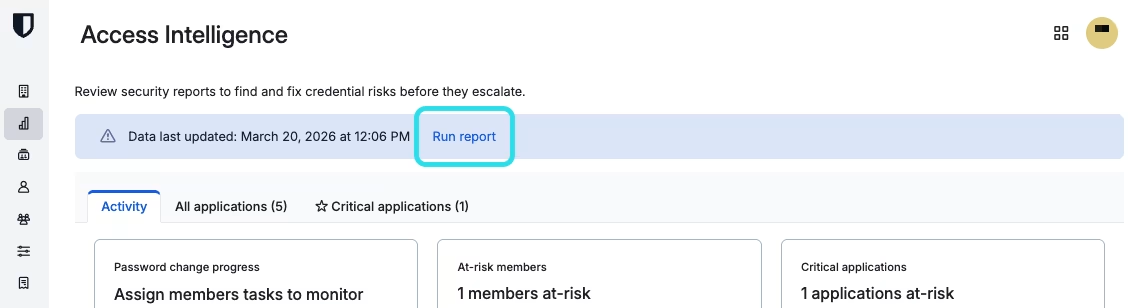
随着应用程序在您组织中的不断演变和变化，本报告的内容也将随之改变。将 Access Intelligence 视为一项持续性的工作，这至关重要。要更新报告，请注意**数据最后更新**时间戳，然后选择**运行报告**按钮。

<div align="left" data-with-frame="true"><figure><img src="https://bitwarden.com/assets/6ooDvXBHM0ehpTD2XWpQGK/88c0af7c5edd5b30b8037f49baf8ac88/2026-03-20_12-07-24.png?w=1146&#x26;fm=avif" alt=""><figcaption><p>运行 Access Intelligence 报告</p></figcaption></figure></div>

## 活动 <a href="#activity" id="activity"></a>

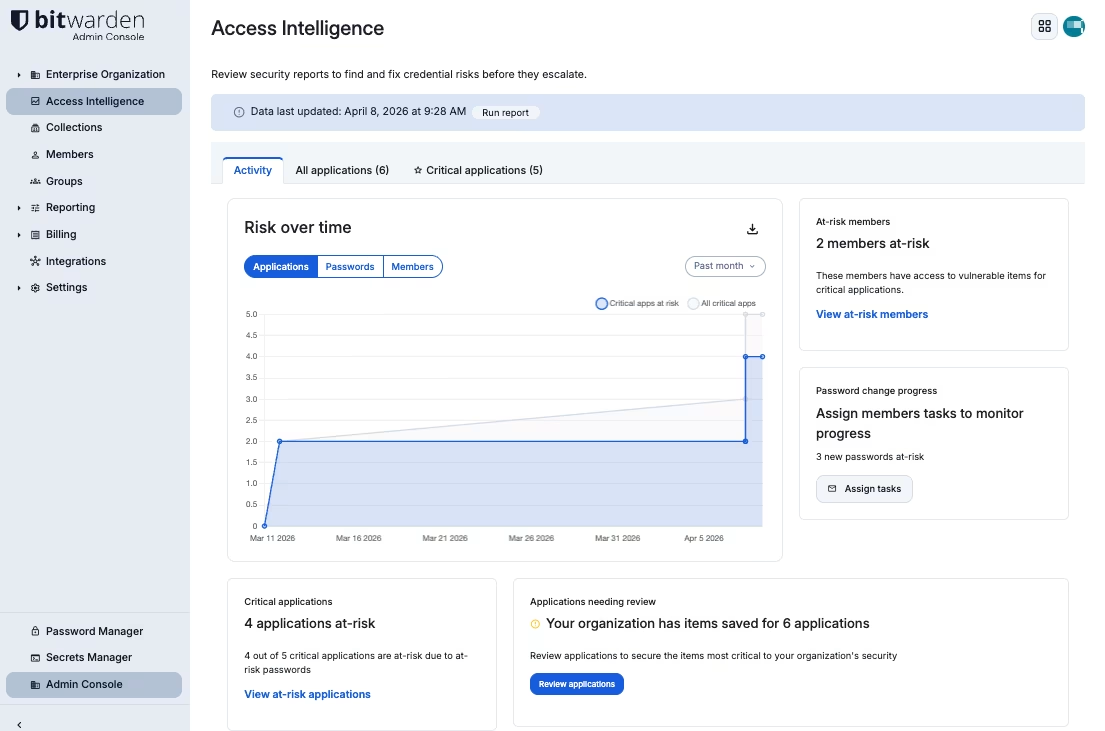
Access Intelligence 报告的**活动**选项卡提供了关键数据点和任务的摘要。虽然「活动」选项卡能一目了然地提供这些信息，但您也应该熟悉**所有应用程序**和**关键应用程序**选项卡，以便更好地理解这里展示的内容：

<div align="left" data-with-frame="true"><figure><img src="https://bitwarden.com/assets/4ors4hBI2rwbW0zvjb2W0U/70128699f9db718b6c99c5f0abcf241e/2026-04-08_09-29-26.png?w=1105&#x26;fm=avif" alt=""><figcaption><p>Access Intelligence 活动选项卡</p></figcaption></figure></div>

* **风险趋势** ：可视化存在风险的应用程序、密码和成员随时间的变化情况，并将其与应用程序、密码和成员数量的绝对变化进行对比。
* **存在风险的成员**：对[关键](#marking-critical-applications)应用程序中[存在风险](#determining-risk)项目拥有访问权限的成员数量。
* **密码更改进度**：[已分派的密码更改请求](#requesting-password-changes)的完成百分比。
* **关键应用程序**：当前[存在风险](#determining-risk)的[关键](#marking-critical-applications)应用程序的比例。
* **需要审查的应用程序**：自最后一次[运行报告](#run-the-report)以来，成员添加的新应用程序的数量。

### 确定风险 <a href="#determining-risk" id="determining-risk"></a>

如果密码在组织内强度不足、已暴露或被重复使用，则该密码将被判定为**存在风险**。此分析使用与[弱密码报告](/docs/password-manager/your-vault/security-tools/vault-health-reports.md#weak-passwords-report)、[已暴露密的码报告](/docs/password-manager/your-vault/security-tools/vault-health-reports.md#exposed-passwords-report)和[重复使用的密码报告](/docs/password-manager/your-vault/security-tools/vault-health-reports.md#reused-passwords-report)中相同的工具进行。与手动运行报告一样，Access Intelligence 的分析也是在本地完成的，以维持零知识原则，并保护您的数据完整性和匿名性。

## 所有应用程序 <a href="#all-applications" id="all-applications"></a>

Access Intelligence 报告列出了您 Bitwarden 组织中保存的所有应用程序。每个应用程序代表一组所有具有与给定网络服务匹配的 URI 的项目（例如，「Atlassian」应用程序可能包含 26 个「密码总数」，表示有 26 个项目包含用于登录 Atlassian 的凭据），并且包含：

| 列           | 描述                                                |
| ----------- | ------------------------------------------------- |
| **应用程序**    | [存在风险](#determining-risk)的应用程序的名称。                |
| **存在风险的密码** | 与[存在风险](#determining-risk)的应用程序关联的密码数量。           |
| **密码总数**    | 与应用程序关联的密码总数。                                     |
| **存在风险的成员** | 对与应用程序关联的[存在风险](#determining-risk)的密码具有访问权限的成员数量。 |
| **成员总数**    | 对应用程序具有访问权限的成员总数。                                 |

{% hint style="success" %}
通过列出所有组织成员拥有凭据的应用程序，Access Intelligence 还可以帮助管理员检测未经授权的应用程序的使用情况，以及可以通过 IdP 迁移到单点登录 (SSO) 身份验证的应用程序。
{% endhint %}

### 标记关键应用程序 <a href="#marking-critical-applications" id="marking-critical-applications"></a>

{% hint style="success" %}
区分**关键应用程序**和**所有应用程序**是确保组织成员能够迅速处理最重要应用程序的重要工具。

Access Intelligence 的一项重要功能是向成员发送通知，告知他们需要处理一个关键的[存在风险](#determining-risk)的密码。通过分批有针对性地发送这些通知，有助于防止成员产生警报疲劳，从而避免延误补救措施。
{% endhint %}

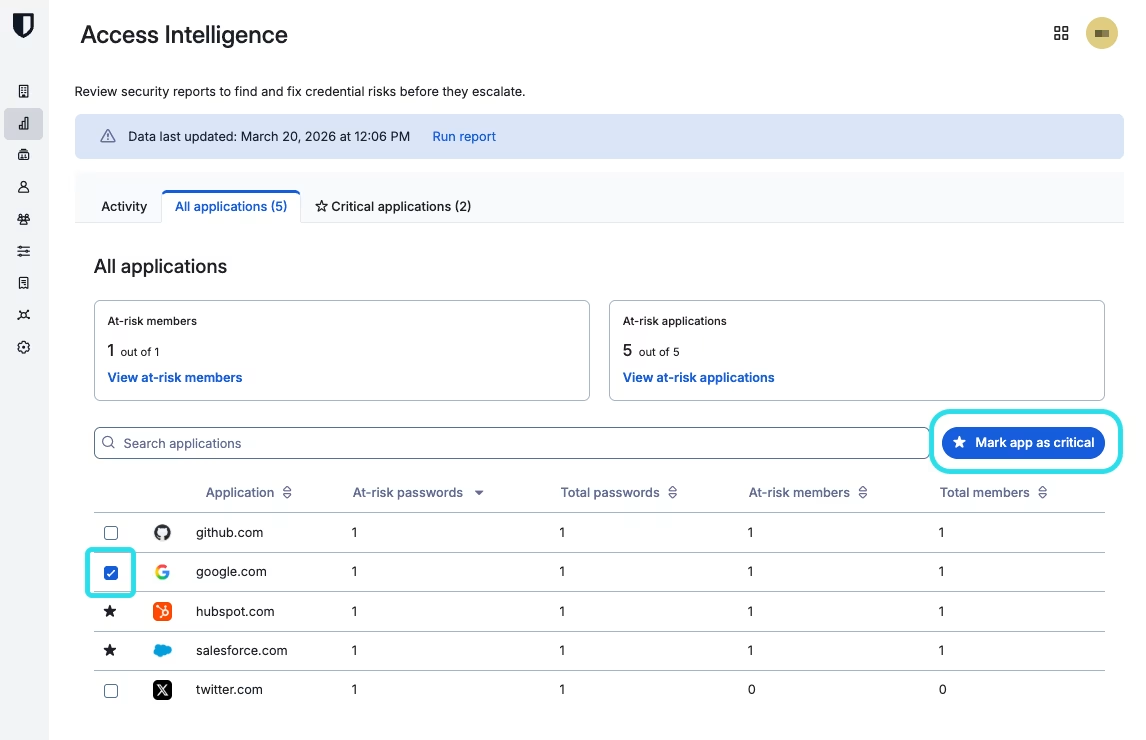
被标记为**关键**的应用程序是指那些将向组织成员发送通知，告知他们需要[处理存在风险的密码](/docs/password-manager/your-vault/security-tools/change-at-risk-passwords.md)的应用程序。要将应用程序标记为关键，请勾选一个或多个复选框，然后选择**将 App 标记为关键**按钮：

<div align="left" data-with-frame="true"><figure><img src="https://bitwarden.com/assets/77hdEeJiKWpHd8BoHYbnCx/e691c69651cace09523a8655e31e3988/2026-03-20_12-09-56.png?w=1146&#x26;fm=avif" alt=""><figcaption><p>标记关键应用程序</p></figcaption></figure></div>

## 关键应用程序 <a href="#critical-applications" id="critical-applications"></a>

借助 Access Intelligence，管理员可以预先评估哪些应用程序需要优先处理，以便成员采取行动。报告范围可以从组织内存储了凭据的**所有应用程序**缩小到仅包含您选定的当前**关键应用程序**。

### 请求密码更改 <a href="#requesting-password-changes" id="requesting-password-changes"></a>

请求密码更改将会对关键应用程序拥有访问权限的组织成员发送通知，告知他们需要[处理存在风险的密码](/docs/password-manager/your-vault/security-tools/change-at-risk-passwords.md)。成员将通过电子邮件收件箱和已登录的 Bitwarden 浏览器扩展中的横幅接收通知。

{% hint style="success" %}
在分派您的第一个密码更改请求之前，或作为员工 Bitwarden 培训的一部分，我们建议：

* 告知成员这些电子邮件是合法的，不应被忽略。
* 向成员提供关于[如何处理密码更改请求](/docs/password-manager/organization-members/change-at-risk-passwords.md)的说明。
  {% endhint %}

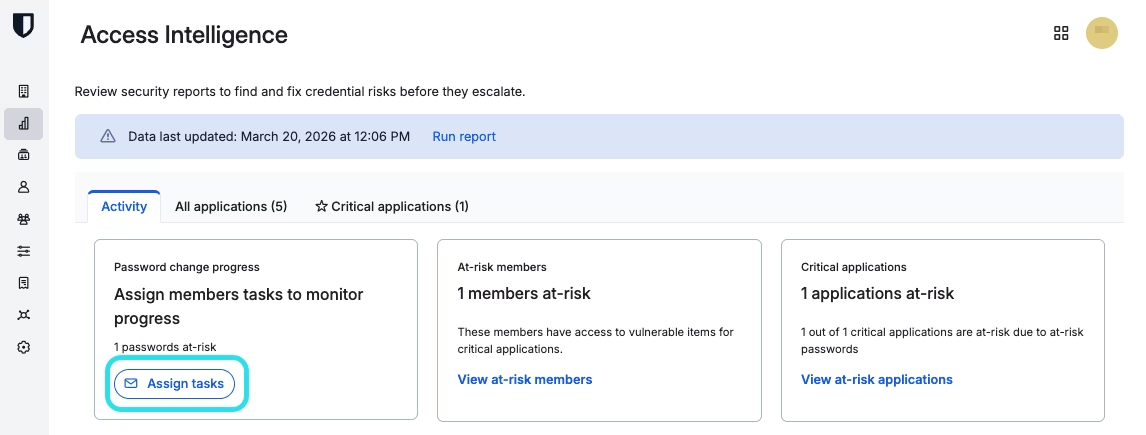
要请求更改所有当前标记为[关键](#marking-critical-applications)的应用程序的密码，请导航至**关键应用程序**视图，然后选择**请求密码更改**：

<div align="left" data-with-frame="true"><figure><img src="https://bitwarden.com/assets/6wQ3EUzMFkzRIkA2FHgnlY/99836bd7d0bd053e1c2eb6878175685c/2026-03-20_12-07-242.png?w=1146&#x26;fm=avif" alt=""><figcaption><p>请求密码更改</p></figcaption></figure></div>


---

# Agent Instructions: Querying This Documentation

If you need additional information that is not directly available in this page, you can query the documentation dynamically by asking a question.

Perform an HTTP GET request on the current page URL with the `ask` query parameter:

```
GET https://help.ppgg.in/docs/admin-console/oversight-visibility/access-intelligence.md?ask=<question>
```

The question should be specific, self-contained, and written in natural language.
The response will contain a direct answer to the question and relevant excerpts and sources from the documentation.

Use this mechanism when the answer is not explicitly present in the current page, you need clarification or additional context, or you want to retrieve related documentation sections.