# 事件日志

{% hint style="success" %}
对应的[官方文档地址](https://bitwarden.com/help/article/event-logs/)
{% endhint %}

使用事件日志可以跟踪您组织的活动并溯源安全事件。事件日志是带有时间戳的记录，用于捕获整个团队或企业组织层面中各类变更和使用情况。您可以通过[网页 App](#access-event-logs) 以及 [Bitwarden 公共 API](#api-responses) 的 `/events` 端点访问这些日志。虽然事件日志数据会被无限期保留，您一次最多只能查看 367 天的数据。

## 访问事件日志 <a href="#access-event-logs" id="access-event-logs"></a>

要在 Bitwarden 网页 App 中查看事件日志：

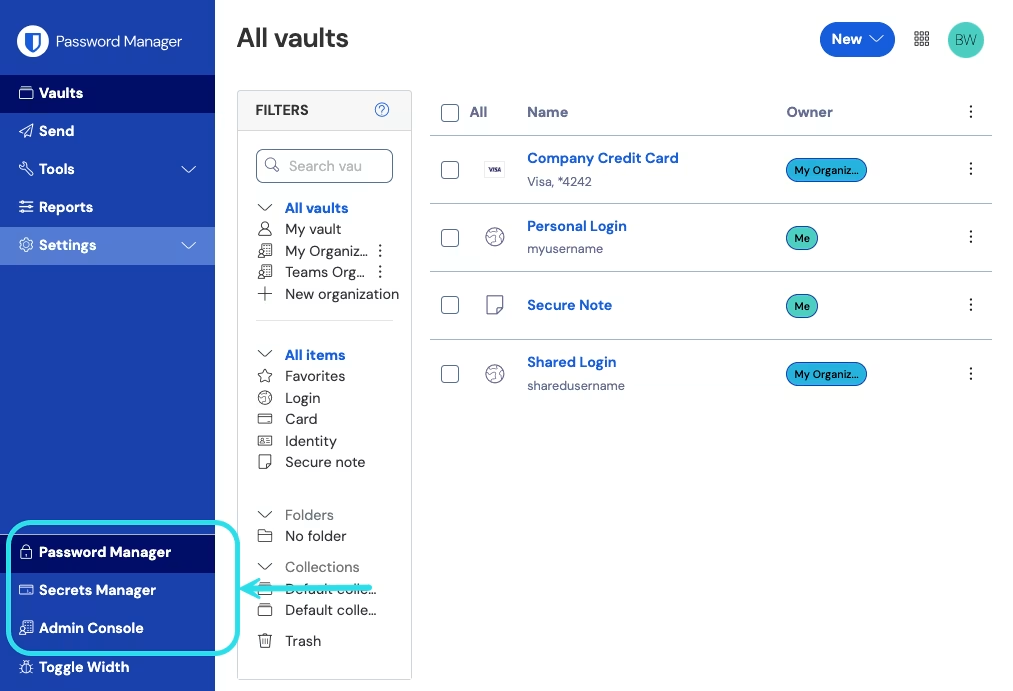
1、从产品切换器打开管理控制台：

{% embed url="<https://res.cloudinary.com/bw-com/image/upload/f_auto/v1/ctf/7rncvj1f8mw7/2uxBDdQa6lu0IgIEfcwMPP/e3de3361749b6496155e25edcfdcf08b/2024-12-02_11-19-56.png?_a=DAJCwlWIZAAB>" %}
产品切换器
{% endembed %}

2、选择**报告** → **事件日志**。

3、（可选）调整日期范围然后选择**更新**。

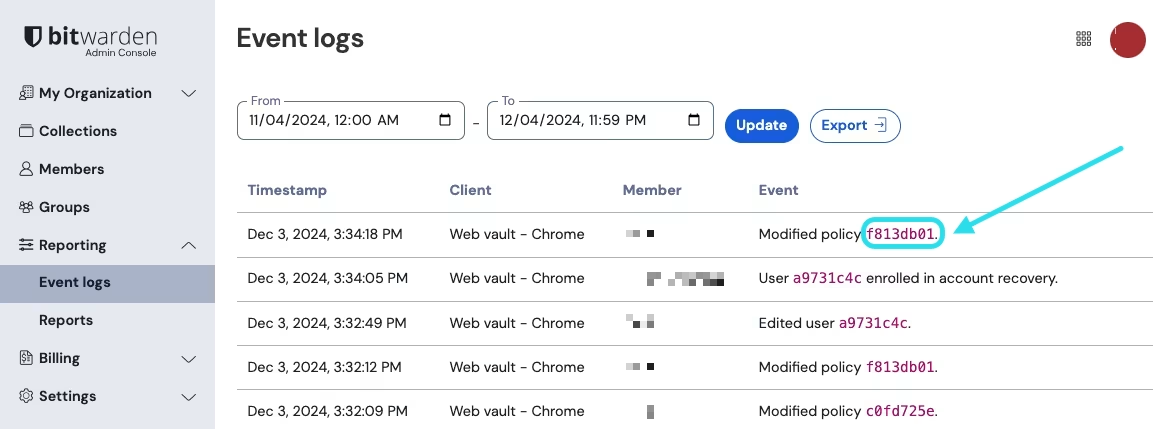
某些事件在**事件**列中包含一个粉红色资源标识符：

{% embed url="<https://bitwarden.com/assets/011fNmRs4fFzD5RjtL7bVT/bda04d6785c1749e0e85d9ee3d60872e/Event_identifier.png?w=1175&fm=avif>" %}
事件标识符
{% endembed %}

选择此事件标识符可以：

* 查看所有关联的事件列表，例如何时编辑了某个项目或打开了某个[企业策略](https://help.ppgg.in/docs/admin-console/oversight-visibility/enterprise-policies)。
* 转至您可以访问和修改该资源（如果可用）的页面。例如，从**事件日志**中选择成员的标识符将带您进入**成员**视图，并自动将列表筛选为该成员。

您还可以从网页 App [将日志导出为 .csv](#export-events)，或通过 [Bitwarden Public API](#api-responses) 将日志导出为 JSON。

## 事件何时会被保存 <a href="#when-events-are-saved" id="when-events-are-saved"></a>

Bitwarden 会在客户端和服务器端同时捕获事件。服务器端事件会即时记录，而客户端事件（占绝大多数）则每 60 秒向服务器传输一次。因此，最近的活动可能会出现短暂的延迟。客户端会自动重试失败的传输，但如果客户端失去 API 连接或或被修改为不发送事件，则无法记录事件。

{% hint style="info" %}
事件日志依赖于用户上报的数据和客户端层面的数据，这些数据在技术上可能被篡改或屏蔽。鉴于这种潜在情况，Bitwarden 事件日志可能无法满足所有用户和组织的安全、法律取证或审计需求。
{% endhint %}

## 事件类型 <a href="#event-types" id="event-types"></a>

Bitwarden 可以记录超过 60 多种事件类型，下面列出了每种事件类型及其类型代码。对于每个事件，事件日志页面将显示：

* 事件的**时间戳**
* **客户端**应用程序的类型和 IP（通过悬停在**客户端**列的值或客户端图标上以获取详细信息）
* 连接到事件的**成员**
* **事件**的描述

事件使用类型代码（`1000`、`1001` 等）关联，以标识事件所捕获的操作。[Bitwarden 公共 API](https://help.ppgg.in/docs/admin-console/bitwarden-public-api) 使用类型代码来标识被事件所记录的操作。

### 用户事件 <a href="#user-events" id="user-events"></a>

* 登录了。(`1000`)
* 修改了账户密码。(`1001`)
* 启用/更新了两步登录。(`1002`)
* 禁用了两步登录。(`1003`)
* 从两步登录中恢复了账户。(`1004`)
* 登录尝试因密码错误而失败。(`1005`)
* 登录尝试因两步登录错误而失败。(`1006`)
* 用户导出了他们个人的密码库项目。(`1007`)
* 用户通过[账户恢复](https://help.ppgg.in/docs/admin-console/manage-members/account-recovery/about-account-recovery)更新了密码。(`1008`)
* 用户使用 [Key Connector](https://help.ppgg.in/docs/self-hosting/key-connector/about-key-connector) 迁移了他们的解密密钥。(`1009`)
* 用户请求了[设备批准](https://help.ppgg.in/docs/admin-console/login-with-sso/trusted-devices/approve-a-trusted-device)。(`1010`)
* 用户在 TDE 下线期间设置了主密码。(`1011`)

### 项目事件 <a href="#item-events" id="item-events"></a>

* 创建了项目 `item-identifier`。(`1100`)
* 编辑了项目 `item-identifier`。(`1101`)
* 永久删除了项目 `item-identifier`。(`1102`)
* 为项目 `item-identifier` 创建了附件。(`1103`)
* 为项目 `item-identifier` 删除了附件。(`1104`)
* 将项目 `item-identifier` 移动至组织。(`1105`)
* 编辑了项目 `item-identifier` 的集合。(`1106`)
* 查看了项目 `item-identifier`。(`1107`)
* 查看了项目 `item-identifier` 的密码。(`1108`)
* 查看了项目 `item-identifier` 的隐藏字段。(`1109`)
* 查看了项目 `item-identifier` 的安全码。(`1110`)
* 复制了项目 `item-identifier` 的密码。(`1111`)
* 复制了项目 `item-identifier` 的隐藏字段。(`1112`）
* 复制了项目 `item-identifier` 的安全码。(`1113`）
* 自动填充了项目 `item-identifier`。(`1114`）
* 将项目 `item-identifier` 发送到了回收站。(`1115`)
* 恢复了项目 `item-identifier`。(`1116`)
* 查看了项目 `item-identifier` 的卡号。(`1117`)
* 查看了项目 `item-identifier` 的安全码。(`1118`)

### 集合事件 <a href="#collection-events" id="collection-events"></a>

* 创建了集合 `collection-identifier`。(`1300`)
* 编辑了集合 `collection-identifier`。(`1301`)
* 删除了集合 `collection-identifier`。(`1302`)

### 群组事件 <a href="#group-events" id="group-events"></a>

* 创建了群组 `group-identifier`。(`1400`)
* 编辑了群组 `group-identifier`。(`1401`)
* 删除了群组 `group-identifier`。(`1402`)

### 组织事件 <a href="#organization-events" id="organization-events"></a>

* 邀请了用户 `user-identifier`。(`1500`)
* 确认了用户 `user-identifier`。(`1501`)
* 编辑了用户 `user-identifier`。(`1502`)
* 删除了用户 `user-identifier`。(`1503`)
* 编辑了用户 `user-identifier` 的群组。(`1504`)
* 为用户 `user-identifier` 取消链接 SSO。(`1505`)
* 用户 `user-identifier` 加入了账户恢复。(`1506`)
* 用户 `user-identifier` 退出了账户恢复。(`1507`)
* 为用户 `user-identifier` 重置了主密码。(`1508`)
* 重置了用户 `user-identifier` 的 SSO 链接。(`1509`)
* 用户 `user-identifier` 首次使用 SSO 登录。(`1510`)
* 撤销了用户 `user-identifier` 的组织访问权限。(`1511`)
* 恢复了用户 `user-identifier` 的组织访问权限。(`1512`)
* 批准了用户 `user-identifier` 的设备。(`1513`)
* 拒绝了用户 `user-identifier` 的设备。(`1514`)
* 删除了用户 `user-identifier`。(`1515`)
* 用户 `user-identifier` 退出了组织。(`1516`)
* 自动确认了用户 `user-identifier`。(`1517`)
* 用户 `user-identifier` 从组织中自行撤销。(`1518`)
* 编辑了组织设置。(`1600`)
* 清除了组织密码库。(`1601`)
* 导出了组织密码库。(`1602`)
* 管理[提供商](https://help.ppgg.in/docs/provider-portal/provider-portal-overview)访问了组织密码库。(`1603`)
* 组织启用了 SSO。(`1604`)
* 组织禁用了 SSO。(`1605`)
* 组织启用了 Key Connector。(`1606`)
* 组织禁用了 Key Connector。(`1607`)
* 家庭赞助同步完成。(`1608`)
* 修改了集合管理设置。(`1609`)
* 启用了[限制集合创建](https://help.ppgg.in/docs/manage-shared-items/collections/collection-settings#restrict-collection-creation-to-owners-and-admins)设置。 (`1610`)
* 停用了[限制集合创建](https://help.ppgg.in/docs/manage-shared-items/collections/collection-settings#restrict-collection-creation-to-owners-and-admins)设置。(`1611`)
* 启用了[限制集合删除](https://help.ppgg.in/docs/manage-shared-items/collections/collection-settings#restrict-collection-deletion-to-owners-and-admins)设置。(`1612`)
* 停用了[限制集合删除](https://help.ppgg.in/docs/manage-shared-items/collections/collection-settings#restrict-collection-deletion-to-owners-and-admins)设置。(`1613`)
* 启用了[限制项目删除](https://help.ppgg.in/docs/manage-shared-items/collections/collection-settings#restrict-item-deletion-to-members-with-the-manage-collection-permissions)设置。(`1614`)
* 停用了[限制项目删除](https://help.ppgg.in/docs/manage-shared-items/collections/collection-settings#restrict-item-deletion-to-members-with-the-manage-collection-permissions)设置。(`1615`)
* 启用了[允许所有者和管理员管理所有集合和项目](https://help.ppgg.in/docs/manage-shared-items/collections/collection-settings#allow-owners-and-admins-to-manage-all-collections-and-items-from-the-admin-console)设置。(`1616`)
* 停用了[允许所有者和管理员管理所有集合和项目](https://help.ppgg.in/docs/manage-shared-items/collections/collection-settings#allow-owners-and-admins-to-manage-all-collections-and-items-from-the-admin-console)设置。(`1617`)
* 接受了转移到组织所有权。(`1618`)
* 因拒绝转移到组织所有权而被撤销。(`1619`)
* 启用了自动用户确认设置。(`1620`)
* 停用了自动用户确认设置。(`1621`)
* 添加了自动用户确认策略。(`1622`)
* 移除了自动用户确认策略。(`1623`)
* 修改了策略 `policy-identifier`。(`1700`)
* 添加了域名 `domain-name`。(`2000`)
* 移除了域名 `domain-name`。(`2001`)
* 域名 `domain-name` 已验证。(`2002`)
* 域名 `domain-name` 未验证。(`2003`)

### Secrets Manager 事件 <a href="#secrets-manager-events" id="secrets-manager-events"></a>

Secrets Manager 事件可从组织密码库的**报告**选项卡和[机器账户事件日志页面](https://help.ppgg.in/secrets-manager/your-secrets/machine-accounts#machine-account-events)获取。以下 Secrets Manager 事件将被捕获：

* 访问了标识符为 `secret-identifier` 的机密。(`2100`)
* 创建了标识符为 `secret-identifier` 的新机密。(`2101`)
* 编辑了标识符为 `secret-identifier` 的机密。(`2102`)
* 删除了标识符为 `secret-identifier` 的机密。(`2103`)
* 访问了标识符为 `project-identifier` 的工程。(`2200`)
* 创建了标识符为 `project-identifier` 的新工程。(`2201`)
* 编辑了标识符为 `project-identifier` 的工程。(`2202`)
* 删除了标识符为 `project-identifier` 的工程。(`2203`)
* 向标识符为 `machine-account-identifier` 的机器账户添加了账户 `user-identifier`。(`2300`)
* 从标识符为 `machine-account-identifier` 的机器账户移除了账户 `user-identifier`。(`2301`)
* 向标识符为 `machine-account-identifier` 的机器账户添加了群组 `group-identifier`。(`2302`)
* 从标识符为 `machine-account-identifier` 的机器账户移除了群组 `group-identifier`。(`2303`)
* 创建了标识符为 `machine-account-identifier` 的机器账户。(`2304`)
* 删除了标识符为 `machine-account-identifier` 的机器账户。(`2305`)

### 提供商事件 <a href="#provider-events" id="provider-events"></a>

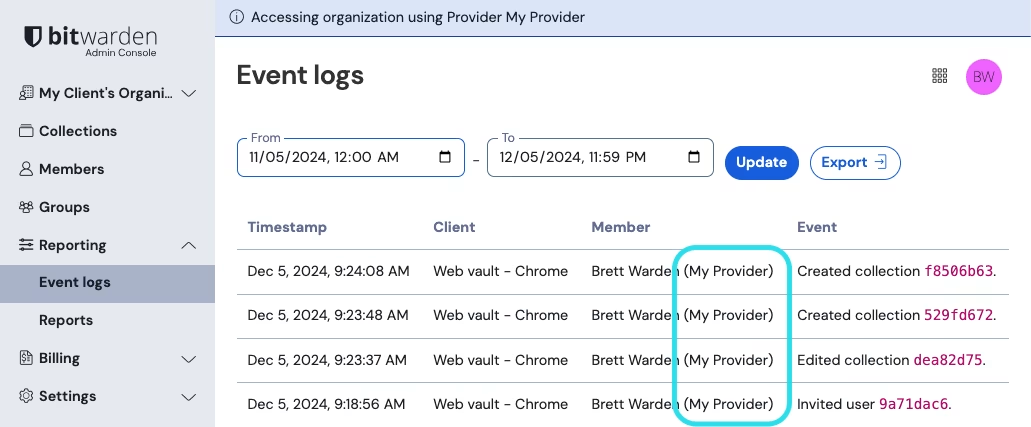
当[管理提供商](https://help.ppgg.in/docs/provider-portal/provider-portal-overview)的成员触发上述任何事件时，**用户**列将记录提供商的名称。此外，每当管理提供商的成员访问您的组织密码库时，专用于提供商的事件也将被记录：

{% embed url="<https://res.cloudinary.com/bw-com/image/upload/f_auto/v1/ctf/7rncvj1f8mw7/4e95ZWDt6ZBPfina42MZhP/d4653c6aebb2bcff6186e6d49415da61/2024-12-05_09-47-18.png?_a=DAJCwlWIZAAB>" %}
提供商访问事件
{% endembed %}

## 导出事件 <a href="#export-events" id="export-events"></a>

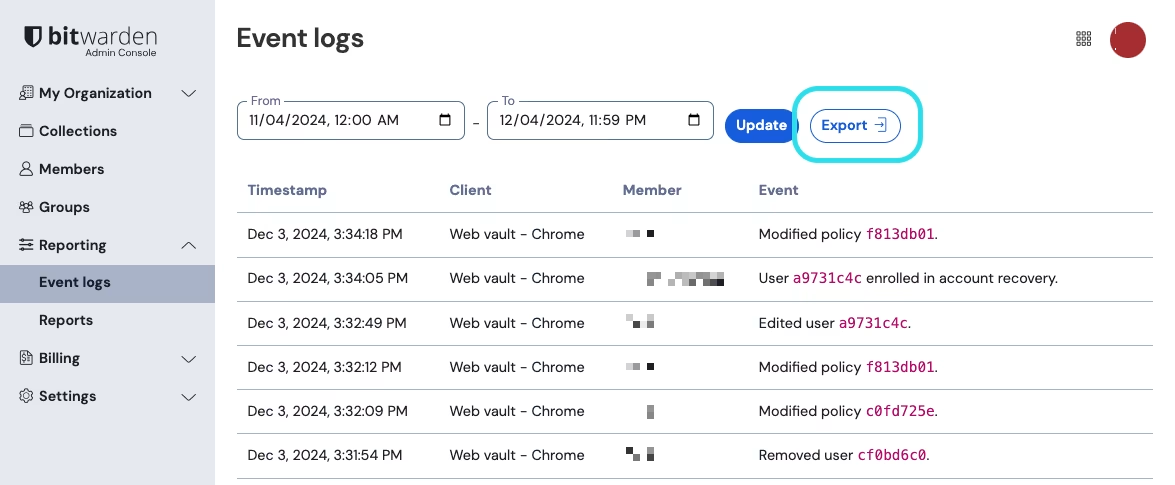
要导出指定日期范围内所有事件的 `.csv` 文件，请选择**导出**：

{% embed url="<https://res.cloudinary.com/bw-com/image/upload/f_auto/v1/ctf/7rncvj1f8mw7/QL3nTOsAOsCPQtQTONOEw/53652d49e4bf8eaa67c972c1b55c12fc/2024-12-04_09-48-02.png?_a=DAJCwlWIZAAB>" %}
导出事件日志
{% endembed %}

示例：

```
message,appIcon,appName,userId,userName,userEmail,date,ip,type
Logged in.,fa-globe,Web Vault - Chrome,1234abcd-56de-78ef-91gh-abcdef123456,Alice,alice@bitwarden.com,2021-06-14T14:22:23.331751Z,111.11.111.111,User_LoggedIn
Invited user zyxw9876.,fa-globe,Unknown,1234abcd-56de-78ef-91gh-abcdef123456,Alice,alice@bitwarden.com,2021-06-14T14:14:44.7566667Z,111.11.111.111,OrganizationUser_Invited
Edited organization settings.,fa-globe,Web Vault - Chrome,9876dcba-65ed-87fe-19hg-654321fedcba,Bob,bob@bitwarden.com,2021-06-07T17:57:08.1866667Z,222.22.222.222,Organization_Updated
```

{% hint style="success" %}
您还可以下载 `.csv` [成员列表](https://help.ppgg.in/docs/manage-members/user-management#download-list-of-members)，其中包含了特定于账户的详细信息，例如 Secrets Manager 是否已激活以及他们在组织中的状态。
{% endhint %}

## API 响应 <a href="#api-responses" id="api-responses"></a>

从 [Bitwarden 公共 API](https://help.ppgg.in/docs/admin-console/bitwarden-public-api) 的 `/events` 端点访问事件日志将返回 JSON 响应，例如下面这样：

```bash
{
  "object": "list",
  "data": [
    {
      "object": "event",
      "type": 1000,
      "itemId": "string",
      "collectionId": "string",
      "groupId": "string",
      "policyId": "string",
      "memberId": "string",
      "actingUserId": "string",
      "date": "2020-11-04T15:01:21.698Z",
      "device": 0,
      "ipAddress": "xxx.xx.xxx.x"
    }
  ],
  "continuationToken": "string"
}
```

## SIEM 和外部系统集成 <a href="#siem-and-external-systems-integrations" id="siem-and-external-systems-integrations"></a>

> **\[译者注]**：[SIEM](https://en.wikipedia.org/wiki/Security_information_and_event_management)（Security Information and Event Management，安全信息与事件管理）是一种综合性的网络安全解决方案，用于实时收集、分析、关联和响应来自企业 IT 基础设施中的安全事件和日志数据。其核心目标是通过集中化监控和智能分析，帮助组织检测威胁、调查安全事件并满足合规要求。
>
> 常见的 SIEM 工具有：
>
> * 商业产品：Splunk Enterprise Security、IBM QRadar、Microsoft Sentinel、LogRhythm 等
> * 开源/免费方案：Elastic Stack、OSSIM、Wazuh 等

Bitwarden 提供了一套与安全信息和事件管理 (SIEM) 平台的全面集成，以利用事件日志：

* [Elastic SIEM](https://help.ppgg.in/docs/admin-console/oversight-visibility/siem-integrations/elastic-siem)
* [Microsoft Sentinel SIEM](https://help.ppgg.in/docs/admin-console/oversight-visibility/siem-integrations/microsoft-sentinel-siem)
* [Panther SIEM](https://help.ppgg.in/docs/admin-console/oversight-visibility/siem-integrations/panther-siem)
* [Rapid7 SIEM](https://help.ppgg.in/docs/admin-console/oversight-visibility/siem-integrations/rapid7-siem)
* [Sumo Logic SIEM](https://help.ppgg.in/docs/admin-console/oversight-visibility/siem-integrations/sumo-logic-siem)
* [Splunk SIEM](https://help.ppgg.in/docs/admin-console/oversight-visibility/siem-integrations/splunk-siem)

Bitwarden 还提供了多种数据访问方法，这些数据可能与 SIEM 平台相关，但目前还没有特定的集成。有关上面未列出的 SIEM 的配置帮助，请参阅[非原生 SIEM](https://help.ppgg.in/docs/admin-console/oversight-visibility/siem-integrations/non-native-siem)。