# 监控事件日志

{% hint style="success" %}
对应的[官方文档地址](https://bitwarden.com/help/monitoring-event-logs/)
{% endhint %}

通过 SIEM（系统信息与事件管理）集成进行事件监控，是监控您的组织以维护最佳安全实践和确保合规性的重要工具。以下章节重点介绍多项监控参考指标，这些指标将增强您对 Bitwarden 解决方案的可观测性，包括洞察用户在密码库中的操作行为，并提供自动化告警目标的示例。

这些事件选自 [Bitwarden 事件日志](/docs/admin-console/oversight-visibility/event-logging/event-logs.md)。通过针对关键业务事件配置实时告警与时段累积告警策略，您将能根据自身独特的安全态势，对组织使用 Bitwarden 的情况进行全面审计。

## 理解日志 <a href="#understanding-logs" id="understanding-logs"></a>

通过多种 SIEM 平台与 Bitwarden 集成，以审查密码库日常使用情况的关键信息。

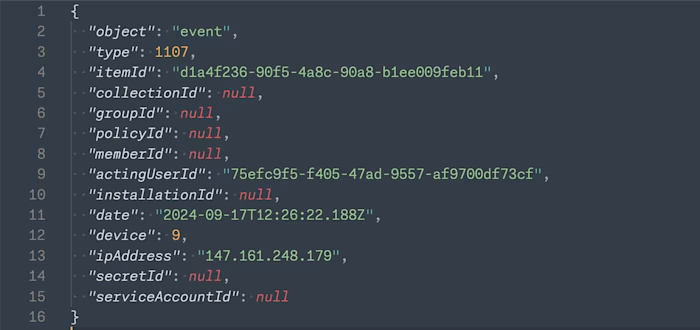
<div align="left" data-with-frame="true"><figure><img src="https://bitwarden.com/assets/1wHDe1snFJ4NB1G13VBUBC/71def83a275e8bf25e25488b872a02f0/Header_object.png?w=700&#x26;fm=avif" alt=""><figcaption><p>Panther JSON 对象</p></figcaption></figure></div>

SIEM 事件监控平台提供了很多特定的字段，这些字段用于监控以维持高标准的安全性：

| 值                 | 描述                                                                                                                                           |
| ----------------- | -------------------------------------------------------------------------------------------------------------------------------------------- |
| `actingUserEmail` | 执行操作的用户电子邮箱地址。                                                                                                                               |
| `actingUserId`    | 执行操作的用户唯一 ID。                                                                                                                                |
| `actingUserName`  | 执行操作的用户名称。                                                                                                                                   |
| `collectionId`    | 组织集合 ID。                                                                                                                                     |
| `device`          | 设备的数值 ID。具体映射关系可以在[这里](https://github.com/bitwarden/server/blob/d50ad97e6eeb733af9c069a949939b0567ba936d/src/Core/Enums/DeviceType.cs#L4)找到。 |
| `ipAddress`       | 执行事件的 IP 地址。                                                                                                                                 |
| `itemId`          | 组织密码库的密码库项目（密码、安全笔记等）。                                                                                                                       |
| `policyId`        | 组织策略更新。在[这里](/docs/admin-console/oversight-visibility/event-logging/event-logs.md#organization-events)查看组织事件。                                |

## 相关趋势 <a href="#concerning-trends" id="concerning-trends"></a>

跟踪 Bitwarden 使用趋势，可以识别可疑活动或潜在的安全威胁：

### 登录尝试失败异常**频率** <a href="#abnormal-rate-of-failed-login-attempts" id="abnormal-rate-of-failed-login-attempts"></a>

* 失败的登录尝试
  * `1005` 登录尝试因密码错误而失败
  * `1006` 登录尝试因两步登录错误而失败

### 查看敏感或隐藏字段的异常**频率** <a href="#abnormal-rate-of-viewing-sensitive-or-hidden-fields" id="abnormal-rate-of-viewing-sensitive-or-hidden-fields"></a>

* 查看项目
  * `1107` 查看了项目 `item-identifier`
  * `1108` 查看了项目 `item-identifier` 的密码
  * `1109` 查看了项目 `item-identifier` 的隐藏字段
  * `1110` 查看了项目 `item-identifier` 的安全码
* 复制项目字段
  * `1111` 复制了项目 `item-identifier` 的密码
  * `1112` 复制了项目 `item-identifier` 的安全码

## 使用趋势 <a href="#usage-trends" id="usage-trends"></a>

监控使用趋势以识别使用 Bitwarden 并保持安全实践的用户：

### 监控用户频率 <a href="#monitor-user-frequency" id="monitor-user-frequency"></a>

* 密码库使用情况
  * `1000` 登录了
  * `1010` 用户请求了[设备批准](/docs/admin-console/login-with-sso/trusted-devices/approve-a-trusted-device.md)

## 关键的密码库操作 <a href="#critical-vault-actions" id="critical-vault-actions"></a>

可对特定事件进行监控，以跟踪高级用户的关键操作或对关键的密码库项目所做的更改：

### 超级用户活动 <a href="#super-user-activities" id="super-user-activities"></a>

* 个人账户活动
  * `1000` 登录了
  * `1001` 更改了账户密码
  * `1002` 启用/更新了两步登录
  * `1003` 禁用了两步登录
  * `1007` 用户导出了他们的个人密码库项目
  * `1603` 管理[提供商](/docs/provider-portal/provider-portal-overview.md)访问了组织密码库
* 组织活动
  * `1500` 邀请了用户 `user-identifier`
  * `1501` 确认了用户 `user-identifier`
  * `1502` 编辑了用户 `user-identifier`
  * `1504` 编辑了用户 `user-identifier` 的群组
  * `1511` 撤销了用户 `user-identifier` 的组织访问权限
  * `1512` 恢复了用户 `user-identifier` 的组织访问权限
  * `1513` 批准了用户 `user-identifier` 的设备
  * `1600` 编辑了组织设置
  * `1609` 修改了集合管理设置
  * `1700` 修改了策略 `policy-identifier`
  * `2001` 移除了域名 `domain-name`
* 导出组织密码库信息
  * `1602` 导出了组织密码库

### 关键的项目活动 <a href="#critical-item-activities" id="critical-item-activities"></a>

* 已识别为关键的项目的变更
  * `1101` 编辑了项目 `item-identifier`
  * `1105` 将项目 `item-identifier` 移动至组织
  * `1106` 编辑了项目 `item-identifier` 的集合
  * `1107` 查看了项目 `item-identifier`
  * `1108` 查看了项目 `item-identifier` 的密码
  * `1109` 查看了项目 `item-identifier` 的隐藏字段
  * `1110` 查看了项目 `item-identifier` 的安全码
  * `1111` 复制了项目 `item-identifier` 的密码
  * `1112` 复制了项目 `item-identifier` 的隐藏字段
  * `1113` 复制了项目 `item-identifier` 的安全码
  * `1114` 自动填充了项目 `item-identifier`
  * `1117` 查看了项目 `item-identifier` 的卡号


---

# Agent Instructions: Querying This Documentation

If you need additional information that is not directly available in this page, you can query the documentation dynamically by asking a question.

Perform an HTTP GET request on the current page URL with the `ask` query parameter:

```
GET https://help.ppgg.in/docs/admin-console/oversight-visibility/event-logging/monitoring-event-logs.md?ask=<question>
```

The question should be specific, self-contained, and written in natural language.
The response will contain a direct answer to the question and relevant excerpts and sources from the documentation.

Use this mechanism when the answer is not explicitly present in the current page, you need clarification or additional context, or you want to retrieve related documentation sections.