# 对指定网站屏蔽自动保存

{% hint style="success" %}
对应的[官方文档地址](https://bitwarden.com/help/article/exclude-domains/)
{% endhint %}

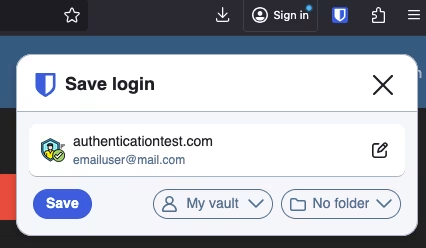
Bitwarden 浏览器扩展可配置为排除指定站点，使其不触发[自动保存通知](/docs/password-manager/autofill/autofill-from/autosave-from-browser-extensions.md)。当某个域名位于**排除域名**列表中时，Bitwarden 不会发出任何可用的通知，包括保存新的登录、更新现有登录、保存或使用通行密钥：

<div align="left" data-with-frame="true"><figure><img src="https://bitwarden.com/assets/4vsurEuH5deik26BWn4n1p/82757186b081890fbe92b4d73baeae53/screenshot_7.png?w=426&#x26;fm=avif" alt=""><figcaption><p>询问添加登录</p></figcaption></figure></div>

要配置排除域名，请导航到 **️设置** → **通知** → **排除域名**：

<div align="left" data-with-frame="true"><figure><img src="https://bitwarden.com/assets/qUGIVQR379ac3R2dXdoy8/06b4dec0b9e02911903052789c44723c/2024-12-03_11-00-24.png?w=970&#x26;fm=avif" alt=""><figcaption><p>排除域名配置</p></figcaption></figure></div>

域名排除不会注册「完整」的 URL，只会注册域名组件。例如 `https://github.com/bitwarden/browser` 保存后将解析为 `github.com`，这意味着浏览器扩展不会明确提示保存 GitHub 凭据。


---

# Agent Instructions: Querying This Documentation

If you need additional information that is not directly available in this page, you can query the documentation dynamically by asking a question.

Perform an HTTP GET request on the current page URL with the `ask` query parameter:

```
GET https://help.ppgg.in/docs/password-manager/autofill/more-autofill-options/exclude-domains.md?ask=<question>
```

The question should be specific, self-contained, and written in natural language.
The response will contain a direct answer to the question and relevant excerpts and sources from the documentation.

Use this mechanism when the answer is not explicitly present in the current page, you need clarification or additional context, or you want to retrieve related documentation sections.