# CLI 身份验证挑战

{% hint style="success" %}
对应的[官方文档地址](https://bitwarden.com/help/article/cli-auth-challenges/)
{% endhint %}

2021 年 08 月发布的 Bitwarden（**2021-09-21**）引入了 [Captcha](https://www.hcaptcha.com/about) 要求，以提高针对机器人流量的安全性。在 CLI 上，Captcha 挑战被身份验证挑战所取代，此挑战可以使用您账户的[个人 API 密钥](/docs/password-manager/developer-tools/cli/personal-api-key.md) 的 `client_secret` 来进行验证。

{% hint style="success" %}
**对于自动化工作流程或对外部应用程序提供访问的场景**，我们建议使用 `bw login --apikey` [方式](/docs/password-manager/developer-tools/cli/password-manager-cli.md#using-an-api-key)。此方式遵循更可预测的身份验证流程，并且可以通过[轮换 API 密钥](/docs/password-manager/developer-tools/cli/personal-api-key.md#rotate-your-api-key)来撤销应用程序或机器的访问权限。
{% endhint %}

## 获取个人 API 密钥 <a href="#get-your-personal-api-key" id="get-your-personal-api-key"></a>

要获取您的个人 API 密码：

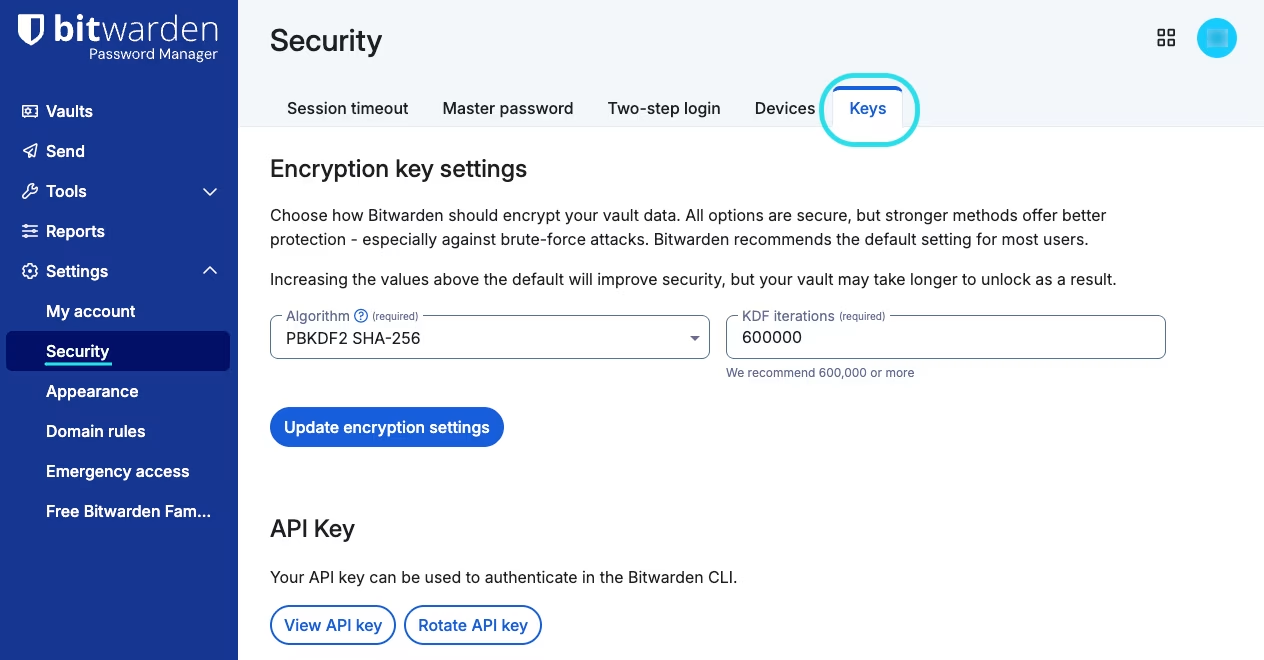
1、在网页 App 中，导航到**设置** → **安全** → **密钥**：

<div align="left" data-with-frame="true"><figure><img src="https://bitwarden.com/assets/3IHpaOpEB5a13TF3B3RqqB/fab175095404a90d9d372542745bb9bb/Keys_settings.png?w=1264&#x26;fm=avif" alt=""><figcaption><p>密钥设置</p></figcaption></figure></div>

3、选择**查看 API 密钥**按钮然后输入主密码以验证访问权限。

4、从 **API 密钥**对话框中，复制 **client\_secret:** 的值，这是一个随机字符串，例如 `efrbgT9C6BogEfXi5pZc48XyJjfpR`。

## 应答挑战 <a href="#answering-challenges" id="answering-challenges"></a>

根据您的偏好，您可以[保存环境变量](/docs/password-manager/developer-tools/cli/cli-authentication-challenges.md#answer-challenges-with-an-environment-variable)以自动通过身份验证挑战或在进行挑战时[手动输入](/docs/password-manager/developer-tools/cli/cli-authentication-challenges.md#answer-challenges-manually)您的 `client_secret`：

### 使用环境变量应答挑战 <a href="#answer-challenges-with-an-environment-variable" id="answer-challenges-with-an-environment-variable"></a>

身份验证挑战将在提示您手动输入之前查找非空的环境变量 `BW_CLIENTSECRET`。使用[获取到的 client\_secret 值](/docs/password-manager/developer-tools/cli/cli-authentication-challenges.md#get-your-personal-api-key)保存此变量后，将允许您自动通过身份验证挑战。要保存此环境变量：

<img src="/files/-M2lmhr5ffWYeEG74jXf" alt="" data-size="line"><img src="/files/-M2lmd9QDMlX1Sn3aHOo" alt="" data-size="line"> Bash

```batch
export BW_CLIENTSECRET="client_secret"
```

<img src="/files/-M2lmjhiYHSJ5-sYyb6Z" alt="" data-size="line"> PowerShell

```powershell
env:BW_CLIENTSECRET="client_secret"
```

{% hint style="danger" %}
如果您的 `client_secret` 不正确，您将收到错误消息。大多数时候，这是因为保存了变量以后您又[轮换了您的 API 密钥](/docs/password-manager/developer-tools/cli/personal-api-key.md#rotate-your-api-key)。使用[上面的步骤](/docs/password-manager/developer-tools/cli/cli-authentication-challenges.md#get-your-personal-api-key)获取正确的值。
{% endhint %}

### 手动应答挑战 <a href="#answer-challenges-manually" id="answer-challenges-manually"></a>

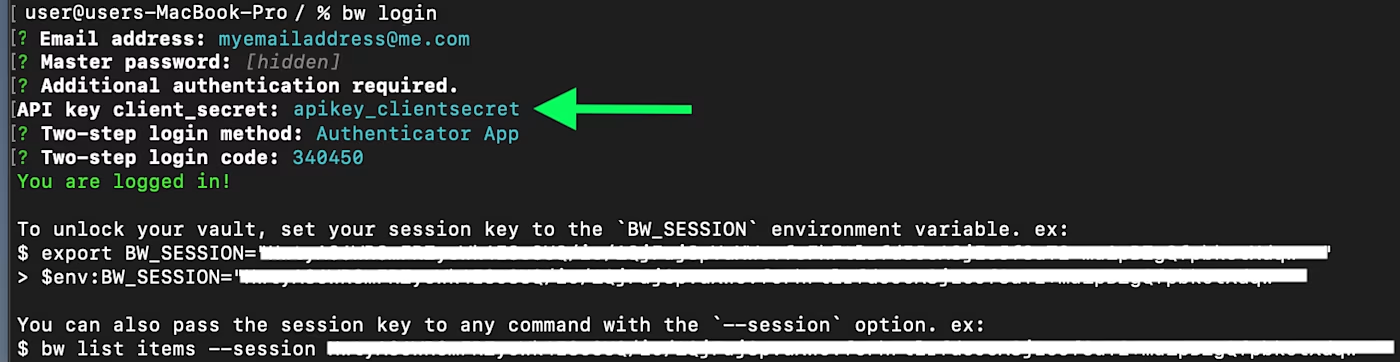
当进行身份验证挑战并且未找到 `BW_CLIENTSECRET` 的值时，系统将提示您手动输入您的 `client_secret` 值：

<div align="left" data-with-frame="true"><figure><img src="https://bitwarden.com/assets/6YPFmH0ALYCuKcpOs6yf8X/e12166c2a561203f4605401b716f89e6/cli-captcha-1-markup.png?w=1400&#x26;fm=avif" alt=""><figcaption><p>带有身份验证挑战的登录提示</p></figcaption></figure></div>

{% hint style="danger" %}
如果您的 `client_secret` 不正确，您将收到错误消息。大多数时候，这是因为保存了变量以后您又[轮换了您的 API 密钥](/docs/password-manager/developer-tools/cli/personal-api-key.md#rotate-your-api-key)。使用[上面的步骤](/docs/password-manager/developer-tools/cli/cli-authentication-challenges.md#get-your-personal-api-key)获取正确的值。
{% endhint %}


---

# Agent Instructions: Querying This Documentation

If you need additional information that is not directly available in this page, you can query the documentation dynamically by asking a question.

Perform an HTTP GET request on the current page URL with the `ask` query parameter:

```
GET https://help.ppgg.in/docs/password-manager/developer-tools/cli/cli-authentication-challenges.md?ask=<question>
```

The question should be specific, self-contained, and written in natural language.
The response will contain a direct answer to the question and relevant excerpts and sources from the documentation.

Use this mechanism when the answer is not explicitly present in the current page, you need clarification or additional context, or you want to retrieve related documentation sections.