# 在 Firefox 隐私窗口中使用 Bitwarden

{% hint style="success" %}
对应的[官方文档地址](https://bitwarden.com/help/private-mode/)
{% endhint %}

## 允许隐私窗口 <a href="#allow-private-windows" id="allow-private-windows"></a>

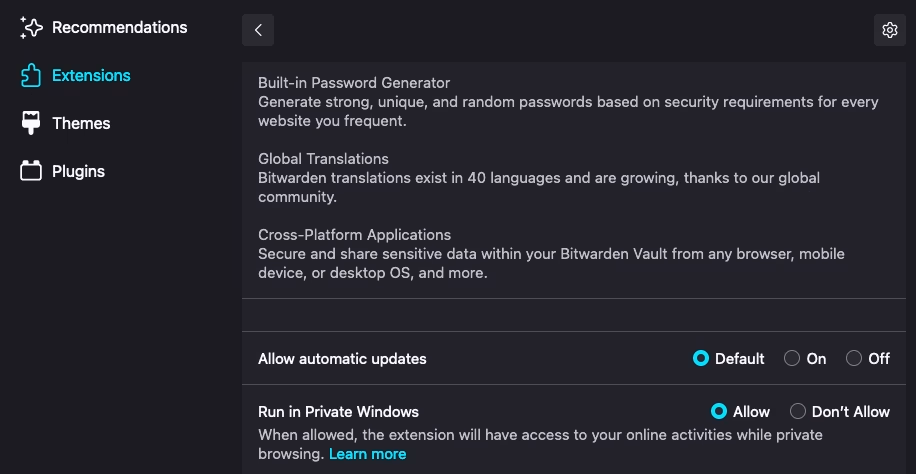
要允许浏览器扩展在 Firefox 隐私窗口中运行：

1. 在浏览器中导航到 `about:addons`，然后从扩展列表中选择 Bitwarden。
2. 在**详细信息**选项卡上，向下滚动到**在隐私窗口中运行**，然后切换为**允许**。

<div align="left" data-with-frame="true"><figure><img src="https://bitwarden.com/assets/1tdckgSp5yF97cp3Jk1nsw/41ae31a8c39b067edefb09a6236d9302/Screen_Shot_2022-03-10_at_11.56.20_AM.png?w=916&#x26;fm=avif" alt=""><figcaption><p>在隐私窗口中启用扩展</p></figcaption></figure></div>

## ~~隐私窗口的限制~~ <a href="#limitations-in-private-windows" id="limitations-in-private-windows"></a>

~~虽然浏览器扩展在 Firefox 隐私窗口中可以展示全部功能，但需要考虑一些限制：~~

* ~~使用~~[~~上下文菜单~~](/docs/password-manager/autofill/autofill-from/autofill-from-browser-extensions.md#using-the-context-menu)~~和~~[~~键盘快捷键~~](/docs/password-manager/autofill/autofill-from/autofill-from-browser-extensions.md#using-keyboard-shortcuts)~~自动填充要求在非隐私窗口中才能解锁密码库。~~
* ~~每次浏览器扩展关闭时，您的密码库都会被锁定，除非您将密码库超时设置为**从不**。或者，您可以将浏览器扩展作为侧边栏以绕过此限制。~~
* ~~仅当未选中**在浏览器重新启动时使用主密码锁定**选项时，PIN 解锁才有效。~~
* [~~徽章图标~~](/docs/password-manager/autofill/autofill-from/autofill-from-browser-extensions.md)~~不会更新以显示密码库的状态（*已锁定*或*已解锁*）。~~


---

# Agent Instructions: Querying This Documentation

If you need additional information that is not directly available in this page, you can query the documentation dynamically by asking a question.

Perform an HTTP GET request on the current page URL with the `ask` query parameter:

```
GET https://help.ppgg.in/docs/password-manager/more/more-platforms/use-bitwarden-in-firefoxs-private-mode.md?ask=<question>
```

The question should be specific, self-contained, and written in natural language.
The response will contain a direct answer to the question and relevant excerpts and sources from the documentation.

Use this mechanism when the answer is not explicitly present in the current page, you need clarification or additional context, or you want to retrieve related documentation sections.