> For the complete documentation index, see [llms.txt](https://help.ppgg.in/llms.txt). Markdown versions of documentation pages are available by appending `.md` to page URLs; this page is available as [Markdown](https://help.ppgg.in/docs/password-manager/your-vault/security-tools/browser-extension-vault-health-reports.md).

# 浏览器扩展密码库健康报告

{% hint style="success" %}
对应的[官方文档地址](https://bitwarden.com/help/browser-extension-vault-health-reports/)
{% endhint %}

在 Bitwarden 浏览器扩展中运行密码库健康报告，以查找并修复存储在 Bitwarden 密码库中的任何弱的、重复使用的或暴露的登录。浏览器扩展中提供的健康报告适用于免费版、高级版和家庭版订阅，可检查三种类型的存在风险的密码：

* 在已知的数据泄露事件中发现的[暴露的密码](/docs/password-manager/your-vault/security-tools/vault-health-reports.md#exposed-passwords)。
* 很容易被黑客或自动化工具猜出的[弱密码](/docs/password-manager/your-vault/security-tools/vault-health-reports.md#weak-passwords)。
* 在您的密码库中保存为两个或多个不同的登录项目的[重复使用的密码](/docs/password-manager/your-vault/security-tools/vault-health-reports.md#reused-passwords)。

{% hint style="success" icon="lightbulb" %}
如果您是团队版或企业版组织的成员，此选项将不会显示。请改为了解 [Access Intelligence](/docs/admin-console/oversight-visibility/access-intelligence.md) 如何帮助识别整个组织中存在风险的凭据，并通知成员更新其密码。
{% endhint %}

## 扫描密码库以检查密码健康状况 <a href="#scan-vault-for-password-health" id="scan-vault-for-password-health"></a>

免费版、高级版和家庭版订阅账户可以查看其密码库中有多少个暴露的密码、弱密码和重复使用的密码。

{% hint style="success" icon="lightbulb" %}
使用 Bitwarden 网页 App 运行更多[密码库健康报告](/docs/password-manager/your-vault/security-tools/vault-health-reports.md)。
{% endhint %}

要了解您的密码库中有多少个密码存在风险：

1、登录 Bitwarden 浏览器扩展。

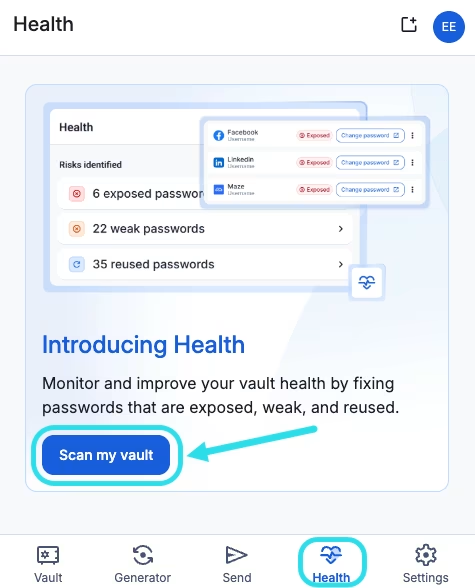
2、选择**健康**。如果这是您首次访问**健康**选项卡，请选择**扫描我的密码库**：

<div align="left" data-with-frame="true"><figure><img src="https://bitwarden.com/assets/hjNDZ9phqDhgp0cqCrQdP/0908df3fdaaa5f8bcd5508dc5eed75f2/Health_scan_in_browser_extension.png?w=475&#x26;fm=avif" alt=""><figcaption><p>浏览器扩展中的健康报告</p></figcaption></figure></div>

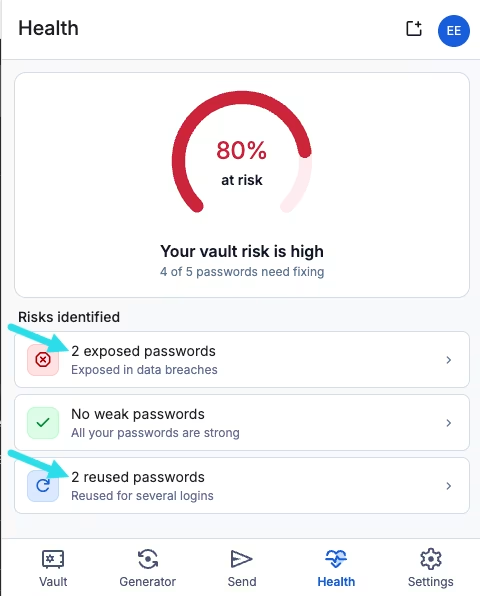
**健康**选项卡将显示您的密码库中暴露的密码、弱密码和重复使用的密码的总数：

<div align="left" data-with-frame="true"><figure><img src="https://bitwarden.com/assets/2N0fLBOMLg1drYnuQlxAbG/f419cccbac162351c10cee9794ad7c3b/Risks_identified_in_health_scan.png?w=480&#x26;fm=avif" alt=""><figcaption><p>康扫描中发现的风险</p></figcaption></figure></div>

## 查看存在风险的密码 <a href="#view-at-risk-passwords" id="view-at-risk-passwords"></a>

如果您的账户是高级版或家庭版订阅，您可以查看每一份健康报告，了解哪些项目（如有）需要处理。

{% hint style="info" %}
免费版订阅用户只能查看每一份报告中存在风险的密码的总数，无法查看哪些登录被标记。
{% endhint %}

要查看存在风险的密码：

1、在**健康**选项卡中，选择一份密码库健康报告：暴露的、弱的或重复使用的。

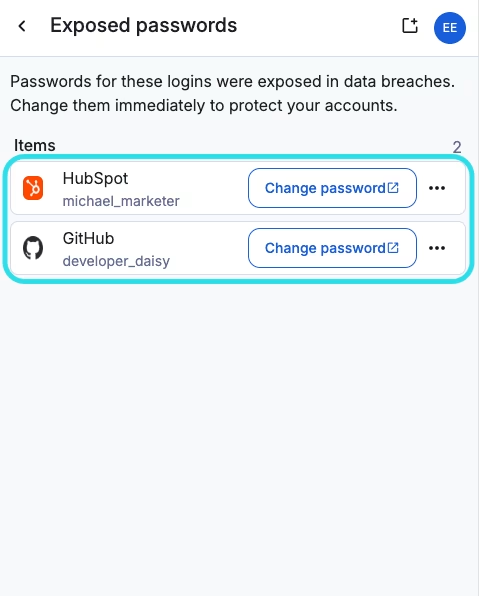
2、查看存在风险的登录列表：

<div align="left" data-with-frame="true"><figure><img src="https://bitwarden.com/assets/Oye8NAAshoVyyCtrh5KHm/347de476dbbee0ba32916588df670f45/At-risk_passwords_in_health_scan.png?w=479&#x26;fm=avif" alt=""><figcaption><p>健康报告中存在风险的密码</p></figcaption></figure></div>

3、（可选）在此列表中，您可以：

* 选择该项目以打开**查看登录**界面，您可以在其中[编辑该项目](/docs/password-manager/your-vault/vault-items/vault-items.md#manage-items)。
* 如果该登录的网站已[保存为 URI](/docs/password-manager/autofill/troubleshoot-autofill/forming-uris-for-autofill.md#save-uris-in-login-items)，请选择**更改密码**以打开网站并更新您的凭据。请记得使用新密码更新您的密码库中的登录项目。
* 选择 <i class="fa-ellipsis">:ellipsis:</i>**选项菜单** → **删除项目**，即可从您的密码库中[移除该登录](/docs/password-manager/your-vault/vault-items/vault-items.md#delete)。选择**删除**以确认。

{% hint style="warning" %}
删除项目仅会将其从您的密码库中移除。它不会更改实际账户上的密码，因此如果该登录仍在使用，它仍然存在风险。
{% endhint %}