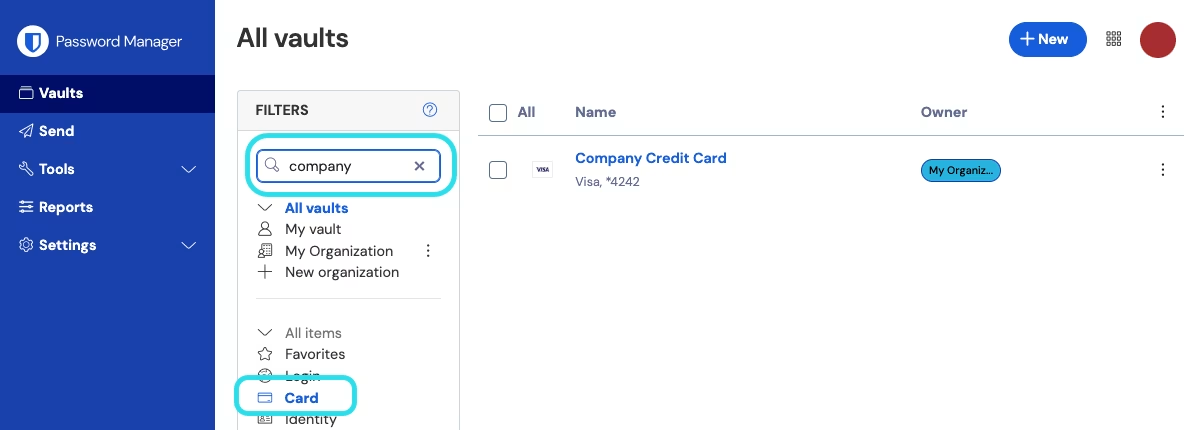
# 检索密码库

{% hint style="success" %}
对应的[官方文档地址](https://bitwarden.com/help/article/searching-vault/)
{% endhint %}

通过检索 Bitwarden 密码库，可以快速找到相关项目。[基本检索](/docs/password-manager/your-vault/vault-navigation/search-vault.md#applications-that-use-full-text-search)查询可以在任何 Bitwarden App 中进行，高级的[全文检索](/docs/password-manager/your-vault/vault-navigation/search-vault.md#applications-that-use-full-text-search-1)查询可以在网页密码库、桌面 App 和浏览器扩展中进行。

任何检索操作的结果都取决于当前通过筛选器菜单或导航打开的内容。例如：

* 如果选择了**所有项目**，检索将检查所有密码库项目以获取结果。
* 如果选择的类型为**登录**，检索将检查所有登录项目以获取结果。
* 如果选择了**我的文件夹**，检索将检查该文件夹中的项目以获取结果（不包括[嵌套文件夹](/docs/password-manager/your-vault/vault-navigation/folders.md)中的项目）。
* 如果选择了**集合**，检索将检查所选集合以获取结果（不包括[嵌套集合](/docs/admin-console/manage-shared-items/collections/about-collections.md#nested-collections)中的项目）。

检索框中的占位符文本将转换为指示当前检索的位置：

<div align="left" data-with-frame="true"><figure><img src="https://bitwarden.com/assets/2Mdb392zQHEfC44zhwLmGl/9d208498c67672f81c47b66a3084853e/2024-12-02_16-28-17.png?w=1204&#x26;fm=avif" alt=""><figcaption><p>检索文件夹</p></figcaption></figure></div>

## 基本检索 <a href="#applications-that-use-full-text-search" id="applications-that-use-full-text-search"></a>

基本检索由 Bitwarden **移动 App** 使用。输入检索的文本（例如 `Github` 或 `myusername`）将在密码库项目的以下字段中检索输入的信息：

* 项目**名称**
* 对于登录，为**用户名**
* 对于登录，为 **URI**
* 对于支付卡，为**品牌**或**卡号**后四位
* 对于身份，为**名称**

为方便您的使用，基本检索会自动包含前导和后导[通配符](/docs/password-manager/your-vault/vault-navigation/search-vault.md#wildcards-and-advanced-search-parameters)。例如，检索 `mail` 将返回名称为 `gmail` 以及 `email` 的密码库项目。

检索结果由一个简单的评分机制决定。检索词中出现的字段越多，该密码库项目的得分就越高。[了解更多](https://lunrjs.com/guides/searching.html#scoring)。

## 全文检索 <a href="#applications-that-use-full-text-search" id="applications-that-use-full-text-search"></a>

网页 App、桌面 App 和浏览器扩展中的检索自动为[全文搜索](https://zh.wikipedia.org/wiki/%E5%85%A8%E6%96%87%E6%AA%A2%E7%B4%A2)，并且与基本检索一样，会自动包括前导和后导通配符。当在全文检索中找不到结果时，Bitwarden 将回退到基本检索。

### 索引字段 <a href="#indexed-fields" id="indexed-fields"></a>

全文检索将为每个密码库项目检索以下字段：：

* `shortid`：项目 ID 的前 8 个字符。
* `organizationid`：项目的组织 ID（如果它属于其中一个）。
* `name`：项目指定的名称。
* `subtitle`：取决于项目类型；登录为**用户名**，支付卡为**品牌**或**卡号**后四位，身份为**名称**。
* `notes`：项目的备注。除非[使用通配符](#wildcards-and-advanced-search-parameters)，否则只会列出全词匹配。
* `fields`：名称和值。仅包&#x542B;**`文本`**&#x7C7B;型字段值。
* `attachments`：附件文件的名称。
* `login.username`：登录项目的用户名。
* `login.uris`：登录项目的 URI [主机名](https://developer.mozilla.org/en-US/docs/Web/API/HTMLHyperlinkElementUtils/hostname)的值。

### 检索特定字段 <a href="#searching-specific-fields" id="searching-specific-fields"></a>

您可以使用「大于」(`>`) 符号来开始检索查询，并按以下格式指示先前列出的字段，来检索特定字段中的数据：

* `>login.username:jsmith`：将检索**用户名**被指定为 `jsmith` 的登录项目。
* `>name:Turbo Tax`：将检索**名称**被指定为 `Turbo Tax` 的任何密码库项目。
* `>fields:Security Question`：将检索具有**名称**为 `Security Question` 的自定义文本字段的任何密码库项目。

如果没有字段指示符，则将检索所有索引字段。

### 通配符和高级检索参数 <a href="#wildcards-and-advanced-search-parameters" id="wildcards-and-advanced-search-parameters"></a>

检索特定字段时，您可以使用星号 (`*`) 作为特定检索值的通配符，例如：

* `>organizationid:*`：将检索属于组织的任何密码库项目。
* `>-organizationid:*`：将检索不属于组织的任何密码库项目。
* `>login.username:*@gmail.com`：将检索**用户名**以 `@gmail.com` 结尾的任何密码库项目。
* `>wild*`：将检索包含单词 `wild` 的所有密码库项目和包含 `wild` 的密码库项目的单词，例如 `wildcard`。

{% hint style="success" %}
除通配符外，[Lunr](https://lunrjs.com/) 还提供了多种高级查询选项，包括：

* **术语组合**：使用 `+`（必须包含）或 `-`（必须不包含）前缀。基于术语组合进行检索时，会单独处理每个术语，即使它们由连字符 (`-`) 分隔。

例如，如果你有多个 Gmail 账户，检索 `>+name:Gmail +name:Work` 将**会**返回名为 `Work Gmail` 的密码库项目，但**不会**返回名为 `Personal Gmail` 的密码库项目。如果您在项目名称中使用连字符 (`-`)（例如 `Work-Gmail`），请勿将连字符包含为搜索词。

术语组合可用于精确搜索。例如，检索 `>+name:5 +name:mail +name:01` 将创建 `5-mail-01` 的精确匹配。

* **模糊匹配**：使用波浪号 (`~`) 前缀结合一个编辑距离的整数。

例如，搜索 `>name:email~1` 将返回名称为 `email` 的密码库项目**以及**名称为 `gmail` 的密码库项目。

了解更多有关使用 [Lunr 搜索指南](https://lunrjs.com/guides/searching.html)编写高级检索查询的信息。
{% endhint %}


---

# Agent Instructions: Querying This Documentation

If you need additional information that is not directly available in this page, you can query the documentation dynamically by asking a question.

Perform an HTTP GET request on the current page URL with the `ask` query parameter:

```
GET https://help.ppgg.in/docs/password-manager/your-vault/vault-navigation/search-vault.md?ask=<question>
```

The question should be specific, self-contained, and written in natural language.
The response will contain a direct answer to the question and relevant excerpts and sources from the documentation.

Use this mechanism when the answer is not explicitly present in the current page, you need clarification or additional context, or you want to retrieve related documentation sections.