# 取消订阅

{% hint style="success" %}
对应的[官方文档地址](https://bitwarden.com/help/cancel-a-subscription/)
{% endhint %}

取消 Bitwarden 订阅将导致您的账户或组织在计费周期结束时失去对付费功能的访问权限。如果您的订阅未满 30 天，请[联系我们](https://bitwarden.com/contact/)获得退款。取消订阅不会自动删除您的账户或组织。[了解更多](/docs/plans-and-pricing/delete-an-account-or-organization.md)。

如果您是自托管，请从您创建账户的托管 Bitwarden 网页 App 中取消您的订阅。[了解更多](/docs/self-hosting/licensing-on-premise.md)。

## 取消个人订阅 <a href="#cancel-a-personal-subscription" id="cancel-a-personal-subscription"></a>

要取消个人订阅：

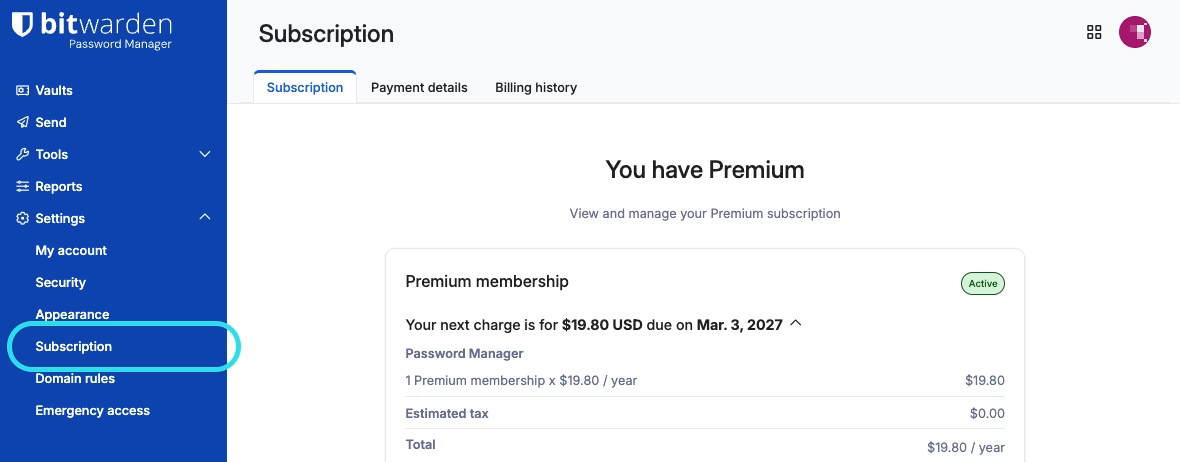
1、在网页 App 中，导航到**设置** → **订阅**：

<div align="left" data-with-frame="true"><figure><img src="https://bitwarden.com/assets/3Ru9TSLguhRNYtLe2TLwXk/bec6794eb58efa8780504720d4acb250/2026-03-03_10-24-17.png?w=1180&#x26;fm=avif" alt=""><figcaption><p>订阅页面</p></figcaption></figure></div>

2、注意**下一次收费**日期。订阅取消后，当到达订阅到期日期时，您将失去对付费功能的访问权限。

3、选择**取消订阅**按钮。

当您确认取消后，您的账户将进入**待取消**状态，直到到达注明的**下一次收费**日期。当到达**下一次收费**日期时，您将被转移到免费的账户。[了解当您失去高级版时会发生什么](/docs/plans-and-pricing/password-manager/premium-renewal.md)。

{% hint style="success" %}
如果您在计费周期结束前改变主意，只需一个按钮即可**恢复订阅**！
{% endhint %}

## 取消组织订阅 <a href="#cancel-an-organization-subscription" id="cancel-an-organization-subscription"></a>

要取消组织订阅：

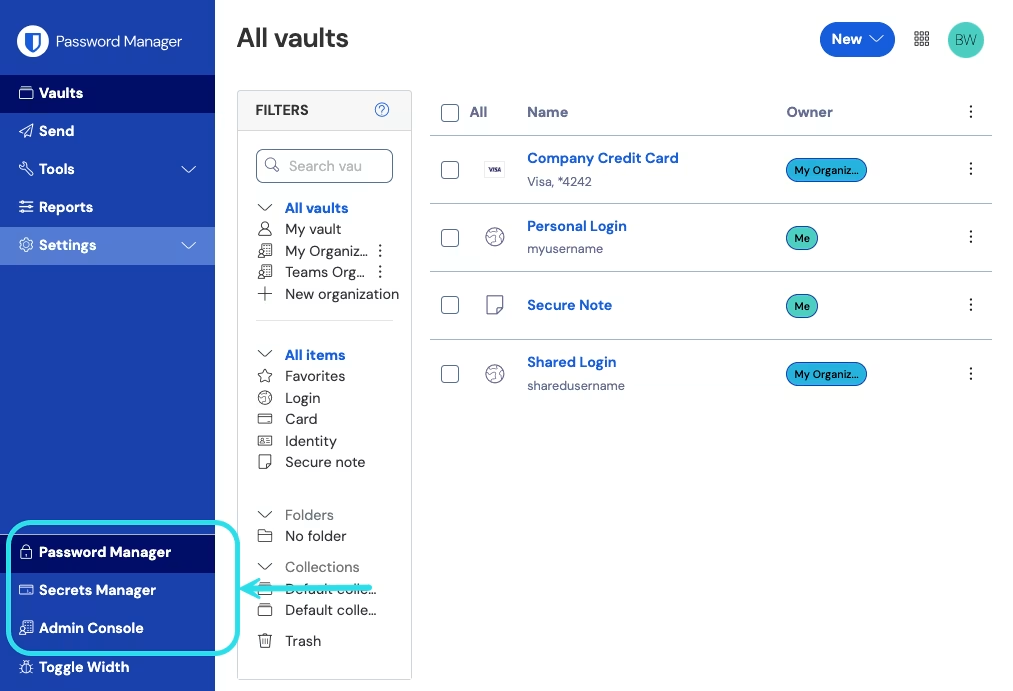
1、在网页 App 中，使用产品切换器打开管理控制台：

<div align="left" data-with-frame="true"><figure><img src="https://bitwarden.com/assets/2uxBDdQa6lu0IgIEfcwMPP/e3de3361749b6496155e25edcfdcf08b/2024-12-02_11-19-56.png?w=1013&#x26;fm=avif" alt=""><figcaption><p>产品切换器</p></figcaption></figure></div>

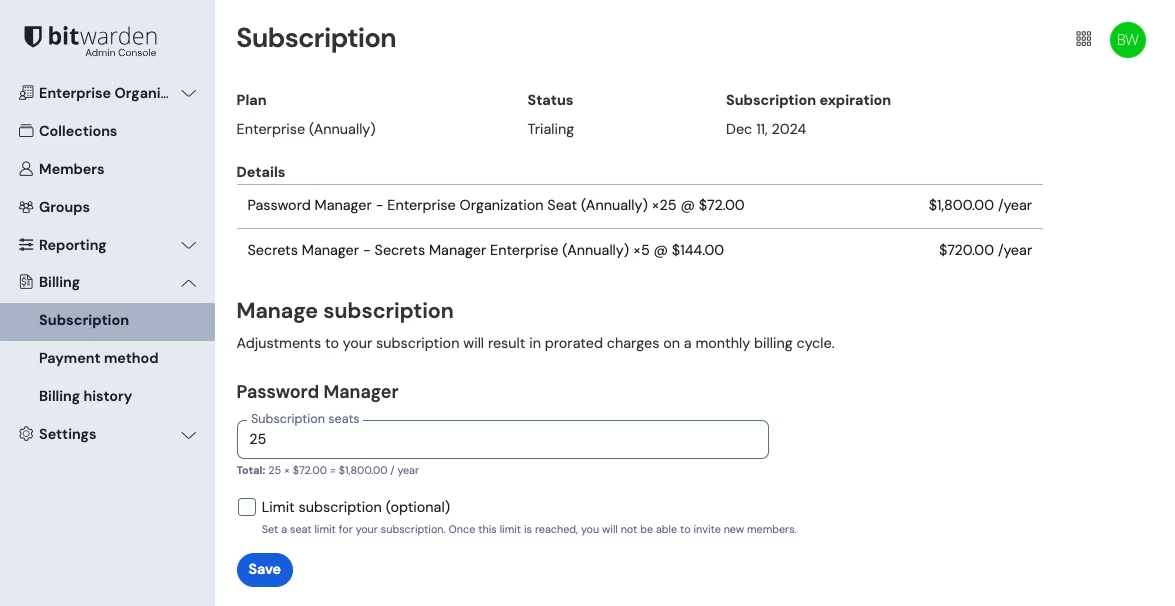
2、导航到**计费** → **订阅**：

<div align="left" data-with-frame="true"><figure><img src="https://bitwarden.com/assets/7MT9lfZZDTOQOBmnrLGceN/1ac8c615153e35250d15ce3921148cfe/2024-12-04_10-33-12.png?w=1175&#x26;fm=avif" alt=""><figcaption><p>组织订阅视图</p></figcaption></figure></div>

{% hint style="info" %}
只有组织所有者可以访问组织的订阅页面。
{% endhint %}

3、注意**订阅到期**日期。订阅取消后，当到达订阅到期日期时，您的组织将失去对付费功能的访问权限。

4、向下滚动然后选择**取消订阅**按钮。

当您确认取消后，您的组织将进入**待取消**状态，直到到达注明的**订阅到期**日期。当到达**订阅到期**日期后，您的订阅将终止。[了解接下来会发生什么](/docs/plans-and-pricing/organization-renewal.md)！

{% hint style="success" %}
如果您在计费周期结束前改变主意，只需一个按钮即可**恢复订阅**！
{% endhint %}


---

# Agent Instructions: Querying This Documentation

If you need additional information that is not directly available in this page, you can query the documentation dynamically by asking a question.

Perform an HTTP GET request on the current page URL with the `ask` query parameter:

```
GET https://help.ppgg.in/docs/plans-and-pricing/cancel-a-subscription.md?ask=<question>
```

The question should be specific, self-contained, and written in natural language.
The response will contain a direct answer to the question and relevant excerpts and sources from the documentation.

Use this mechanism when the answer is not explicitly present in the current page, you need clarification or additional context, or you want to retrieve related documentation sections.