# 删除账户或组织

{% hint style="success" %}
对应的[官方文档地址](https://bitwarden.com/help/article/delete-your-account/)
{% endhint %}

{% hint style="danger" %}
删除账户是永久性的，无法撤消或恢复。要创建密码库数据的备份并将其存储在安全的位置，请[导出您的密码库数据](/docs/password-manager/import-and-export/export-vault-data.md)。
{% endhint %}

删除 Bitwarden 账户或组织将永久删除该账户或组织以及**与之相关联的所有数据**。Bitwarden不会「软删除」任何数据。

删除账户或组织并不会自动取消订阅。了解如何在删除账户之前[取消订阅](/docs/plans-and-pricing/cancel-a-subscription.md)。

如果您被锁定在您的密码库之外，并且想删除您的账户，以便您可以创建一个新的账户，请[联系我们](https://bitwarden.com/contact/)，我们可以帮助您将您的订阅转移到新的账户。

## 删除个人账户 <a href="#delete-your-personal-account" id="delete-your-personal-account"></a>

要删除您的个人账户：

{% tabs %}
{% tab title="无需登录" %}
要无需登录删除您的账户（例如，如果您丢失了主密码）：

1. 在网页浏览器中打开 <https://vault.bitwarden.com/#/recover-delete>（或 <https://vault.bitwarden.eu/#/recover-delete>）。
2. 输入与账户关联的**电子邮箱地址**以发送一封删除确认电子邮件。
3. 在您的收件箱中，打开此电子邮件并确认您要删除此 Bitwarden 账户。

如果您删除账户后要创建一个新的账户，请执行后续步骤：

* 如果您删除了与高级版订阅相关联的 Bitwarden 账户，请[联系我们](https://bitwarden.com/contact/)，我们会将您现有的订阅重新应用到新的账户中。
* 如果您能够在删除前成功导出密码库数据，则可以轻松地将其[导入新的账户](/docs/password-manager/import-and-export/import-data.md)。

{% hint style="info" %}
如果您是某个[组织](/docs/admin-console/organizations-overview.md)的唯一所有者，则必须先添加第二个所有者或删除该组织本身，才能删除您的账户。如果您忘记了主密码，请使用组织所属的电子邮箱地址[联系我们 ](https://bitwarden.com/contact/)。
{% endhint %}

如果您愿意，您可以使用与已删除账户关联的电子邮箱地址立即重新注册 Bitwarden
{% endtab %}

{% tab title="网页 App" %}
要使用网页 App 删除您的 Bitwarden 账户：

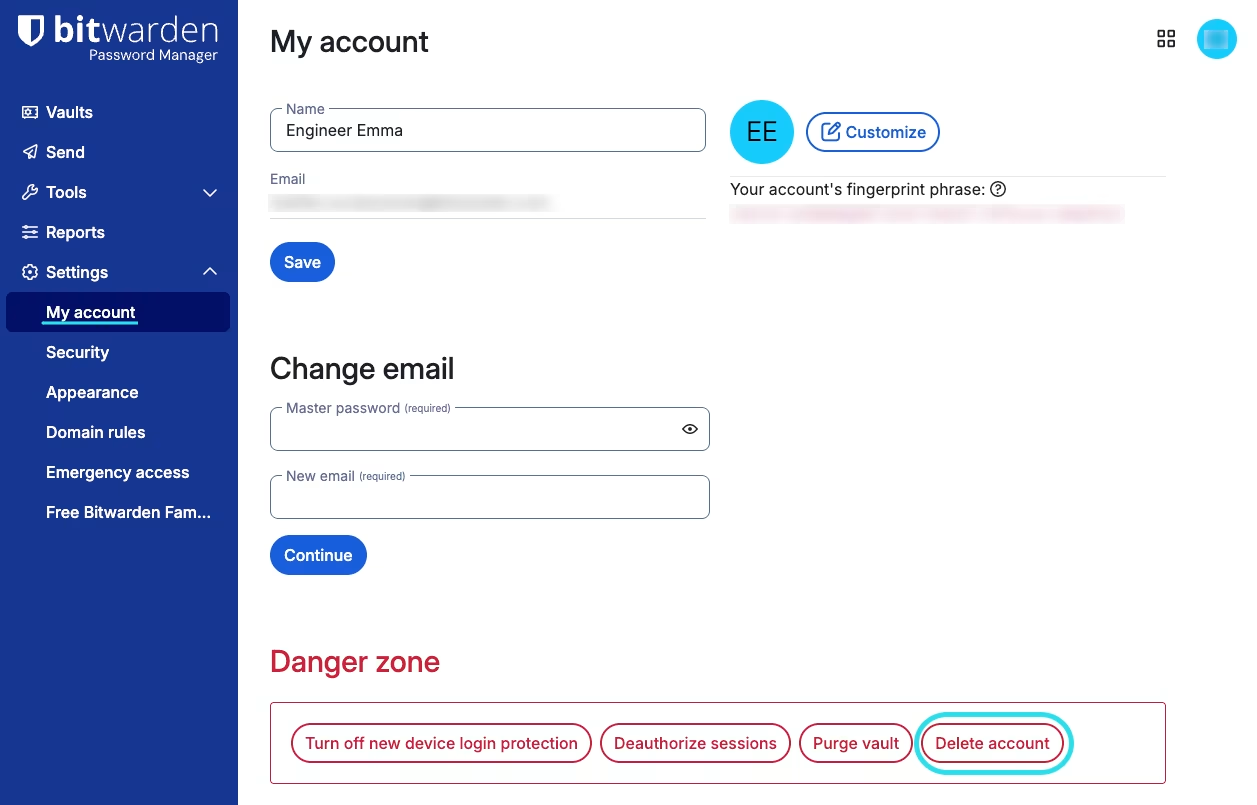
1、导航到**设置** → **我的账户**。

2、向下滚动到**危险区域**然后选择**删除账户**：

<div align="left" data-with-frame="true"><figure><img src="https://bitwarden.com/assets/74BqYDU6qE9evz6wEz8K7Y/2cd5b482c2dd160f47ec330464a43c11/My_account_settings.png?w=1257&#x26;fm=avif" alt=""><figcaption><p>我的账户设置</p></figcaption></figure></div>

将提示您输入主密码，以确认您有权执行此操作。
{% endtab %}

{% tab title="移动端" %}
要使用移动 App 删除您的 Bitwarden 账户：

1. 选择**设置**选项卡。
2. 选择**账户安全**。
3. 滚动到底部然后选择**删除账户**。
4. 确认您要**删除账户**。

将提示您输入主密码，以确认您有权执行此操作。
{% endtab %}

{% tab title="桌面端" %}
要使用桌面 App 删除您的 Bitwarden 账户：

1. 从菜单栏中选择**账户** → **删除账户**。
2. 输入您的主密码然后选择**删除账户**。
   {% endtab %}
   {% endtabs %}

组织所有者、管理员和某些自定义角色成员也能够[删除成员账户](/docs/admin-console/manage-members/revoke-remove/delete-member-accounts.md)。

## 删除组织 <a href="#delete-an-organization" id="delete-an-organization"></a>

只有[组织的所有者](/docs/admin-console/manage-members/member-roles.md)可以删除组织（如果您是组织成员，则可以[退出组织](/docs/admin-console/more/organizations-faqs.md#q-how-do-i-leave-an-organization)）。要删除组织：

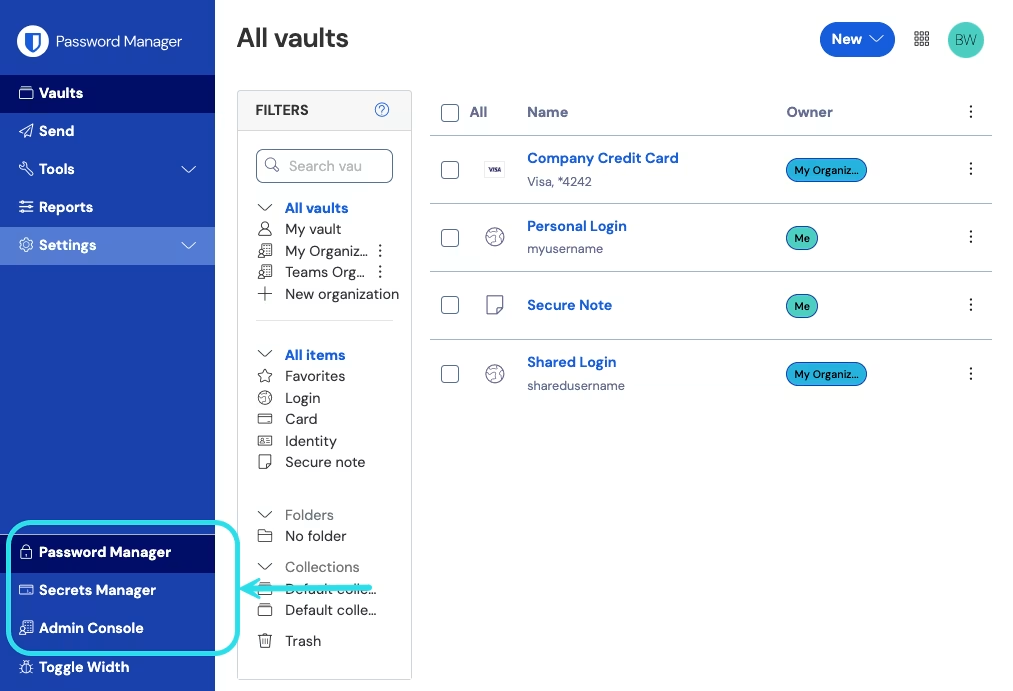
1、打开管理控制台：

<div align="left" data-with-frame="true"><figure><img src="https://bitwarden.com/assets/2uxBDdQa6lu0IgIEfcwMPP/e3de3361749b6496155e25edcfdcf08b/2024-12-02_11-19-56.png?w=1013&#x26;fm=avif" alt=""><figcaption><p>产品切换器</p></figcaption></figure></div>

2、转到**设置** → **组织信息**。

3、向下滚动到**危险区域**然后选择**删除组织**。

将提示您输入主密码，以确认您有权执行此操作。


---

# Agent Instructions: Querying This Documentation

If you need additional information that is not directly available in this page, you can query the documentation dynamically by asking a question.

Perform an HTTP GET request on the current page URL with the `ask` query parameter:

```
GET https://help.ppgg.in/docs/plans-and-pricing/delete-an-account-or-organization.md?ask=<question>
```

The question should be specific, self-contained, and written in natural language.
The response will contain a direct answer to the question and relevant excerpts and sources from the documentation.

Use this mechanism when the answer is not explicitly present in the current page, you need clarification or additional context, or you want to retrieve related documentation sections.