# 账单 & 收据

{% hint style="success" %}
对应的[官方文档地址](https://bitwarden.com/help/invoices-and-receipts/)
{% endhint %}

Bitwarden 为付费订阅自动生成账单和收据。只有订阅的持有者，例如高级版方案的用户或组织的[所有者](/docs/admin-console/manage-members/member-roles.md#default-roles)，才能查看或下载 PDF 格式的账单。

{% hint style="success" %}
如果您是自托管，账单和收据可通过[连接到您的自托管部署的云账户](/docs/self-hosting/licensing-on-premise.md)获取。
{% endhint %}

提供两种类型的账单：

* **未支付账单**：如果我们无法处理此付款，或者您通过支票支付了商业版方案（如企业版），账单将在此部分列出。
* **已支付账单**：此部分包含收据，付款处理完成后就会生成。

## 查看账单 <a href="#review-invoices" id="review-invoices"></a>

要访问您的账户或组织的账单：

{% tabs %}
{% tab title="个人" %}
作为高级版个人订阅的账户持有人：

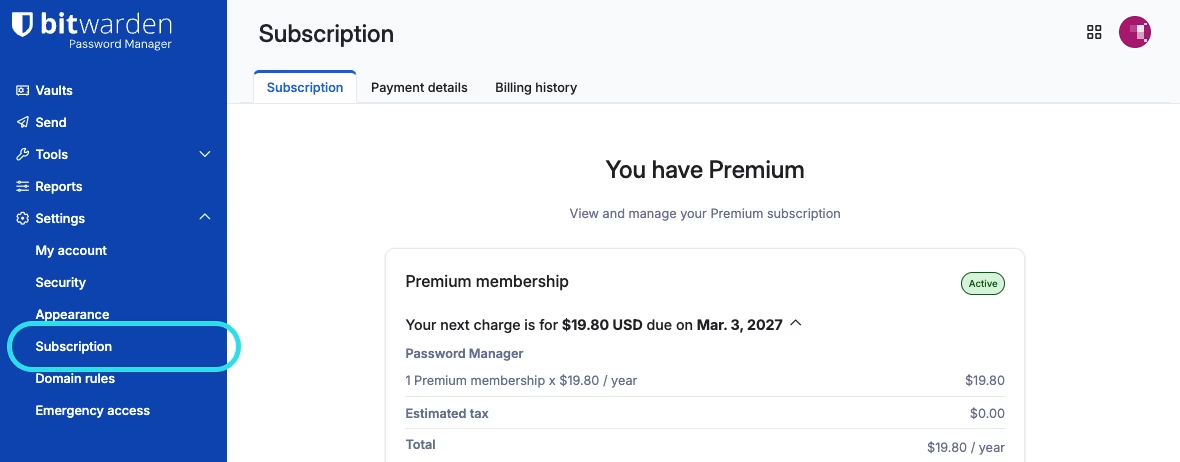
1、使用网页 App，前往**设置** → **订阅**：

<div align="left" data-with-frame="true"><figure><img src="https://bitwarden.com/assets/3Ru9TSLguhRNYtLe2TLwXk/bec6794eb58efa8780504720d4acb250/2026-03-03_10-24-17.png?w=1180&#x26;fm=avif" alt=""><figcaption><p>订阅页面</p></figcaption></figure></div>

2、选择**计费历史记录**。

3、从**未支付账单**或**已支付账单**中选择一行项目，以查看或下载特定的账单或已支付的收据：

<div align="left" data-with-frame="true"><figure><img src="https://bitwarden.com/assets/4vSHZX44OMs8dPa1c9GNMk/b7b7a7a6c7564a802650afd762212907/2026-03-03_10-24-26.png?w=1180&#x26;fm=avif" alt=""><figcaption><p>个人订阅账单</p></figcaption></figure></div>
{% endtab %}

{% tab title="组织" %}
作为家庭版、团队版或企业版组织的[所有者](/docs/admin-console/manage-members/member-roles.md)：

1、使用网页 App，前往**管理控制台**。

2、前往**计费** → **计费历史记录**。

3、从**未支付账单**或**已支付账单**中选择一行项目，以查看或下载特定的账单或已支付的收据：

<div align="left" data-with-frame="true"><figure><img src="https://bitwarden.com/assets/2GcEwWFCc1KsGOKjazcmeP/88846e28fa4e77c0b5b5cce32cd9caac/2026-03-03_10-38-21.png?w=1180&#x26;fm=avif" alt=""><figcaption><p>组织账单</p></figcaption></figure></div>
{% endtab %}

{% tab title="提供商" %}
作为[提供商管理员](/docs/provider-portal/provider-users.md#provider-user-types)：

1、使用网页 App，前往**提供商门户**。

2、前往**计费** → **计费历史记录**。

3、从**未支付账单**或**已支付账单**中选择一行项目，以查看或下载特定的账单或已支付的收据：

<div align="left" data-with-frame="true"><figure><img src="https://bitwarden.com/assets/6uYalZ51JW56lFgio37MBv/7df0f55f9b09aa827c1aa8897ebacba4/2026-03-03_14-51-10.png?w=1173&#x26;fm=avif" alt=""><figcaption><p>提供商账单</p></figcaption></figure></div>

在此视图中，您还可以下载包含按客户分配的席位明细的 `.csv` 文件。
{% endtab %}
{% endtabs %}

账单包含：

* 与 Bitwarden 及您的订阅关联的[计费电子邮箱](/docs/plans-and-pricing/update-your-billing-information.md#billing-email)。
* 订阅周期对应的应付款金额，包括以单行项目列出的任何适用的[税费](/docs/plans-and-pricing/tax-calculation.md)。
* 对于组织订阅，包含[已支付的席位](/docs/plans-and-pricing/manage-subscription-seats-in-your-organization.md)的数量。
* 用于处理付款的付款方式（如适用）。

## 支付账单 <a href="#pay-an-invoice" id="pay-an-invoice"></a>

使用列出的[付款方式](/docs/plans-and-pricing/payment-methods.md)之一，按照您的账单上的说明操作。


---

# Agent Instructions: Querying This Documentation

If you need additional information that is not directly available in this page, you can query the documentation dynamically by asking a question.

Perform an HTTP GET request on the current page URL with the `ask` query parameter:

```
GET https://help.ppgg.in/docs/plans-and-pricing/invoices-and-receipts.md?ask=<question>
```

The question should be specific, self-contained, and written in natural language.
The response will contain a direct answer to the question and relevant excerpts and sources from the documentation.

Use this mechanism when the answer is not explicitly present in the current page, you need clarification or additional context, or you want to retrieve related documentation sections.