# 从个人版升级到组织版

{% hint style="success" %}
对应的官[方文档地址](https://bitwarden.com/help/article/upgrade-from-individual-to-org/)
{% endhint %}

本文将指导现有的 Password Manager 个人用户（[免费版](/docs/plans-and-pricing/password-manager/about-bitwarden-plans.md#free-individual)或[高级版](/docs/plans-and-pricing/password-manager/about-bitwarden-plans.md#premium-individual)）过渡到组织方案（[免费版](/docs/plans-and-pricing/password-manager/about-bitwarden-plans.md#free-organizations)、[家庭版](/docs/plans-and-pricing/password-manager/about-bitwarden-plans.md#families-organizations)、[团队版](/docs/plans-and-pricing/password-manager/about-bitwarden-plans.md#teams-organizations)或[企业版](/docs/plans-and-pricing/password-manager/about-bitwarden-plans.md#enterprise-organizations)），以便开始在朋友、家人、同事、部门或整个公司之间安全地共享组织数据。

## 创建您的组织 <a href="#start-your-organization" id="start-your-organization"></a>

完成以下步骤以创建您的组织：

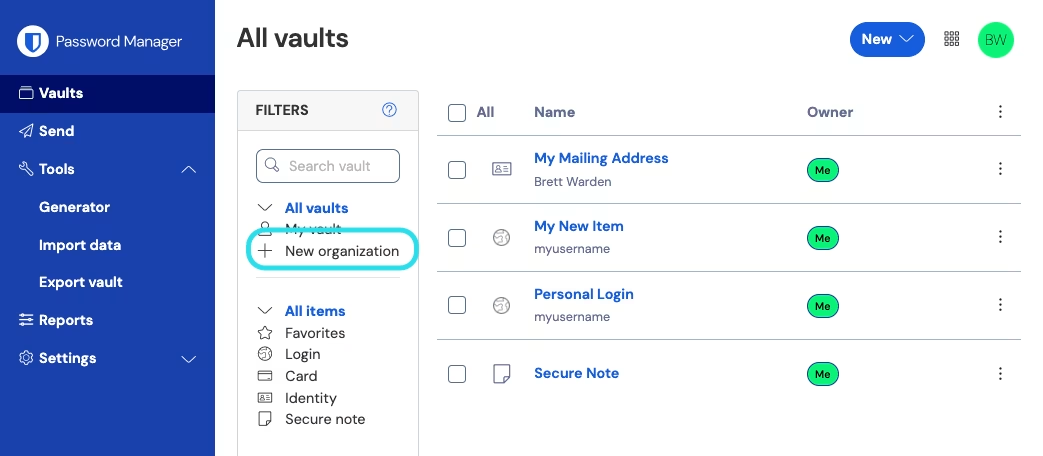
1、登录 Bitwarden 网页 App，然后选择**新增组织**按钮：

<div align="left" data-with-frame="true"><figure><img src="https://bitwarden.com/assets/3eSqWiTIuPSFxXdo5AAjT9/248b0fa7bb381add0d71682acd244a63/2024-12-03_13-57-58.png?w=1043&#x26;fm=avif" alt=""><figcaption><p>新增组织</p></figcaption></figure></div>

2、在**新增组织**界面，输入您的新组织的**组织名称**以及我们能联系到您的**计费电子邮箱**。

{% hint style="info" %}
付费组织（家庭版、团队版或企业版）有一个 7 天的免费试用期。在您的试用期结束之前，我们不会向您收取费用。您可以随时在您的组织的**设置**选项卡中取消您的订阅。
{% endhint %}

3、如果您代表公司创建一个组织：

* 勾选**此账户由公司拥有**复选框。
* 提供您的**公司名称**。

4、在**选择您的方案**部分，选择要创建的组织类型。选项包括：

* **免费版**：适用于测试或个人用户与 1 位其他用户共享。。[了解更多](/docs/plans-and-pricing/password-manager/about-bitwarden-plans.md#free-organizations)。
* **家庭版**：适用于个人使用，与家人及朋友共享。[了解更多](/docs/plans-and-pricing/password-manager/about-bitwarden-plans.md#families-organizations)。
* **团队版**：适用于企业和其他团队组织。[了解更多](/docs/plans-and-pricing/password-manager/about-bitwarden-plans.md#teams-organizations)。
* **企业版**：适用于企业和其他大型组织。[了解更多](/docs/plans-and-pricing/password-manager/about-bitwarden-plans.md#enterprise-organizations)。

{% hint style="info" %}
付费组织（家庭版、团队版或企业版）包含所有注册用户的高级功能。关于高级功能的更多信息，请参阅 [Password Manager 方案](/docs/plans-and-pricing/password-manager/about-bitwarden-plans.md)。
{% endhint %}

5、如果您选择了付费组织，请输入以下信息：

* 对于**团队版**或**企业版**，输入您需要的**用户席位**的数量。如果超过此数量，则会增加席位，除非您[指定限制](/docs/admin-console/manage-members/user-management.md#set-a-seat-limit)。
* 对于**家庭版**、**团队版**或**企业版**，输入你需要的**附加存储 (GB)** 的大小。您的方案带有 5 GB 的共享加密文件存储空间，您也可以在以后需要的时候增加附加存储。
* 对于**团队版**或**企业版**，选择是**按年**还是**按月**计费。其他组织只能按年计费。
* 对于任何付费组织，请输入您的**付款信息**。

{% hint style="success" %}
如果您想使用 [Secrets Manager](/docs/secrets-manager/secrets-manager-overview.md)，请完成以下步骤以将其添加到您的方案中：

1. 在**更多来自 Bitwarden 的产品**部分，选中**订阅机密管理器**复选框。
2. 在**用户席位**字段中，指定要为 Secrets Manager 购买的席位数量。该数字必须小于或等于您的 Password Manager 订阅的席位数。
3. 在**附加机器账户**字段中，指定要添加到 Secrets Manager 的服务机器数量。团队方案和企业方案分别预先提供了 50 个和 200 个机器账户。
   {% endhint %}

6、点击**提交**以开始使用您的新组织。

## 取消个人高级版方案 <a href="#cancel-premium-individual-plan" id="cancel-premium-individual-plan"></a>

付费组织（家庭版、团队版或企业版）会自动为所有用户提供高级功能的访问权限。如果您在创建组织时已经拥有个人高级版订阅，您可以取消您的个人高级版订阅，这不会失去对高级功能的访问权限。

{% hint style="danger" %}
Bitwarden 提供**在订阅创建后 30 天内**取消高级版订阅的退款。如果您在创建高级个人版账户后的 30 天内创建了一个付费组织，请[联系我们](https://bitwarden.com/contact)发起退款。

目前，Bitwarden 不对超过 30 天的付费订阅提供退款。
{% endhint %}

要取消您的个人高级版订阅：

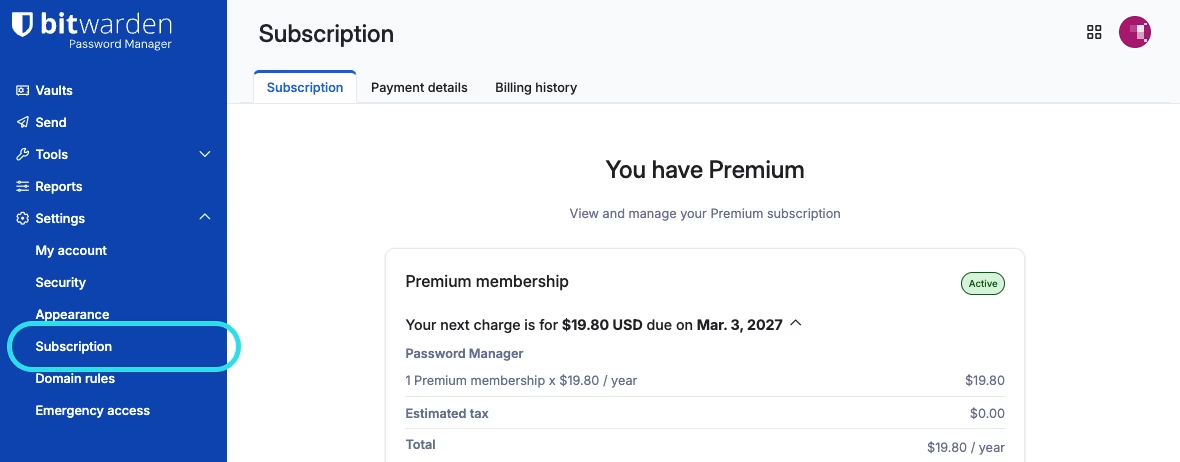
1、在 Bitwarden 网页 App 中，导航至**设置** → **订阅**：

<div align="left" data-with-frame="true"><figure><img src="https://bitwarden.com/assets/3Ru9TSLguhRNYtLe2TLwXk/bec6794eb58efa8780504720d4acb250/2026-03-03_10-24-17.png?w=1180&#x26;fm=avif" alt=""><figcaption><p>订阅页面</p></figcaption></figure></div>

2、选择**取消订阅**按钮。

## 下一步 <a href="#next-steps" id="next-steps"></a>

现在您已经创建了您的组织。我们建议您：

* [邀请用户加入您的组织](/docs/admin-console/manage-members/user-management.md)
* [创建一个集合](/docs/admin-console/manage-shared-items/collections/about-collections.md#create-a-collection)
* [共享项目到集合](/docs/password-manager/organization-members/sharing.md)


---

# Agent Instructions: Querying This Documentation

If you need additional information that is not directly available in this page, you can query the documentation dynamically by asking a question.

Perform an HTTP GET request on the current page URL with the `ask` query parameter:

```
GET https://help.ppgg.in/docs/plans-and-pricing/password-manager/upgrade-from-individual-to-organization.md?ask=<question>
```

The question should be specific, self-contained, and written in natural language.
The response will contain a direct answer to the question and relevant excerpts and sources from the documentation.

Use this mechanism when the answer is not explicitly present in the current page, you need clarification or additional context, or you want to retrieve related documentation sections.