# \*开始企业版试用

{% hint style="success" %}
对应的[官方文档地址](https://bitwarden.com/help/enterprise-free-trial/)
{% endhint %}

## Bitwarden 新手吗？ <a href="#new-to-bitwarden" id="new-to-bitwarden"></a>

如果您是 Bitwarden 的新手，我们很乐意帮助您通过我们专属注册页面建立一个账户并开始您的企业版组织 7 天免费试用。[开始企业版免费试用](https://vault.bitwarden.com/#/register?org=enterprise)。

或者，要了解更多有关 [Bitwarden 企业产品](https://bitwarden.com/products/business/)的信息，请参阅 [Bitwarden 方案和定价](https://bitwarden.com/pricing/business/)或 [Password Manager 方案](/docs/plans-and-pricing/password-manager/about-bitwarden-plans.md#enterprise-organizations)以及 [Secrets Manager 方案](/docs/plans-and-pricing/secrets-manager/secrets-manager-plans.md)。

## 已是 Bitwardne 用户了吗？ <a href="#already-a-user" id="already-a-user"></a>

如果您已经拥有 Bitwarden 账户，完成以下步骤以开始您的 Bitwarden 企业版 7 天免费试用：

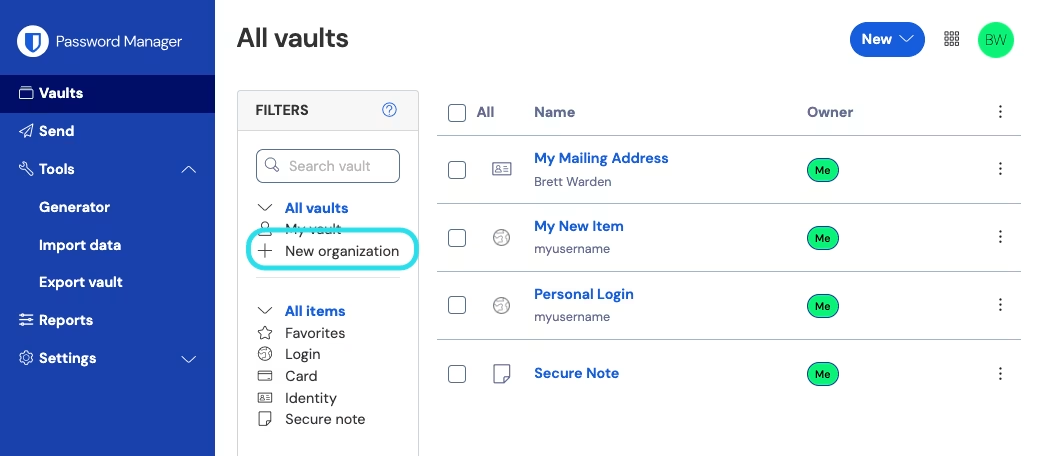
1、登录 Bitwarden 网页 App，然后选择**新增组织**按钮：

{% embed url="<https://res.cloudinary.com/bw-com/image/upload/f_auto/v1/ctf/7rncvj1f8mw7/3eSqWiTIuPSFxXdo5AAjT9/248b0fa7bb381add0d71682acd244a63/2024-12-03_13-57-58.png?_a=DAJCwlWIZAAB>" %}
新增组织
{% endembed %}

2、在**新增组织**界面，输入您的新组织的**组织名称**以及我们能联系到您的**计费电子邮箱**。

{% hint style="info" %}
在企业版方案的 7 天免费试用期结束之前，我们不会向您收费。您可以随时在您的组织的**设置**选项卡中取消您的订阅。
{% endhint %}

3、如果您代表某公司试用企业版方案：

* 勾选**此账户由公司拥有**复选框。
* 提供您的**公司名称**。

4、选择**企业版**方案选项。这样做将触发显示额外的面向企业的字段内容。

5、在**用户**部分，输入您需要的**用户席位**的数量。如果超过此数量，则会增加席位，除非您[指定限制](/docs/admin-console/manage-members/user-management.md#set-a-seat-limit)。

6、在**附加项目**部分，输入您需要的**附加存储 (GB)** 的数量。您的方案附带 5 GB 加密存储。您也可以在以后需要的时候增加附加存储。

7、在**概要**部分，选择您希望**按年**或**按月**计费。

{% hint style="success" %}
如果您想使用 [Secrets Manager](/docs/secrets-manager/secrets-manager-overview.md)，请完成以下步骤以将其添加到您的方案中：

1. 在**更多来自 Bitwarden 的产品**部分，选中**订阅机密管理器**复选框。
2. 在**用户席位**字段中，指定要为 Secrets Manager 购买的席位数量。该数字必须小于或等于 Password Manager 订阅指定的席位数。
3. 在**附加服务账户**字段中，指定要添加到 Secrets Manager 的机器账户数量。团队版方案和企业版方案分别预提供了 20 个和 50 个服务账户。
   {% endhint %}

8、输入您的**付款信息**然后选择**提交**。

## 下一步 <a href="#next-steps" id="next-steps"></a>

现在，您已经创建好了您的试用版企业版组织。我们建议您：

* [将用户添加到您的组织](/docs/admin-console/manage-members/user-management.md)
* [创建集合](/docs/admin-console/manage-shared-items/collections/about-collections.md#create-a-collection)
* 设置 [SSO 登录](/docs/admin-console/login-with-sso/about-sso.md)
* 查看[自托管组织](/docs/self-hosting/plan-for-deployment/self-host-an-organization.md)


---

# Agent Instructions: Querying This Documentation

If you need additional information that is not directly available in this page, you can query the documentation dynamically by asking a question.

Perform an HTTP GET request on the current page URL with the `ask` query parameter:

```
GET https://help.ppgg.in/docs/plans-and-pricing/start-an-enterprise-trial-with-your-bitwarden-account.md?ask=<question>
```

The question should be specific, self-contained, and written in natural language.
The response will contain a direct answer to the question and relevant excerpts and sources from the documentation.

Use this mechanism when the answer is not explicitly present in the current page, you need clarification or additional context, or you want to retrieve related documentation sections.