# 持续管理

{% hint style="success" %}
对应的[官方文档地址](https://bitwarden.com/help/article/manage-client-orgs/)
{% endhint %}

要以[服务用户](/docs/provider-portal/provider-users.md#provider-user-types)身份访问[客户组织](/docs/provider-portal/provider-portal-overview.md#client-organizations)：

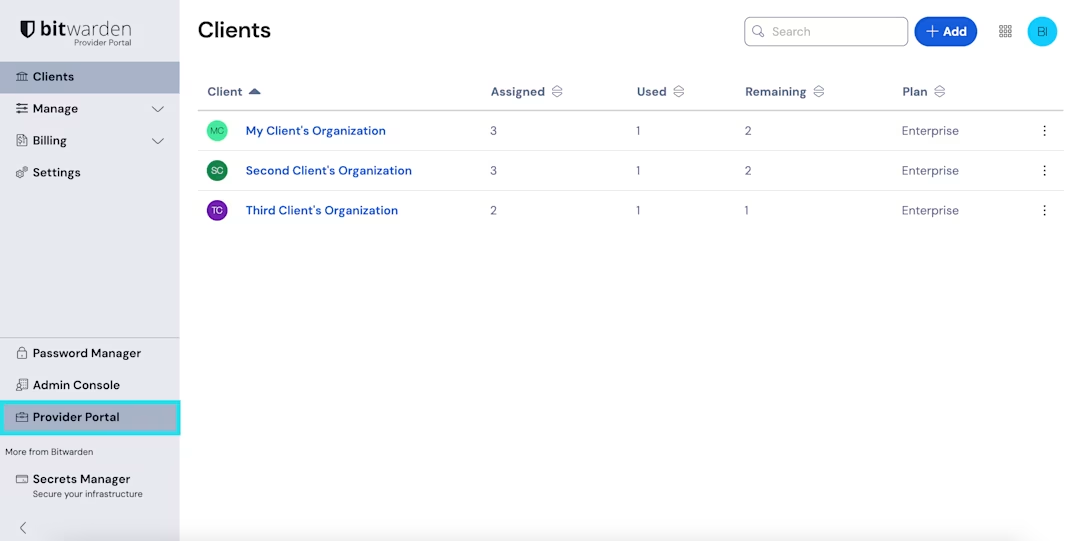
1、使用产品切换器打开**提供商门户**：

<div align="left" data-with-frame="true"><figure><img src="https://bitwarden.com/assets/4xn04Sj9u8n73TPxZUWi5f/dac0d56f47a05e2d8b28754e997a1391/2025-02-25_15-16-00.png?w=1080&#x26;fm=avif" alt=""><figcaption><p>品切换器 - 提供商门户</p></figcaption></figure></div>

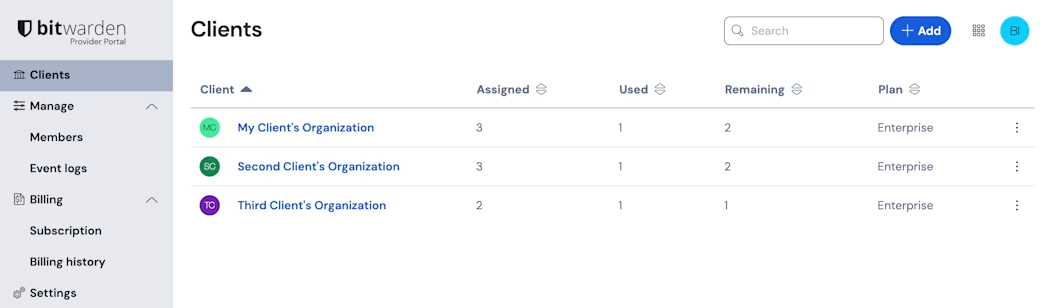
2、从**客户**选项卡中选择要管理的客户组织：

<div align="left" data-with-frame="true"><figure><img src="https://bitwarden.com/assets/7AoSHeZgJJTBXQmpZ13UBr/56ca464fe6987c8c5fc8e7099235d640/2025-02-25_15-17-46.png?w=1050&#x26;fm=avif" alt=""><figcaption><p>提供商门户</p></figcaption></figure></div>

进入客户的管理控制台后，您可以全面管理客户组织，包括以下重要的任务：

{% hint style="danger" %}
提供商用户不再能直接查看、管理、创建或导出客户组织密码库中的项目。但提供商用户可以直接向客户组织导入密码库数据。
{% endhint %}

| 任务        | 描述                                  | 资源                                                                                                                                          |
| --------- | ----------------------------------- | ------------------------------------------------------------------------------------------------------------------------------------------- |
| 添加和移除用户   | 当他们加入或离开客户的组织时，从 Bitwarden 入职和离职用户。 | <p><a href="/pages/-M2Y_k19IjdsCL68mtV_#onboard-users">用户入职</a></p><p><br><a href="/pages/-M2Y_k19IjdsCL68mtV_#offboard-users">用户离职</a></p> |
| 更改用户权限    | 当最终用户更改角色时，根据需要更改他们的权限。             | [用户类型和访问控制](/docs/admin-console/manage-members/member-roles.md)                                                                             |
| 添加和移除用户席位 | 随着客户业务的增长，管理客户组织的用户席位的数量。           | [管理用户席位](/docs/admin-console/manage-members/user-management.md#manage-user-seats)                                                           |
| 重置用户主密码   | 如果启用，使用管理员密码重置来恢复忘记主密码的最终用户账户。      | [管理员密码重置](/docs/admin-console/manage-members/account-recovery/about-account-recovery.md)                                                    |
| 安全的一次性共享  | 使用 Bitwarden 安全地一次性共享凭据、文档等。        | [创建 Send](/docs/password-manager/bitwarden-send/create-a-send.md)                                                                           |
| 监控密码库健康   | 使用组织密码库健康报告和事件日志来密切关注客户组织的整体健康状况。   | <p><a href="/pages/-MFTjKbvlhetLYe1ueE2">密码库健康报告</a></p><p><a href="/pages/-MFTpQF5ifa5p0TJjB6g">事件日志</a></p>                               |

此外，**如果您的服务用户帮助培训客户的最终用户使用 Bitwarden**，以下资源可能会有所帮助：

| 任务                | 描述                                         | 资源                                                                                    |
| ----------------- | ------------------------------------------ | ------------------------------------------------------------------------------------- |
| 用户注册              | 帮助最终用户注册 Bitwarden 账户。                     | [注册](https://vault.bitwarden.com/#/register)                                          |
| 观看培训视频            | 分享我们过去进行的一些培训。                             | [Bitwarden 入门](https://bitwarden.com/getting-started)                                 |
| 帮助用户导入他们的数据       | 如果您的客户允许，请向用户提供将其个人数据导入 Bitwarden 的说明。     | [导入数据到密码库](/docs/password-manager/import-and-export/import-data.md)                   |
| 帮助设置两步登录          | 向用户提供说明以帮助完成两步登录设置。                        | [两步登录方式](/docs/account/two-step-login/setup-two-step-login/two-step-login-methods.md) |
| 演示 Bitwarden 应用程序 | 帮助用户了解 Bitwarden 移动 App、浏览器扩展以及其他 App 的优势。 | [入门指南](/docs/password-manager/getting-started.md)                                     |
| 演示注册              | 鼓励高级用户通过参加每周演示来独立学习。                       | [Bitwarden 事件](https://www.crowdcast.io/bitwarden)                                    |

---

# Agent Instructions: Querying This Documentation

If you need additional information that is not directly available in this page, you can query the documentation dynamically by asking a question.

Perform an HTTP GET request on the current page URL with the `ask` query parameter:

```
GET https://help.ppgg.in/docs/provider-portal/ongoing-administration.md?ask=<question>
```

The question should be specific, self-contained, and written in natural language.
The response will contain a direct answer to the question and relevant excerpts and sources from the documentation.

Use this mechanism when the answer is not explicitly present in the current page, you need clarification or additional context, or you want to retrieve related documentation sections.