# 取消链接客户组织

{% hint style="success" %}
对应的[官方文档地址](https://bitwarden.com/help/article/client-org-removal/)
{% endhint %}

作为提供商，如果您不再向某个组织提供服务，您可能需要解除与该组织的提供商 - 客户关系。要移除客户端组织，需满足以下条件：

* 您必须是[提供商管理员](/docs/provider-portal/provider-users.md#provider-user-types)。
* 客户组织必须至少有一名[已确认的所有者](/docs/admin-console/manage-members/user-management.md#onboard-users)。

{% hint style="info" %}
客户组织只能通过提供商门户界面解除链接，无法直接**删除**。如需删除客户端组织，您必须是提供商管理员，按照以下步骤操作：

1. 打开客户组织，导航到**设置** → **组织信息**。
2. 滚动至**危险区域**界面，然后选择**删除组织**。
   {% endhint %}

满足这些条件后：

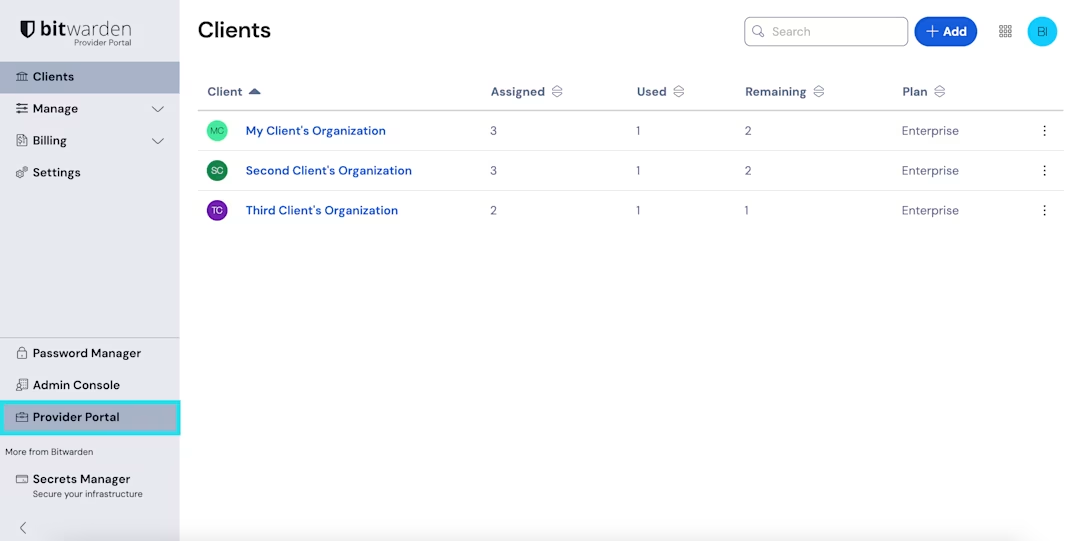
1、使用产品切换器打开提供商门户：

<div align="left" data-with-frame="true"><figure><img src="https://bitwarden.com/assets/4xn04Sj9u8n73TPxZUWi5f/dac0d56f47a05e2d8b28754e997a1391/2025-02-25_15-16-00.png?w=1080&#x26;fm=avif" alt=""><figcaption><p>产品切换器 - 提供商门户</p></figcaption></figure></div>

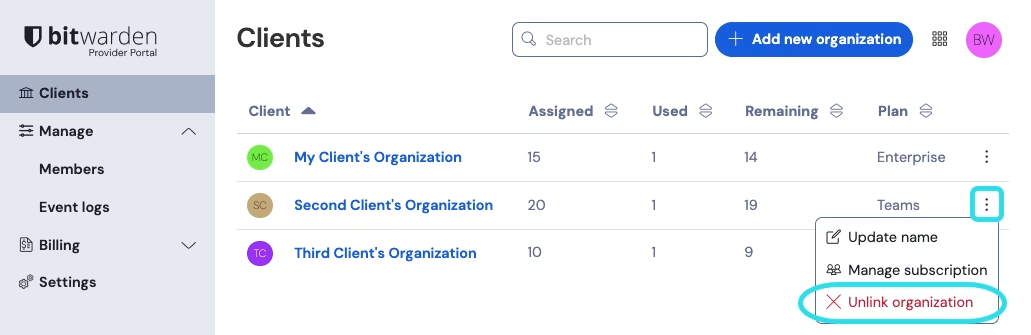
2、在客户视图中，使用所需客户组织的 **≡**&#x9009;项菜单，选择 **✘取消链接组织**选项：

<div align="left" data-with-frame="true"><figure><img src="https://bitwarden.com/assets/5U9GTBeSblIONdtg4q1duw/3579f9c80ca8f188d24a7910d8506643/2024-12-05_09-39-10.png?w=1031&#x26;fm=avif" alt=""><figcaption><p>取消链接客户组织</p></figcaption></figure></div>

{% hint style="success" %}
客户组织取消链接后，他们将需要设置自己的计费方式，以保留对 Bitwarden 服务的访问权限。
{% endhint %}


---

# Agent Instructions: Querying This Documentation

If you need additional information that is not directly available in this page, you can query the documentation dynamically by asking a question.

Perform an HTTP GET request on the current page URL with the `ask` query parameter:

```
GET https://help.ppgg.in/docs/provider-portal/unlink-client-organization.md?ask=<question>
```

The question should be specific, self-contained, and written in natural language.
The response will contain a direct answer to the question and relevant excerpts and sources from the documentation.

Use this mechanism when the answer is not explicitly present in the current page, you need clarification or additional context, or you want to retrieve related documentation sections.