# GitLab CI/CD

{% hint style="success" %}
对应的[官方文档地址](https://bitwarden.com/help/gitlab-integration/)
{% endhint %}

Bitwarden 提供了一种使用 Bitwarden [Secrets Manager CLI](/docs/secrets-manager/developer-tools/secrets-manager-cli.md) 将机密注入 [GitLab CI/CD](https://docs.gitlab.com/ee/ci/) 流水线的方法。这使您可以在 CI/CD 工作流中安全地存储和使用机密。要开始：

## 保存访问令牌 <a href="#save-an-access-token" id="save-an-access-token"></a>

在这个步骤中，我们将把[访问令牌](/docs/secrets-manager/your-secrets/access-tokens.md)保存为 GitLab CI/CD 变量。该令牌被用于使用 Bitwarden Secrets Manager API 进行身份验证以及获取[机密](/docs/secrets-manager/your-secrets/secrets.md)。

1. 在 GitLab 中，导航到您的项目的 **设置** → **CI/CD** 页面。
2. 在**变量**部分中选择**展开**。
3. 选择**添加变量**。
4. 勾选**隐藏变量**标记。
5. 将**键**命名为 `BWS_ACCESS_TOKEN`。这是 Secrets Manager CLI 用于进行[身份验证](/docs/secrets-manager/developer-tools/secrets-manager-cli.md#authentication)的变量。或者，如果您需要将**键**命名为其他名称，请稍后在 `bws secret get` 行中指定 `--access-token NAME_OF_VAR`。
6. 在另一个选项卡中打开 Secrets Manager Web 应用程序，然后[创建一个访问令牌](/docs/secrets-manager/your-secrets/access-tokens.md)。
7. 返回 GitLab，将新创建的访问令牌粘贴到**值**字段中。
8. 选择**添加变量**以保存。
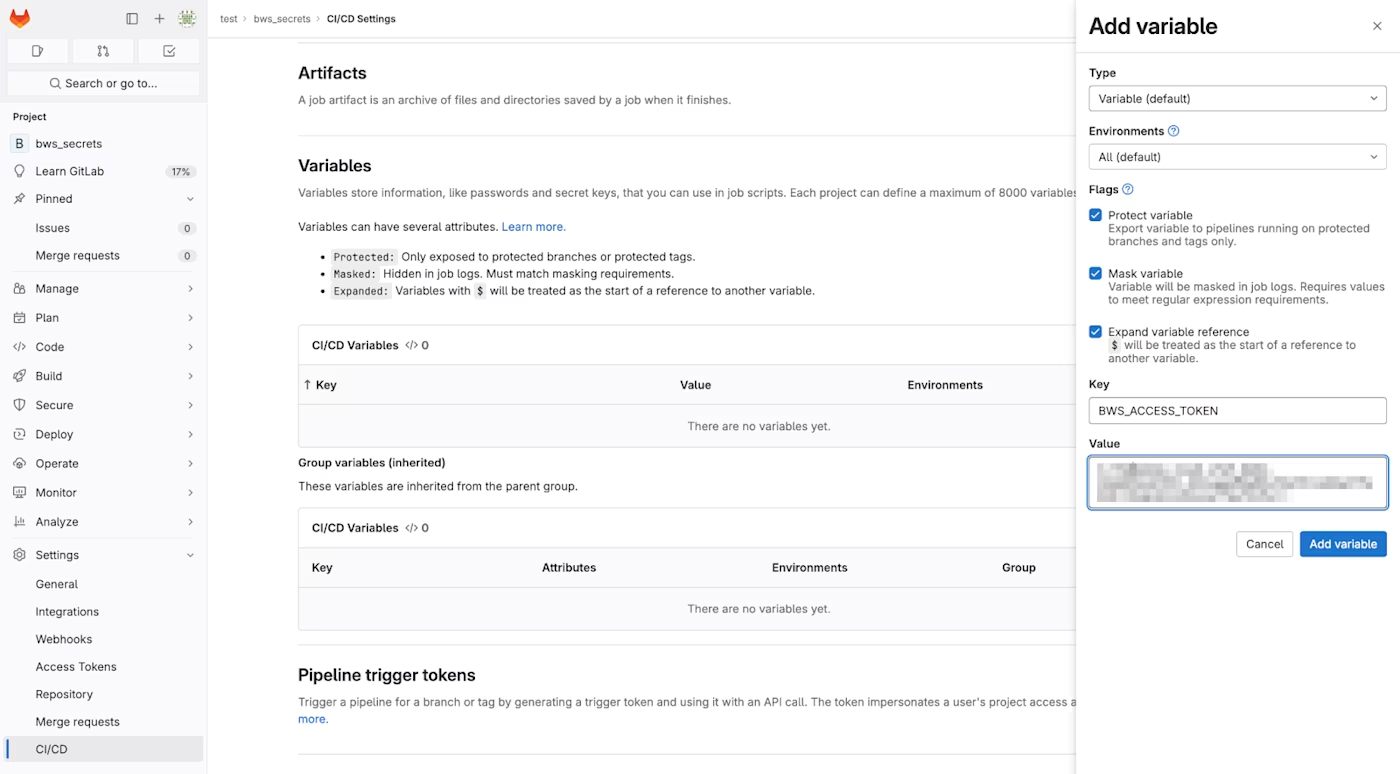
<div align="left" data-with-frame="true"><figure><img src="https://bitwarden.com/assets/5oaev7YcHn7ndLaofLb8Uw/2c653506fca3ca2300ce93e226e163e8/gitlab_variables.png?w=1400&#x26;fm=avif" alt=""><figcaption><p>在 GitLab 中添加一个变量</p></figcaption></figure></div>

## 添加到您的工作流文件 <a href="#add-to-your-workflow-file" id="add-to-your-workflow-file"></a>

接下来，我们编写一个简单的 GitLab CI/CD 工作流文件。在您的代码库的根目录中创建一个名为 `.gitlab-ci.yml` 的文件，并包含以下内容：

```yaml
stages:
- default_runner

image: ubuntu
build:
  stage: default_runner
  script: 
  - |
    # install bws
    apt-get update && apt-get install -y curl git jq unzip
    export BWS_VER="1.0.0"
    curl -LO \
      "https://github.com/bitwarden/sdk/releases/download/bws-v$BWS_VER/bws-x86_64-unknown-linux-gnu-$BWS_VER.zip"
    unzip -o bws-x86_64-unknown-linux-gnu-$BWS_VER.zip -d /usr/local/bin

  # use the `bws run` command to inject secrets into your commands
  - bws run -- 'npm run start'
```

说明：

* `BWS_VER` 是要安装的 Bitwarden Secrets Manager CLI 的版本。您可以通过将其更改为指定的版本（例如 `BWS_VER="0.3.1"`）来固定要安装的版本，。
* `534cc788-a143-4743-94f5-afdb00a40a41` 和 `9a0b500c-cb3a-42b2-aaa2-afdb00a41daa` 是存储在 Secrets Manager 中的机密的引用标识符。您的访问令牌所属的机器账户必须能够访问这些特定的机密。
* `npm run start` 是一个命令，它期望通过 `bws` 获取的机密值。请将其替换为运行您的项目所需的相关命令。

{% hint style="danger" %}
机密被存储为环境变量。[避免运行那些会将这些机密输出到日志中的命令](https://docs.gitlab.com/ee/ci/variables/#cicd-variable-security)非常重要。
{% endhint %}

## 运行 CI/CD 流水线 <a href="#run-the-ci-cd-pipeline" id="run-the-ci-cd-pipeline"></a>

在左侧，选择**构建** → **流水线**，然后在页面右上角选择**运行流水线**。在页面上选择**运行流水线**以运行刚创建的流水线。


---

# Agent Instructions: Querying This Documentation

If you need additional information that is not directly available in this page, you can query the documentation dynamically by asking a question.

Perform an HTTP GET request on the current page URL with the `ask` query parameter:

```
GET https://help.ppgg.in/docs/secrets-manager/integrations/gitlab-ci-cd.md?ask=<question>
```

The question should be specific, self-contained, and written in natural language.
The response will contain a direct answer to the question and relevant excerpts and sources from the documentation.

Use this mechanism when the answer is not explicitly present in the current page, you need clarification or additional context, or you want to retrieve related documentation sections.
