> For the complete documentation index, see [llms.txt](https://help.ppgg.in/llms.txt). Markdown versions of documentation pages are available by appending `.md` to page URLs; this page is available as [Markdown](https://help.ppgg.in/docs/secrets-manager/your-secrets/access-tokens.md).

# 访问令牌

{% hint style="success" %}
对应的[官方文档地址](https://bitwarden.com/help/access-tokens/)
{% endhint %}

访问令牌是一种对象，它允许[机器账户](/docs/secrets-manager/your-secrets/machine-accounts.md)访问和解密、编辑和创建存储在 Secrets Manager 中的[机密](/docs/secrets-manager/your-secrets/secrets.md)。访问令牌颁发给特定的机器账户，并且任何应用了该令牌的机器**仅能访问与该机器账户关联的机密**。

## 创建访问令牌 <a href="#create-an-access-token" id="create-an-access-token"></a>

访问令牌永远不会存储在 Bitwarden 数据库中并且无法找回，因此在生成访问令牌时请务必将其存储在安全的地方。要创建访问令牌：

1、从导航中选择**机器账户**。

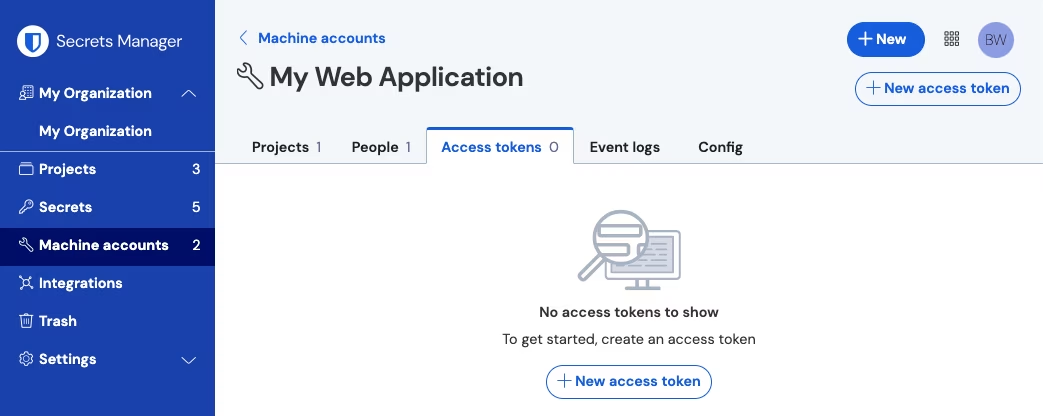
2、选择要为其创建访问令牌的机器账户，然后打开**访问令牌**选项卡：

<div align="left" data-with-frame="true"><figure><img src="https://bitwarden.com/assets/6EINDaXiPQp9qQcO6q1zt5/259e6c2c6e91e0df63c83d03a89ac4a2/2024-12-03_11-31-26.png?w=1043&#x26;fm=avif" alt=""><figcaption><p>创建访问令牌</p></figcaption></figure></div>

3、选择**创建访问令牌**按钮。

4、在「创建访问令牌」窗口中，提供以下信息：

* 令牌的**名称**。
* 令牌的**到期**时间。默认为「从不」。

5、完成令牌配置后，选择**创建访问令牌**按钮。

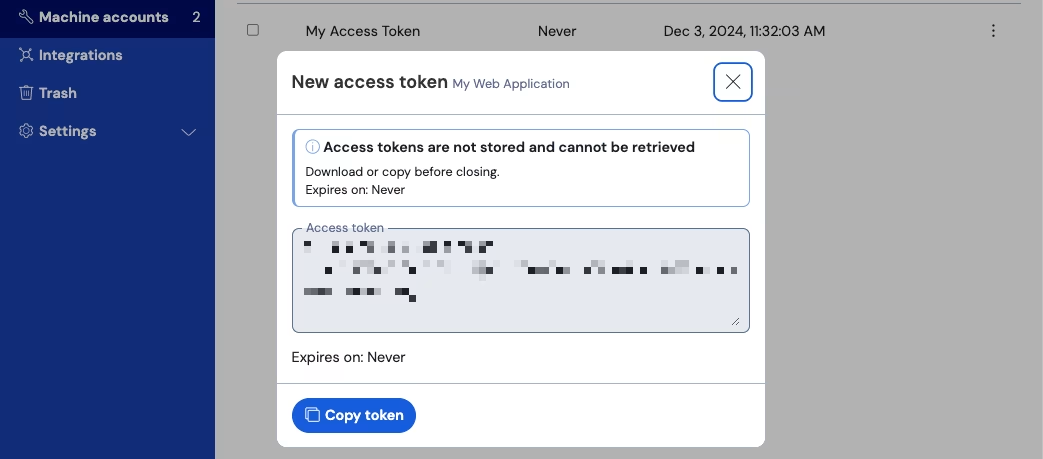
6、将出现一个显示访问令牌的窗口。关闭此窗口之前请将您的令牌复制到安全的地方，因为您的令牌**不会被存储并且以后无法获取**：

<div align="left" data-with-frame="true"><figure><img src="https://bitwarden.com/assets/3QfpdSQai2hFrWGdGSlQRN/a5a5483cfbbbf690a8436043be58cea7/2024-12-03_11-32-26.png?w=1043&#x26;fm=avif" alt=""><figcaption><p>访问令牌示例</p></figcaption></figure></div>

此访问令牌是身份验证工具，通过它您可以编写机密注入脚本到您的机器和应用程序中。

## 使用访问令牌 <a href="#use-an-access-token" id="use-an-access-token"></a>

访问令牌用于 [Secrets Manager CLI](/docs/secrets-manager/developer-tools/secrets-manager-cli.md) 的身份验证。您创建了访问令牌并将其值保存在安全的地方后，就可以通过 CLI 来使用它验证机密检索命令，以注入您的应用程序或基础设施。它可以：

* 将访问令牌导出到主机上的 `BWS_ACCESS_TOKEN` 环境变量。如下所示的 CLI 命令将自动检查具有该密钥的变量以进行身份​​验证：

  ```batch
  bws get secret fc3a93f4-2a16-445b-b0c4-aeaf0102f0ffText C
  ```
* 在脚本中使用 `-access-token` 选项 `get` 和注入机密，例如包含以下行的内容：

  ```batch
  ...
  export DB_PW=$(bws get secret fc3a93f4-2a16-445b-b0c4-aeaf0102f0ff --access-token 0.48c78342-1635-48a6-accd-afbe01336365.C0tMmQqHnAp1h0gL8bngprlPOYutt0:B3h5D+YgLvFiQhWkIq6Bow== | .jq '.value')
  ...
  docker run -d database ... -env DB_PW=$DB_PW ... mysql:latest
  ```
* 使用我们专用的 [GitHub Actions 集成](/docs/secrets-manager/integrations/github-actions.md)将访问令牌保存为存储库机密，以便在您的工作流文件中使用。

## 吊销访问令牌 <a href="#revoke-an-access-token" id="revoke-an-access-token"></a>

您可以随时吊销访问令牌。**吊销令牌将破坏当前使用它的任何机器检索和解密机密的能力**。要吊销令牌：

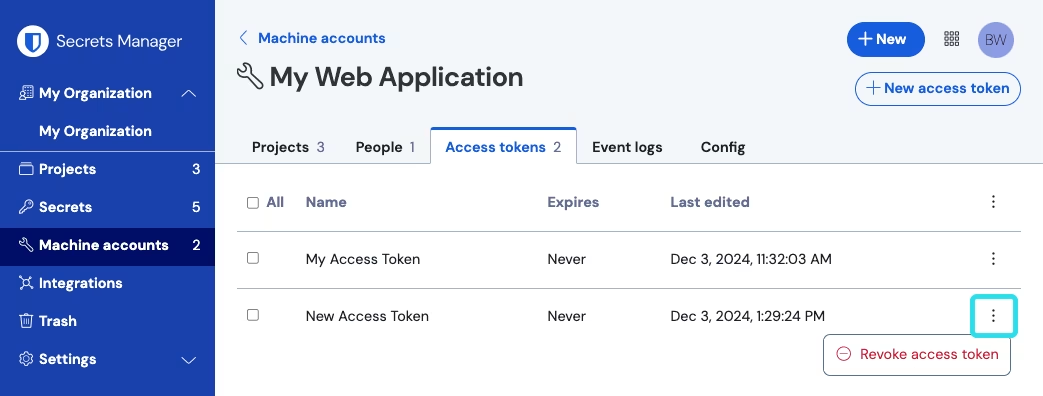
1、从导航中选择**机器账户**，然后打开**访问令牌**选项卡。

2、对于要撤销的访问令牌，使用 (**≡**) 选项菜单选择**吊销访问令牌**：

<div align="left" data-with-frame="true"><figure><img src="https://bitwarden.com/assets/1rujDBqHJ6lYy26kqmTZw4/38b09b908992c91639a49012adbec93c/2024-12-03_13-40-17.png?w=1043&#x26;fm=avif" alt=""><figcaption><p>吊销访问令牌</p></figcaption></figure></div>


---

# Agent Instructions
This documentation is published with GitBook. GitBook is the documentation platform designed so that both humans and AI agents can read, navigate, and reason over technical content effectively. Learn more at gitbook.com.

## Querying This Documentation
If you need additional information that is not directly available in this page, you can query the documentation dynamically by asking a question.

Perform an HTTP GET request on the current page URL with the `ask` query parameter, and the optional `goal` query parameter:

```
GET https://help.ppgg.in/docs/secrets-manager/your-secrets/access-tokens.md?ask=<question>&goal=<endgoal>
```

`ask` is the immediate question: it should be specific, self-contained, and written in natural language.
`goal` is optional and describes the broader end goal you are ultimately trying to accomplish on behalf of the user. GitBook uses it to tailor the answer towards what is most useful for that goal.

The response will contain a direct answer to the question and relevant excerpts and sources from the documentation.

Use this mechanism when the answer is not explicitly present in the current page, you need clarification or additional context, or you want to retrieve related documentation sections.