# 机器账户

{% hint style="success" %}
对应的[官方文档地址](https://bitwarden.com/help/service-accounts/)
{% endhint %}

{% hint style="info" %}
自 2024.4.1 版本起，在 Bitwarden Secrets Manager 中的服务账户现在称为机器账户。所有功能将保持不变。
{% endhint %}

机器账户代表非人类机器用户，例如，需要以编程方式访问一组谨慎的[机密](/docs/secrets-manager/your-secrets/secrets.md)的应用程序或部署管道。机器账户可用于：

* 适当地限制机器用户对一定范围的机密的访问权限。
* 颁发[访问令牌](/docs/secrets-manager/your-secrets/access-tokens.md)以促进对机密的编程访问和解密能力。

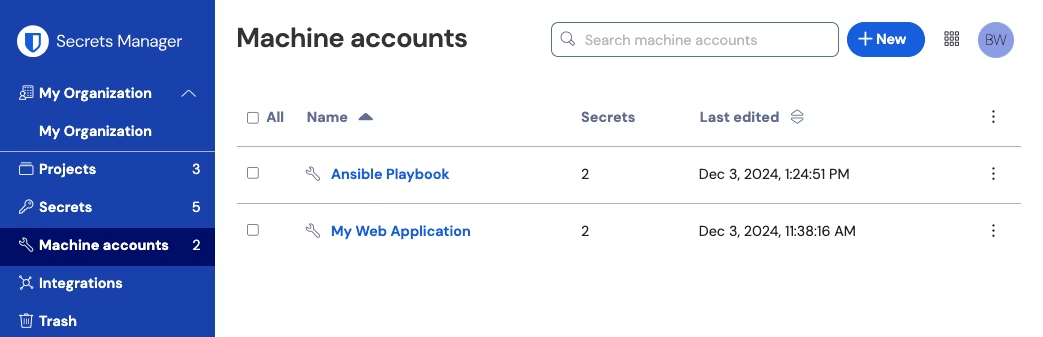
您可以通过从导航中选择**机器账户**查看您的用户账户拥有访问权限的机器账户：

<div align="left" data-with-frame="true"><figure><img src="https://bitwarden.com/assets/3IQzFGc9f4OAoqvJSgrEBn/601542ce696652aac733e63b18cdffb0/2024-12-03_13-25-13.png?w=1043&#x26;fm=avif" alt=""><figcaption><p>机器账户</p></figcaption></figure></div>

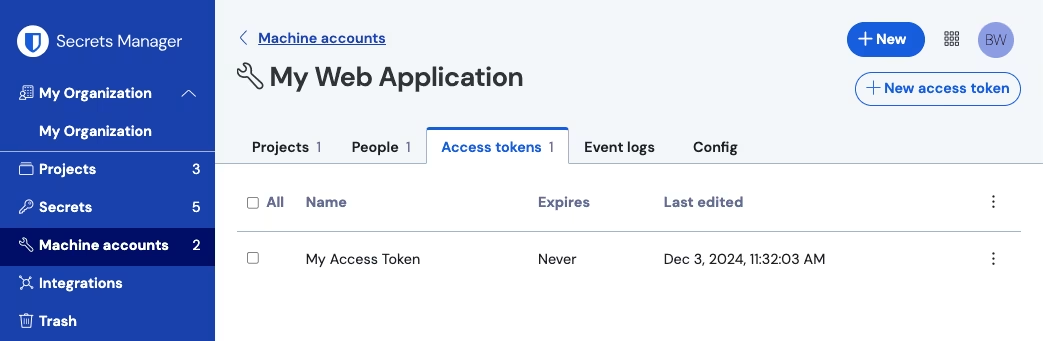
打开机器账户将列出此机器账户拥有访问权限的**机密**和**人员**，以及任何已生成的**访问令牌**和**事件日志**：

<div align="left" data-with-frame="true"><figure><img src="https://bitwarden.com/assets/3L9EGMDn7gGAMi3uwD1MIP/74dd29c2c80c1d67ee3b27bd5160e8b7/2024-12-03_13-26-04.png?w=1043&#x26;fm=avif" alt=""><figcaption><p>机器账户内部</p></figcaption></figure></div>

## 创建机器账户 <a href="#create-a-machine-account" id="create-a-machine-account"></a>

在管理控制台的**计费** → **订阅**页面上，您可以分配可供组织使用的机器账户的数量。有关可用机器账户和机器账户扩展的更多信息，请参阅[此处](/docs/secrets-manager/get-started/secrets-manager-quick-start.md#user-seats-and-service-account-scaling)。

要创建一个新的机器账户：

{% embed url="<https://vimeo.com/845933062>" %}

[此处](/docs/secrets-manager/your-secrets/machine-accounts.md)了解更多有关机器账户的信息。

* **00:10**：什么是机器账户？
* **00:19**：机器账户有什么用？
* **00:33**：如何添加机器账户

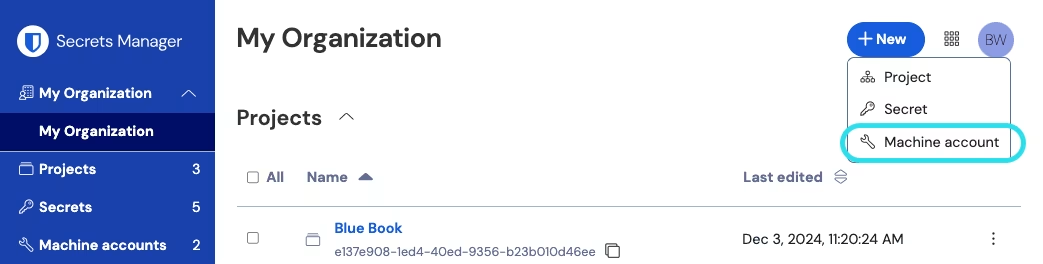
1、使用**新增**下拉菜单选择**机器账户**：

<div align="left" data-with-frame="true"><figure><img src="https://bitwarden.com/assets/LaVwicbqhvbliXPm6loOU/5559a5caf8ad70a95be3ea89f1b760ad/2024-12-03_11-29-17.png?w=1043&#x26;fm=avif" alt=""><figcaption><p>新增机器账户</p></figcaption></figure></div>

2、输入**机器账户名称**，然后选择**保存**。

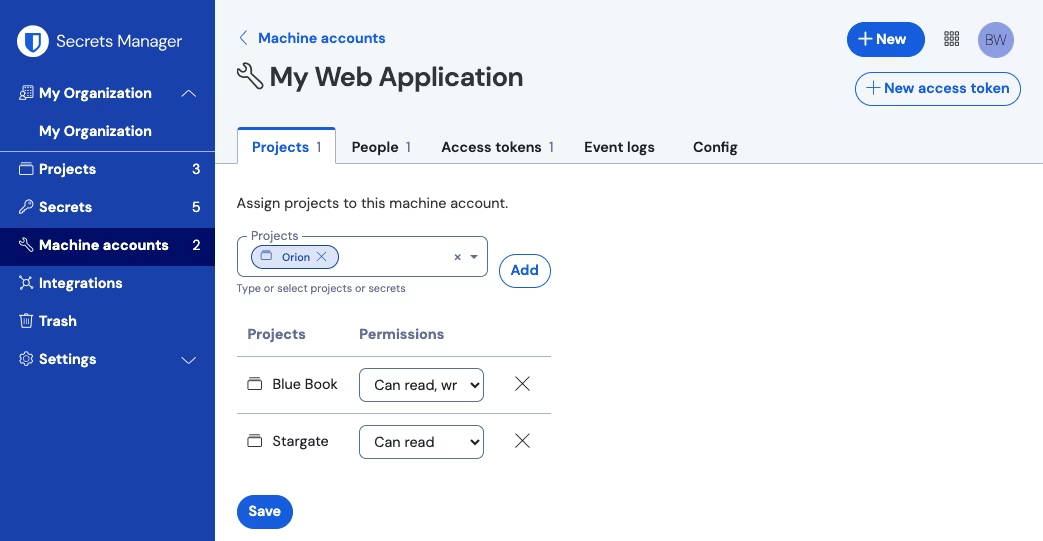
3、打开「机器账户」，然后在**工程**选项卡中键入或选择该机器账户应能够访问的工程的名称。对于每个添加的工程，选择一个**权限**级别：

* **可以读取**：机器账户可以从分配的工程中检索机密。
* **可以读取和写入**：机器账户可以从分配的工程中检索和编辑机密，在分配的工程中创建新的机密，或者完全创建新的工程。

{% hint style="success" %}
机器账户的写入​​访问权限的充分利用取决于即将发布的 [CLI](/docs/secrets-manager/developer-tools/secrets-manager-cli.md) 版本。目前，这只是在 UI 中提供了此选项。请继续关注[发行说明](/docs/release-notes.md)以获取更多信息。
{% endhint %}

## 添加人员到机器账户 <a href="#add-people-to-a-machine-account" id="add-people-to-a-machine-account"></a>

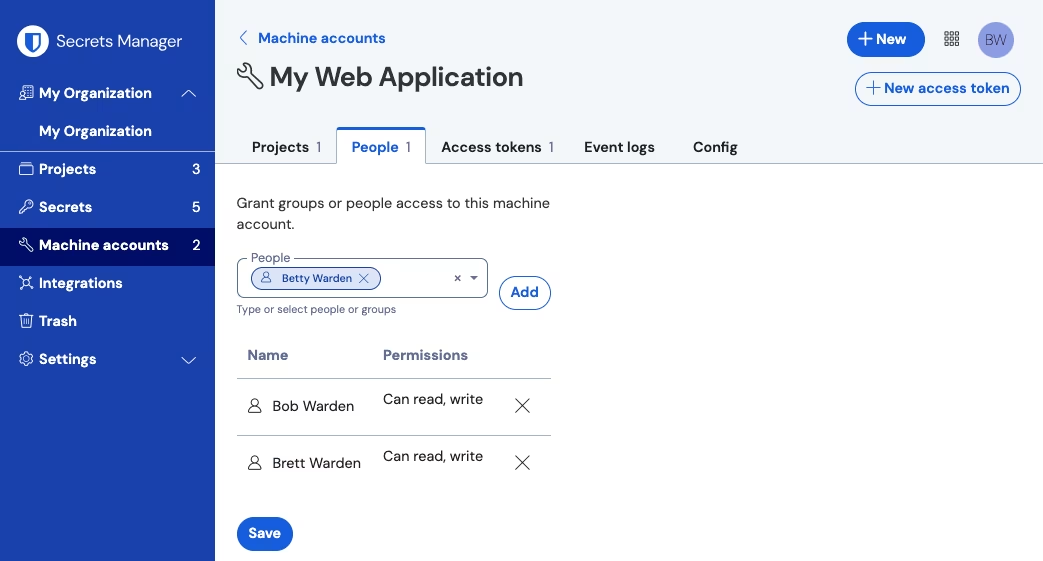
将组织成员添加到机器账户将允许他们为机器账户生成访问令牌并与机器账户具有访问权限的所有机密进行交互。要将人员添加到您的机器账户：

1、在「机器账户」中，选择**人员**选项卡。

2、从「人员」下拉列表中，输入或选择要添加到工程的成员或群组。选择了合适的人员后，选择**添加**按钮：

<div align="left" data-with-frame="true"><figure><img src="https://bitwarden.com/assets/3TrklnCquoynDHFX6nJ8w/2482453bf759525ccb6d23f8e9731a7d/2024-12-03_13-27-11.png?w=1043&#x26;fm=avif" alt=""><figcaption><p>将人员添加到机器账户</p></figcaption></figure></div>

## 添加工程到机器账户 <a href="#add-projects-to-a-machine-account" id="add-projects-to-a-machine-account"></a>

将工程添加到机器账户将允许使用访问令牌以编程方式访问包含的机密。您可以将新工程和现有工程添加到机器账户：

要将工程添加到机器账户：

1、在「机器账户」中，选择**工程**选项卡。

2、从「工程」下拉菜单中，键入或选择要添加到机器账户的工程。选择正确的工程后，选择**添加**按钮：

<div align="left" data-with-frame="true"><figure><img src="https://bitwarden.com/assets/3XGkQt3MdNHmAoKLXXXMGh/2c68b9ea5a47885f35360a94d26f0442/2024-12-03_13-28-00.png?w=1043&#x26;fm=avif" alt=""><figcaption><p>添加工程</p></figcaption></figure></div>

3、对于每个已添加的工程，选择一个**权限**级别：

* **可以读取**：机器账户可以从分配的工程中检索机密。
* **可以读取和写入**：机器账户可以从分配的工程中检索和编辑机密，在分配的工程中创建新的机密，或者完全创建新的工程。

## 删除机器账户 <a href="#delete-a-machine-account" id="delete-a-machine-account"></a>

要删除机器账户，请使用要删除的机器账户的 (**≡**) 选项菜单选择**删除机器账户**。删除机器账户不会删除与其关联的机密。机器账户一旦删除就会被完全移除，**不会**像[机密那样被发送到回收站](/docs/secrets-manager/your-secrets/secrets.md#delete-a-secret)。

## 机器账户事件 <a href="#machine-account-events" id="machine-account-events"></a>

每个机器账户执行操作的时间戳记录可从机器账户的**事件日志**选项卡中获得：

有权访问给定机器账户的任何用户都可以查看该机器账户的事件。捕获的事件包括：

* 访问了机密 *secret-identifier.* (`2100`)
* 向标识符为 *machine-account-identifier* 的机器账户添加了用户 *user-identifier* (`2300`)
* 从标识符为 *machine-account-identifier* 的机器账户移除了用户 *user-identifier* (`2301`)
* 向标识符为 *machine-account-identifier* 的机器账户添加了群组 *group-identifier* (`2302`)
* 从标识符为 *machine-account-identifier* 的机器账户移除了群组 *group-identifier* (`2303`)
* 创建了标识符为 *machine-account-identifier* 的机器账户 (`2304`)
* 删除了标识符为 *machine-account-identifier* 的机器账户 (`2305`)

{% hint style="info" %}
每个**事件**都与类型代码（`1000`、`1001` 等）关联，用于标识事件捕获的操作。[Bitwarden 公共 API](/docs/admin-console/bitwarden-public-api.md) 使用类型代码来识别事件记录的操作。
{% endhint %}

事件日志可导出并且无限期保留。导出事件将创建一个指定日期范围内所有事件的 `.csv` 文件，该日期范围不应超过 367 天。

## 配置信息 <a href="#configuration-information" id="configuration-information"></a>

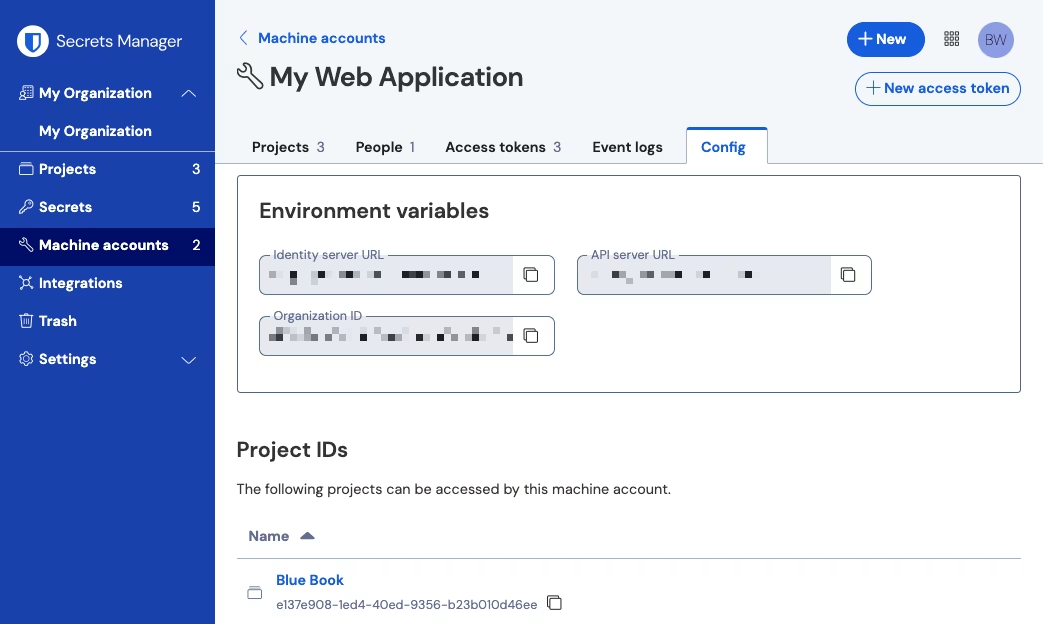
**配置**选项卡提供了配置应用程序以使用机器账户时可能需要的信息的快速视图。将显示**身份服务器 URL**、**API 服务器 URL**、**组织 ID** 和**工程 ID**，并且可以通过选择每个字段各自的 **❐**&#x56FE;标来复制它们。有关 Secrets Manager 环境的更多信息，请参阅 Secrets Manager [SDK 文档](/docs/secrets-manager/developer-tools/secrets-manager-sdk.md)和 [CLI 文档](/docs/secrets-manager/developer-tools/secrets-manager-cli.md)。

<div align="left" data-with-frame="true"><figure><img src="https://bitwarden.com/assets/4XRItVAnKy1iVtOM2DbDLg/97e60d73e9bf18823c98fa46c588f99e/2024-12-03_13-38-10.png?w=1043&#x26;fm=avif" alt=""><figcaption><p>机器账户配置视图</p></figcaption></figure></div>


---

# Agent Instructions: Querying This Documentation

If you need additional information that is not directly available in this page, you can query the documentation dynamically by asking a question.

Perform an HTTP GET request on the current page URL with the `ask` query parameter:

```
GET https://help.ppgg.in/docs/secrets-manager/your-secrets/machine-accounts.md?ask=<question>
```

The question should be specific, self-contained, and written in natural language.
The response will contain a direct answer to the question and relevant excerpts and sources from the documentation.

Use this mechanism when the answer is not explicitly present in the current page, you need clarification or additional context, or you want to retrieve related documentation sections.