> For the complete documentation index, see [llms.txt](https://help.ppgg.in/llms.txt). Markdown versions of documentation pages are available by appending `.md` to page URLs; this page is available as [Markdown](https://help.ppgg.in/docs/security/encryption/encryption-key-rotation.md).
# 加密密钥轮换
{% hint style="success" %}
对应的[官方文档地址](https://bitwarden.com/help/article/account-encryption-key/)
{% endhint %}
每个 Bitwarden 账户都有一个用于加密所有密码库数据的加密密钥。
{% hint style="warning" %}
**轮换加密密钥是潜在的危险操作。**请通读本章节,以了解这样做的全部后果。
{% endhint %}
轮换账户的加密密钥会生成一个新的加密密钥,用于重新加密所有密码库数据。如果您的账户已被盗用,并且有人获得了您的加密密钥,则您应该考虑轮换您的加密密钥。
## 轮换前
在轮换前,您应该采取以下措施以防止潜在的数据丢失或损坏:
### 重新创建所有「账户限制」的导出
如果您使用「账户限制」的[加密导出](/docs/password-manager/import-and-export/encrypted-exports.md)来存储长期的安全备份,则应预先使用「密码保护」选项重新创建密码库数据的加密导出。
「账户限制」加密导出使用您的加密密钥来加密**以及解密**您的密码库数据,这意味着,经过轮换的加密密钥将无法解密使用「陈旧」(轮换前)的密钥创建的导出。将「账户限制」的导出替换为「密码保护」的导出,可确保您在轮换账户加密密钥后,如果需要,能够重新导入数据。
### 注销客户端应用程序
轮换加密密钥后,我们建议您注销 Bitwarden 客户端应用程序(桌面 App、浏览器扩展、移动 App 等)上的任何已登录的会话。这样,注销客户端 App 将可以防止会话使用「陈旧」(轮换前)的加密密钥。然后,像往常一样重新登录将使用新的加密密钥。
**在使用「陈旧」加密密钥的会话中进行更改将导致数据损坏,这将使您的数据无法恢复。**
## 如何轮换加密密钥
{% hint style="warning" %}
Bitwarden 建议在轮换账户加密密钥前备份您的项目。在此场景下,推荐使用「密码保护」的 `.json` 导出格式,**除「账户限制」**的 `.json` 导出格式外,任何格式在密钥轮换后均可重新导入。有关密码库导出以及包含哪些项目的更多信息,请参阅[导出密码库数据](/docs/password-manager/import-and-export/export-vault-data.md)。
{% endhint %}
要轮换您账户的加密密钥:
1、在网页 App 中,导航到**设置** → **安全** → **主密码**:
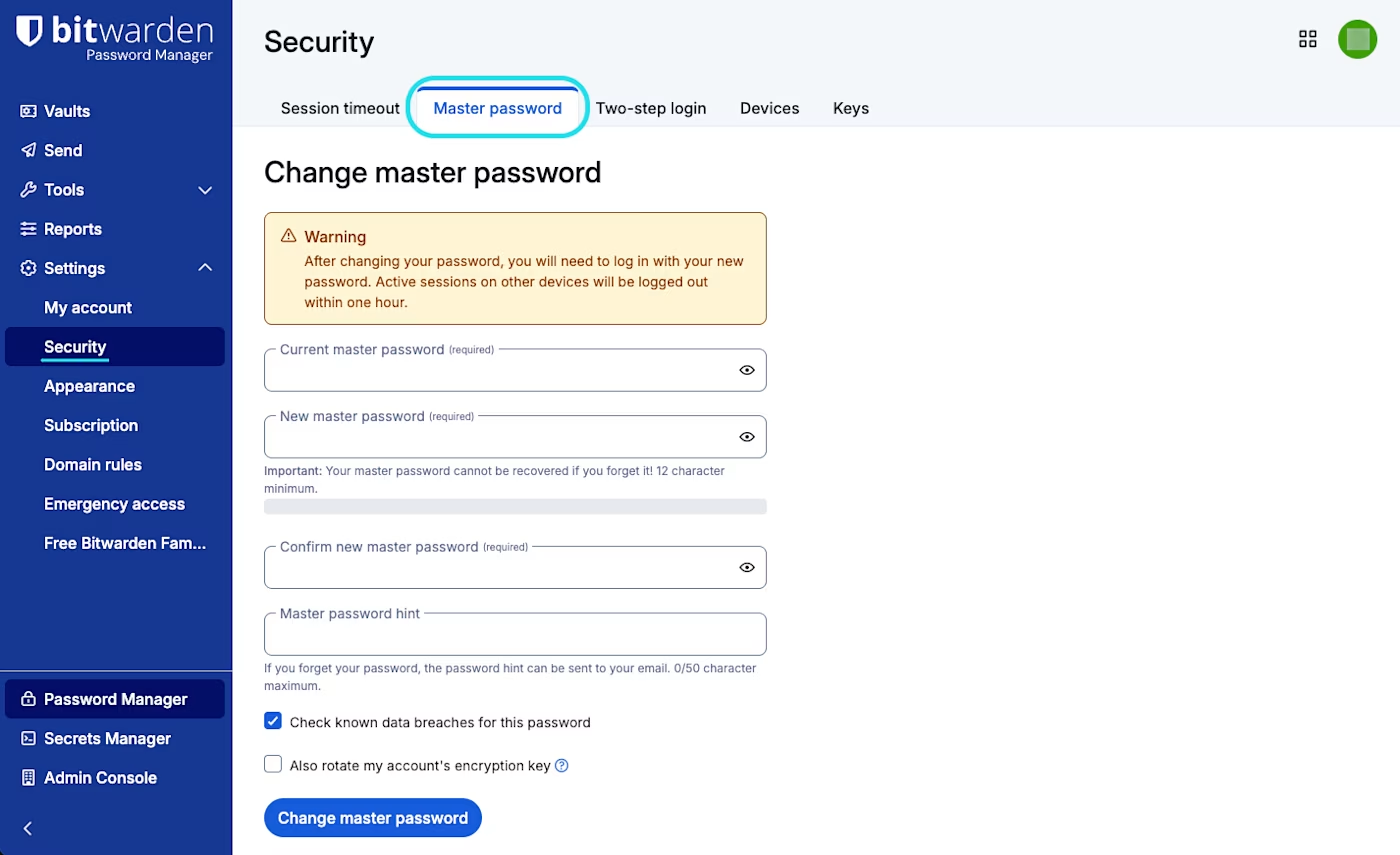
主密码设置