> For the complete documentation index, see [llms.txt](https://help.ppgg.in/llms.txt). Markdown versions of documentation pages are available by appending `.md` to page URLs; this page is available as [Markdown](https://help.ppgg.in/docs/security/trusted-communications/emails-from-bitwarden.md).

# 识别来自 Bitwarden 的合法电子邮件

{% hint style="success" %}
对应的[官方文档地址](https://bitwarden.com/help/emails-from-bitwarden/)
{% endhint %}

与使用强密码一样，避免可疑电子邮件也是您在线安全工具包中的重要一环。我们建议您熟悉 [FTC 指南](https://www.consumer.ftc.gov/articles/how-recognize-and-avoid-phishing-scams)，以识别和避免网络钓鱼。

以下是一些指导原则，可帮助您判断一封看似来自 Bitwarden 的电子邮件是否合法：

## 自动电子邮件 <a href="#automated-emails" id="automated-emails"></a>

### 产品交互电子邮件 <a href="#product-interaction-emails" id="product-interaction-emails"></a>

诸如新设备警报、[加入组织](/docs/admin-console/manage-members/user-management.md)的邀请、[请求对 Secrets Manager 的访问权限](/docs/secrets-manager/get-started/secrets-manager-quick-start.md#access-secrets-manager)，以及[两步登录代码](/docs/account/two-step-login/setup-two-step-login/two-step-login-via-email.md)或 [Send 验证码](/docs/password-manager/bitwarden-send/send-privacy.md#email-verified-recipients)之类的电子邮件将来自 `no-reply@bitwarden.com` 或 `no-reply@bitwarden.eu`，或者，如果您是自托管，则来自[已配置的域名](/docs/self-hosting/deploy-and-configure/docker/linux-standard-deployment.md#install-bitwarden)，例如 `no-reply@my.domain.com`。

{% hint style="info" %}
自版本 2024.9.2 起，在创建账户时发送给云端用户的电子邮件验证请求，也是从 `no-reply@bitwarden.com` 发出的：

<img src="https://res.cloudinary.com/bw-com/image/upload/f_auto/v1/ctf/7rncvj1f8mw7/2QR4MYirRuYyMJnkx5ce6e/858d2d1fc23440e31ce87a8ff6efa4f5/2024-09-26_10-01-00.png?_a=DAJCwlWIZAAB" alt="" data-size="original">
{% endhint %}

这些电子邮件**永远不会包含附件**。如果提示您下载文件，请向我们报告该电子邮件。

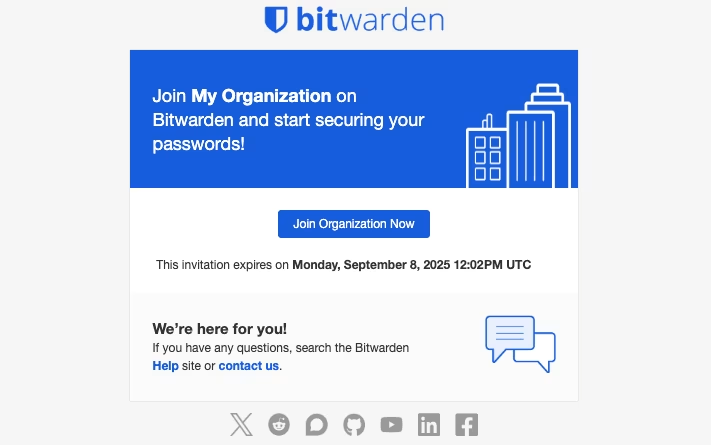
其中一些电子邮件（例如组织邀请）将包含按钮。在**单击超链接之前**，请务必总是检查此超链接的合法性，确认它指向 `https://vault.bitwarden.com` 或您组织的自托管域名。如果您不知道您组织的域名，请询问您的 IT 团队成员或管理员。

<div align="left" data-with-frame="true"><figure><img src="https://bitwarden.com/assets/4Fe96NuWb7yRe6muKf7UbZ/bcb1a8df0bc2ffdecbcd86b82d16c9a3/2025-09-03_10-41-25.png?w=711&#x26;fm=avif" alt=""><figcaption><p>组织邀请</p></figcaption></figure></div>

### 付款电子邮件 <a href="#payments-emails" id="payments-emails"></a>

个人高级版订阅和付费组织版订阅的自动付款电子邮件将来自 `invoice+statements@bitwarden.com` 地址。这些电子邮件**将包含**附件，具体来说是 PDF 格式的账单和收据。如果付款失败，您将收到一封来自 `failed-payments@bitwarden.com` 地址的通知电子邮件。

### 续费电子邮件 <a href="#renewals-emails" id="renewals-emails"></a>

对于即将到期的 Bitwarden 订阅，付费用户将收到电子邮件提醒即将续费。这些电子邮件将来自 `no-reply@bitwarden.com` 或 `no-reply@bitwarden.eu` 和 `upcoming-invoice@bitwarden.com` 地址。

## 交互式电子邮件 <a href="#opt-in-emails" id="opt-in-emails"></a>

在日常使用 Bitwarden 过程中，您会收到[自动电子邮件](#automated-emails)，如果您与 Bitwarden 生态系统的各个部分进行过交互，您也可能会收到来自以下地址的电子邮件：

* 支持请求：`support@bitwarden.com`
* 产品公告：`productupdates@bitwarden.com`
* 试用信息：`trial@bitwarden.com`&#x20;
* 营销活动：`marketing@bitwarden.com` 和 `care@bitwarden.com`。
* 来自 Bitwarden 团队成员的电子邮件：`@bitwarden.com`&#x20;

## 警告电子邮件 <a href="#alert-emails" id="alert-emails"></a>

Bitwarden 会在出现可疑活动（例如从未知设备登录和从未知设备尝试登录失败）时发送电子邮件警告。

这些电子邮件**永远不会包含附件**。如果提示您下载文件或点击未知链接，请联系我们。

### 新设备验证 <a href="#new-device-verification" id="new-device-verification"></a>

如果您的账户没有使用两步登录，当您从之前未登录过的设备首次登录时，您将收到一封包含验证码的电子邮件。[了解更多](/docs/account/log-in-and-unlock/new-device-protection.md)。

### 新设备登录 <a href="#new-device-logged-in" id="new-device-logged-in"></a>

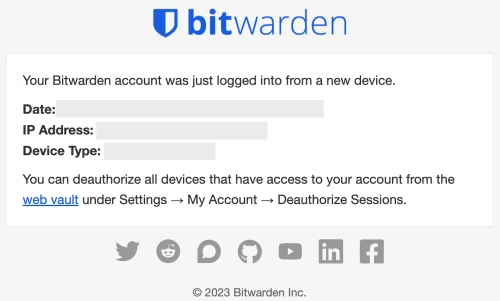
如果您的账户从未知设备成功登录，您将收到一封包含登录信息的电子邮件。

<div align="left" data-with-frame="true"><figure><img src="https://bitwarden.com/assets/3BPGGp6Wvm3NzDopPbkkj2/b8ff436931e2791d366dda3ea8ed078e/Screenshot_2023-03-29_at_4.05.28_PM.png?w=500&#x26;fm=avif" alt=""><figcaption><p>从未知设备登录电子邮件</p></figcaption></figure></div>

电子邮件内容包含：

* 日期
* IP 地址
* 设备类型

如果您无法识别该登录，请参阅[此处](/docs/security/security-faqs.md#q-what-do-i-do-if-i-dont-recognize-a-new-device-logging-into-bitwarden)并立即采取措施保护您的账户。

### 受信任设备请求被批准 <a href="#trusted-device-request-approved" id="trusted-device-request-approved"></a>

向组织管理员提出的[添加受信任设备](/docs/account/log-in-and-unlock/using-single-sign-on/add-a-trusted-device.md)的请求获得批准后，会向提出请求的用户发送一封电子邮件，通知他们可以继续在该设备上登录。**用户必须在 12 小时内登录新设备，否则批准将失效。**

电子邮件内容包含：

* 日期
* IP 地址
* 设备类型

### 检测到失败的登录尝试 <a href="#failed-login-attempts-detected" id="failed-login-attempts-detected"></a>

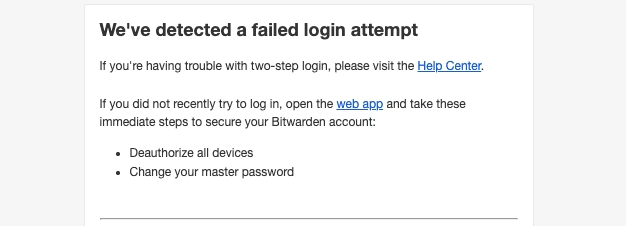
如果检测到错误的两步登录尝试，例如输入了错误的 TOTP 代码，您将收到一封电子邮件通知您：

<div align="left" data-with-frame="true"><figure><img src="https://bitwarden.com/assets/7oGzZ6B0WTuRKeKu7DBmAE/8a7b4517cab6b76fd474e05171be5fba/2025-08-28_11-07-13.png?w=626&#x26;fm=avif" alt=""><figcaption><p>失败的登录尝试电子邮件</p></figcaption></figure></div>

如果尝试的人是您，您可以放心地忽略这条信息。如果尝试的人**不是您**，则应立即[更改主密码](/docs/account/log-in-and-unlock/master-password.md#change-your-master-password)。

## 公告电子邮件 <a href="#announcement-emails" id="announcement-emails"></a>

### 主题：即将到来的登录变更（2024 年 12 月） <a href="#subject-upcoming-login-changes-dec.-2024" id="subject-upcoming-login-changes-dec.-2024"></a>

这封电子邮件于 2024 年 12 月从 `no-reply@bitwarden.com` 发送，旨在通知用户即将对新设备验证做出的更改。


---

# Agent Instructions
This documentation is published with GitBook. GitBook is the documentation platform designed so that both humans and AI agents can read, navigate, and reason over technical content effectively. Learn more at gitbook.com.

## Querying This Documentation
If you need additional information that is not directly available in this page, you can query the documentation dynamically by asking a question.

Perform an HTTP GET request on the current page URL with the `ask` query parameter, and the optional `goal` query parameter:

```
GET https://help.ppgg.in/docs/security/trusted-communications/emails-from-bitwarden.md?ask=<question>&goal=<endgoal>
```

`ask` is the immediate question: it should be specific, self-contained, and written in natural language.
`goal` is optional and describes the broader end goal you are ultimately trying to accomplish on behalf of the user. GitBook uses it to tailor the answer towards what is most useful for that goal.

The response will contain a direct answer to the question and relevant excerpts and sources from the documentation.

Use this mechanism when the answer is not explicitly present in the current page, you need clarification or additional context, or you want to retrieve related documentation sections.