# \*作为 MSP 部署 Bitwarden

{% hint style="success" %}
对应的 [GitHub 地址](https://github.com/bitwarden/help/blob/25bc445da1a9484e93ae6759ea2ef391d0c1881a/_articles/organizations/deploying-bitwarden-as-a-msp.md)
{% endhint %}

> **\[译者注]**：[MSP](https://wiki.mbalib.com/wiki/%E7%AE%A1%E7%90%86%E6%9C%8D%E5%8A%A1%E6%8F%90%E4%BE%9B%E5%95%86)：Managed Service Provider，托管服务提供商

Bitwarden 支持经销商和托管服务提供商 (MSP) 模式。您可以立即开始，而无需签署正式协议。如果您正在寻找有关 Bitwarden 合作伙伴计划的信息，请不要错过这篇文章。

本文详细介绍了一个推荐的实施方案，以帮助合作伙伴和他们的客户获得成功，同时也解答了一些关于我们合作伙伴计划的常见问题。

## Bitwarden 组织 <a href="#bitwarden-organizations" id="bitwarden-organizations"></a>

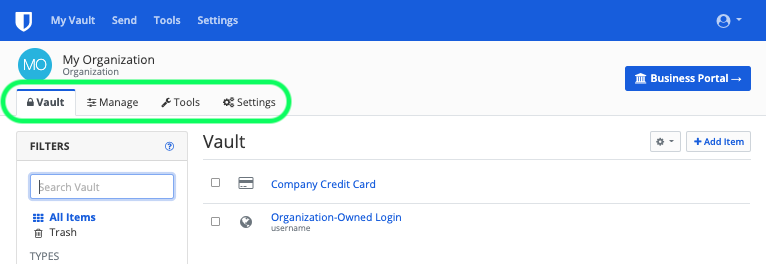
Bitwarden 组织将用户和密码库项目联系在一起，以便[安全地共享](/docs/password-manager/organization-members/sharing.md)登录、笔记、支付卡和身份信息。组织可以是一个家庭、团队、公司或任何需要安全地共享数据的人群。组织有一个独立的密码库，[管理员](/docs/admin-console/manage-members/member-roles.md)可以在那里管理组织的项目、用户和设置。

{% embed url="<https://raw.githubusercontent.com/bitwarden/help/25bc445da1a9484e93ae6759ea2ef391d0c1881a/images/organizations/org-vault-admin.png>" %}
组织密码库
{% endembed %}

MSP 应该为每一个客户[创建一个组织](/docs/admin-console/organizations-overview.md#create-an-organization)，或者客户可以为自己创建一个。你可以在好几种[组织类型](/docs/admin-console/organizations-overview.md#types-of-organizations-1)中你选择一种最适合您的客户的需要的类型。对于最强大的业务功能集，我们推荐[企业方案](/docs/plans-and-pricing/password-manager/about-bitwarden-plans.md#enterprise-organizations)。

在所有情况下，MSP 团队的成员应被[指定为所有者和管理者](/docs/admin-console/manage-members/member-roles.md)，以便他们能够管理该组织。管理员可以访问和管理组织中的所有项目、[集合](/docs/admin-console/manage-shared-items/collections/about-collections.md)和用户。应在多个用户之间分担管理职责，尤其是在有大量用户的组织中。

{% hint style="info" %}
为了确保你的组织的安全，Bitwarden 对新成员的加入采用了 3 个步骤：[邀请](/docs/admin-console/manage-members/user-management.md#invite) → [接受](/docs/admin-console/manage-members/user-management.md#accept) → [确认](/docs/admin-console/manage-members/user-management.md#confirm)。邀请发出后，应通知用户，如果需要，还可以帮助他们接受。
{% endhint %}

**一旦 MSP 团队的成员被配置为所有者和管理员，他们就可以管理和执行本文中剩余的所有任务。**

## 集合和群组 <a href="#collections-and-groups" id="collections-and-groups"></a>

Bitwarden 组织被设计为以可扩展和安全的方式管理用户和数据。在个人基础上管理用户和数据是非常低效的，并且会导致意外的错误管理。为了解决这个问题，组织提供了[集合](/docs/admin-console/manage-shared-items/collections/about-collections.md)和[群组](/docs/admin-console/manage-members/groups.md)功能。

### 集合 <a href="#collections" id="collections"></a>

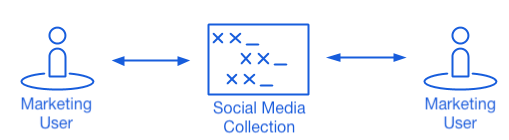
集合汇集了用于在一个组织内[安全共享](/docs/password-manager/organization-members/sharing.md)的登录、笔记、支付卡和身份信息。构建可扩展集合的常见方式包括：**按部门集合**（比如来自营销团队的用户被分配到 **Marketing** 集合），或**按功能集合**（比如营销团队的用户被分配到 **Social Media** 集合）：

{% embed url="<https://raw.githubusercontent.com/bitwarden/help/25bc445da1a9484e93ae6759ea2ef391d0c1881a/images/organizations/collections-graphic-1.png>" %}
集合
{% endembed %}

[学习如何创建集合](/docs/admin-console/manage-shared-items/collections/about-collections.md#create-a-collection)

### 群组 <a href="#groups" id="groups"></a>

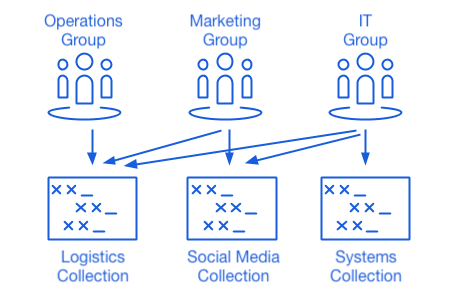
团队和企业组织也可以建立群组，群组将单个用户联系在一起，以提供一种可扩展的方式来分配权限，包括对集合的访问和其他访问控制。一种常见的群组 - 集合方式是**按部门创建群组**，按**功能创建集合**，例如：

{% embed url="<https://raw.githubusercontent.com/bitwarden/help/25bc445da1a9484e93ae6759ea2ef391d0c1881a/images/organizations/collections-graphic-2.png>" %}
群组
{% endembed %}

[学习如何创建群组](/docs/admin-console/manage-members/groups.md#create-a-group)

## 共享密码库项目 <a href="#share-vault-items" id="share-vault-items"></a>

现在已经创建了集合，并制定了使用群组将用户连接到凭证的计划，现在您就可以开始向组织中添加数据了。您可以直接将数据导入组织，也可以手动添加并共享数据。

## 用户管理 <a href="#user-management" id="user-management"></a>

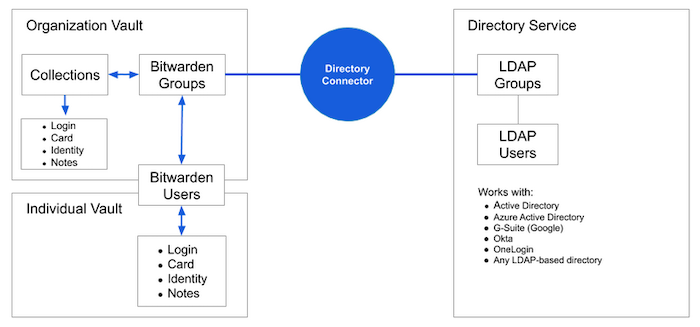
MSP 团队可以手动管理组织的用户，或使用 Directory Connector 从现有目录服务（LDAP、AD 等）同步用户和群组。对于大多数 MSP 客户来说，Directory Connector 是推荐的方式：

{% embed url="<https://raw.githubusercontent.com/bitwarden/help/25bc445da1a9484e93ae6759ea2ef391d0c1881a/images/directory-connector/dc-diagram.png>" %}
Directory Connector
{% endembed %}

确保您的组织拥有正确的[用户席位数](/docs/admin-console/manage-members/user-management.md#manage-user-seats)，为用户入职做准备。然后，入职用户：

* [直接从网络密码库](/docs/admin-console/manage-members/user-management.md#onboard-users)
* [使用 Directory Connector](/docs/admin-console/manage-members/directory-connector/about-directory-connector.md)

## MSP 最佳实践 <a href="#msp-best-practices" id="msp-best-practices"></a>

### 合作伙伴定价 <a href="#pricing-for-partners" id="pricing-for-partners"></a>

无论你是转售还是代表客户使用 Bitwarden，Bitwarden 都提供透明的定价模式。价格是基于每用户每月，不依赖于部署方式（云、私有云或自托管）。批量折扣从 250 个席位开始。

### 账单 <a href="#invoicing" id="invoicing"></a>

Bitwarden 将基于年度订阅的组织席位开具账单，账单将发送给您账户中的账单联系人。对于我们的许多 MSP，他们会增加或收取额外的服务费用，因此他们更愿意自己来处理客户的账单。

### 增值服务 <a href="#value-added-services" id="value-added-services"></a>

对于为客户提供额外的服务，合作伙伴拥有全面的灵活性。一些服务的示例：组织咨询和实施、入职培训、集合管理、支持，以及报告。如果您想了解为您的客户构建账单的示例，请[联系我们](https://bitwarden.com/contact/)。

### 跨平台无障碍性 <a href="#cross-platform-accessibility" id="cross-platform-accessibility"></a>

Bitwarden 最好的地方之一就是终端用户可以随时随地从任何设备和任何平台访问它。

鼓励客户和终端用户为他们常用的操作系统和浏览器[下载](https://bitwarden.com/download/)和安装 Bitwarden。

### 培训 <a href="#training" id="training"></a>

无论您是高水平的电脑用户还是普通的电脑用户，Bitwarden 都很容易使用。在 Bitwarden 的 YouTube 频道上有很多[培训视频](https://www.youtube.com/c/Bitwarden/videos)。

此外，Bitwarden 还举办网络广播、演示和 Vault 时刻（我们的「办公时刻」版本），以定期与我们的客户保持联系，并提供教育机会。通过在 [Twitter](https://twitter.com/bitwarden) 上关注我们来了解这些活动的最新情况。

### 公司凭据和个人凭据 <a href="#company-credentials-and-personal-credentials" id="company-credentials-and-personal-credentials"></a>

Bitwarden 建议每个终端用户使用个人密码库来存储他们的私人信息和机密。

公司凭据应存储在组织密码库并放入适合团队使用的集合中。个人凭据应存储在个人密码库中。这样，如果终端用户与公司分道扬镳，双方都能确保顺利：员工保留对其个人项目的访问权，但无法再访问组织内的项目。

在我们的[博客](https://bitwarden.com/blog/post/secure-password-management-for-msps/)上阅读更多关于 Bitwarden 合作伙伴计划的优势。如果您有其他问题或反馈，请随时联系 [Bitwarden 销售团队](https://bitwarden.com/contact)。


---

# Agent Instructions: Querying This Documentation

If you need additional information that is not directly available in this page, you can query the documentation dynamically by asking a question.

Perform an HTTP GET request on the current page URL with the `ask` query parameter:

```
GET https://help.ppgg.in/docs/self-hosting/deploying-bitwarden-as-an-msp.md?ask=<question>
```

The question should be specific, self-contained, and written in natural language.
The response will contain a direct answer to the question and relevant excerpts and sources from the documentation.

Use this mechanism when the answer is not explicitly present in the current page, you need clarification or additional context, or you want to retrieve related documentation sections.