# Bitwarden 公共 API

{% hint style="success" %}
对应的[官方文档地址](https://bitwarden.com/help/article/public-api/)
{% endhint %}

Bitwarden 公共 API 为组织提供了一套用于管理成员、集合、群组、事件日志和策略的工具。

{% hint style="success" %}
该 API 不允许管理个人密码库项目。要管理个人密码库项目，请使用[密码库管理 API](https://help.ppgg.in/password-manager/developer-tools/api/password-manager-apis#vault-management-api)。
{% endhint %}

公共 API 是一种 RESTful API，RESTful API 具有可预测的面向资源的 URL，接受 JSON 编码的请求正文，返回 JSON 编码的响应，并使用标准的 HTTP 响应代码、验证和动态词。

> **\[译者注]**：Swagger-UI 是一套 HTML/CSS/JS 框架，用于解析遵守 Swagger 规范的 JSON 或 YAML 文件，展示 swagger-editor 生成的 API 文档，还可以在其中调试 API。它将我们编写的 OpenAPI 规范呈现为交互式的 API 文档，使用浏览器来查看并且操作我们的 RESTful API。
>
> [Swagger 官方网站](https://swagger.io/)、[Swagger 介绍 1](https://fallenk.github.io/2018/11/28/Swagger%E7%9A%84%E5%BF%AB%E9%80%9F%E5%85%A5%E9%97%A8/)、[Swagger 介绍 2](https://lingmoumou.github.io/p/2020/01/31/631e780c/)、[Swagger UI 介绍](https://bbs.huaweicloud.com/blogs/160304)。

公共 API 与 OpenAPI 规范 (OAS3) 兼容，并发布符合标准的 [`swagger.json`](https://bitwarden.com/help/api/specs/public/swagger.json) 定义文件。使用 [Swagger UI](https://swagger.io/tools/swagger-ui/) 探索 OpenAPI 规范：

* 对于公共云托管实例：`https://bitwarden.com/help/api/`
* 对于自托管实例：`https://your.domain.com/api/docs/`

{% hint style="info" %}
所有企业和团队组织的客户均可访问 Bitwarden 公共 API。更多信息，请参阅 [Password Manager 方案](https://help.ppgg.in/docs/plans-and-pricing/password-manager/about-bitwarden-plans)。
{% endhint %}

## 端点 <a href="#endpoints" id="endpoints"></a>

### 基础 URL <a href="#base-url" id="base-url"></a>

对于云托管：`https://api.bitwarden.com` 或 `https://api.bitwarden.eu`

对于自托管：`https://your.domain.com/api`

### 验证端点 <a href="#authentication-endpoints" id="authentication-endpoints"></a>

对于云托管：`https://identity.bitwarden.com/connect/token` 或 `https://identity.bitwarden.eu/connect/token`

对于自托管：`https://your.domain.com/identity/connect/token`

## 验证 <a href="#authentication" id="authentication"></a>

API 使用承载访问令牌对受保护的 API 端点进行验证。Bitwarden 使用 [OAuth2 客户端凭据](https://www.oauth.com/oauth2-servers/access-tokens/client-credentials/)应用程序请求流来从端点授予承载访问令牌。验证请求将 `client_id` 和 `client_secret` 作为必要的参数。

{% hint style="success" %}
用于验证公共 API 的[ API 密钥](#authentication)与个人 API 密钥是**不同的**。组织 API 密钥的 `client_id` 格式为 `"organization.ClientId"`，而个人 API 密钥的 `client_id` 格式为 `"user.clientId"`。
{% endhint %}

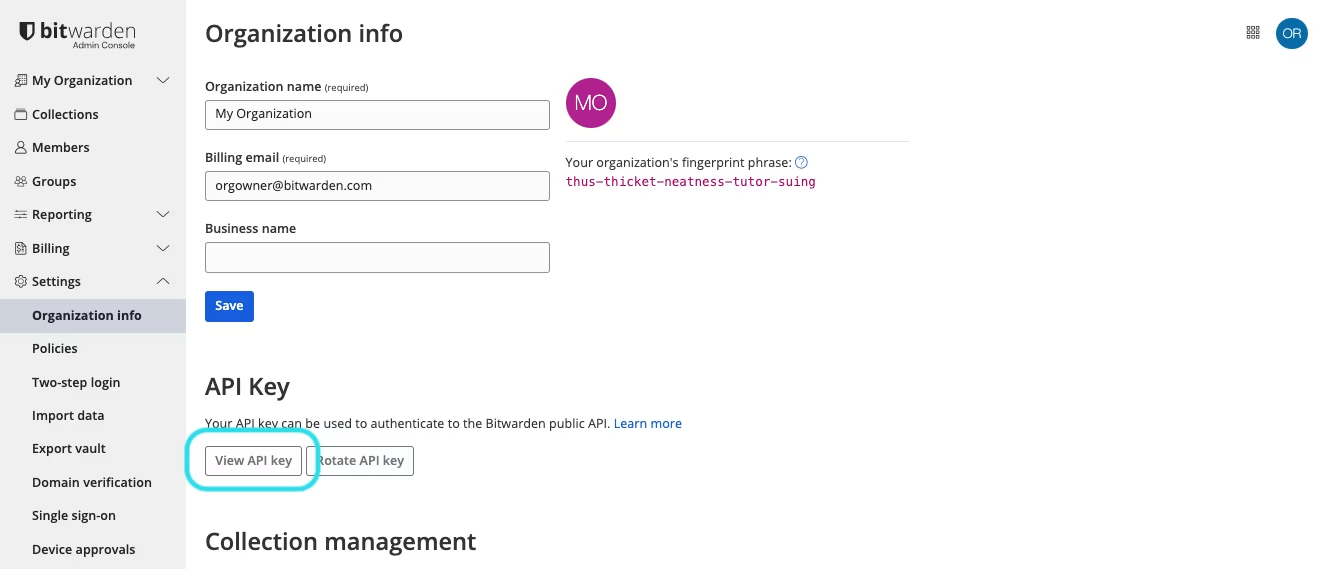
API 密钥 `client_id` 和 `client_secret` 可以由所有者从管理控制台获得，方法是通过导航到组织**设置** → **组织信息**，然后向下滚动到 **API 密钥**部分：

{% embed url="<https://res.cloudinary.com/bw-com/image/upload/f_auto/v1/ctf/7rncvj1f8mw7/1Mq824Xunm2wmzd8f905AJ/792cca9c6edddee71abfc350479ec813/Screenshot_2024-02-28_at_2.43.34_PM.png?_a=DAJCwlWIZAAB>" %}
获取组织 API 密钥
{% endembed %}

作为所有者，如果您想与管理员或其他用户分享 API 密钥，请使用安全的通信方式，比如 [Bitwarden Send](https://help.ppgg.in/docs/password-manager/bitwarden-send/about-send)。

{% hint style="danger" %}
您的组织 API 密钥具有对您的组织的完全访问权限。请妥善保管您的 API 密钥。如果您认为您的 API 密钥已经泄露，请在此界面上选择**轮换 API 密钥**按钮。当前 API 密钥的有效实施需要在使用前用新的密钥重新配置。
{% endhint %}

### 承载访问令牌 <a href="#bearer-access-tokens" id="bearer-access-tokens"></a>

要获取承载访问令牌，请与您的 `client_id` 和 `client_secret` 一起使用`Content-Type: application/x-www-form-urlencoded` 向[验证端点](#authentication-endpoints)发送 `POST` 请求。当使用用于组织管理的 API 时，您将始终使用 `grant_type=client_credentials` 和 `scope=api.organization`。例如：

```shell
curl -X POST \
  https://identity.bitwarden.com/connect/token \
  -H 'Content-Type: application/x-www-form-urlencoded' \
  -d 'grant_type=client_credentials&scope=api.organization&client_id=<ID>&client_secret=<SECRET>'
```

该请求将返回如下响应：

```json
{
  "access_token": "<TOKEN>",
  "expires_in": 3600,
  "token_type": "Bearer"
}
```

在此响应中，`3600` 表示到期值（以秒为单位），表示此令牌在发出后 60 分钟内有效。使用过期的令牌进行 API 调用将返回一个 `401 Unauthorized` 的[响应代码](#response-codes)。

## 内容类型 <a href="#content-types" id="content-types"></a>

Bitwarden Public API 与 `application/json` 请求和响应进行通信，但有一个例外：[验证端点](#authentication-endpoints)期望一个 `application / x-www-form-urlencoded` 请求时，将只以 `application/json` 响应。

## 样本请求 <a href="#sample-request" id="sample-request"></a>

```shell
curl -X GET \
  https://api.bitwarden.com/public/collections \
  -H 'Authorization: Bearer <TOKEN>'
```

这里的 `<TOKEN>` 表示 `access_token` 的值：获取到的[承载访问令牌](#bearer-access-tokens)中的值。

该请求将返回如下响应：

```json
{
  "object": "list",
  "data": [
    {
      "object": "event",
      "type": 1000,
      "itemId": "string",
      "collectionId": "string",
      "groupId": "string",
      "policyId": "string",
      "memberId": "string",
      "actingUserId": "string",
      "date": "2020-11-04T15:01:21.698Z",
      "device": 0,
      "ipAddress": "xxx.xx.xxx.x"
    }
  ],
  "continuationToken": "string"
}
```

## 状态 <a href="#status" id="status"></a>

Bitwarden 拥有一个公共[状态页面](https://status.bitwarden.com/)，您可以在其中查看所有服务（包括公共 API）的运行状况和事件的信息。

## 响应代码 <a href="#response-codes" id="response-codes"></a>

Bitwarden 公共 API 使用传统的 HTTP 响应代码来表示 API 请求是成功或失败：

| 状态代码                              | 描述                                                                    |
| --------------------------------- | --------------------------------------------------------------------- |
| `200 OK`                          | 一切都按预期进行。                                                             |
| `400 Bad Request`                 | 该请求不可接受。可能是由于参数丢失或格式错误。                                               |
| `401 Unauthorized`                | 承载访问令牌丢失、无效或过期。                                                       |
| `404 Not Found`                   | 所请求的资源不存在。                                                            |
| `429 Too Many Requests`           | 太多请求太快到达 API。我们建议缩减请求数。                                               |
| `500, 502, 503, 504 Server Error` | Bitwarden 端出现问题。这些情况很少见，如果发生，请[联系我们](https://bitwarden.com/contact/)。 |

## 延续令牌 <a href="#continuation-token" id="continuation-token"></a>

为返回超过 50 条日志的查询提供延续令牌，该值 `field: string` 在请求响应的底部提供，例如：

```json
{
  "object": "list",
  "data": [
    {
      "externalId": "external_id_123456",
      "object": "collection",
      "id": "539a36c5-e0d2-4cf9-979e-51ecf5cf6593",
      "groups": [
        {
          "id": "bfbc8338-e329-4dc0-b0c9-317c2ebf1a09",
          "readOnly": true,
          "hidePasswords": true,
          "manage": true
        }
      ]
    }
  ],
  "continuationToken": "string"
}
```

以下端点存在 `continuationToken`：

* `get/public/collections`
* `get/public/events`
* `get/public/groups`
* `get/public/members`
* `get/public/policies`

&#x20;将 `continuationToken` 的值添加到现有请求中以查看分页结果，例如：

```
https://api.bitwarden.com/public/events?continuationToken=<token_value>
```

## 进一步阅读 <a href="#further-reading" id="further-reading"></a>

有关使用 Bitwarden 公共 API 的更多信息，请参阅以下文章：

* [Bitwarden Public API OAS 规范](https://bitwarden.com/help/api/)
* [事件日志](https://help.ppgg.in/docs/admin-console/oversight-visibility/event-logging/event-logs)